Starting a Workflow from the form fragment Editor, No dialog is opening to specify the required workflow. | Community
Skip to main content
July 23, 2019
Solved

Starting a Workflow from the form fragment Editor, No dialog is opening to specify the required workflow.

  • July 23, 2019
  • 2 replies
  • 1403 views

Open any aem form or form fragment in edit mode and modify the form. select Page Information from the toolbar. The drop down menu has the option Start in Workflow. This should open a dialog where we can specify the required workflow. This dialog is not opening..

We have requirement of modifying the form fragment and initiate the workflow manually from the form fragment edit mode. As the functionality not working as expected, please help me in resolving this issue.

Thanks,

Manasi

This post is no longer active and is closed to new replies. Need help? Start a new post to ask your question.
Best answer by Mayank_Gandhi

What version of Aem forms are you using? This is being fixed in latest version already.

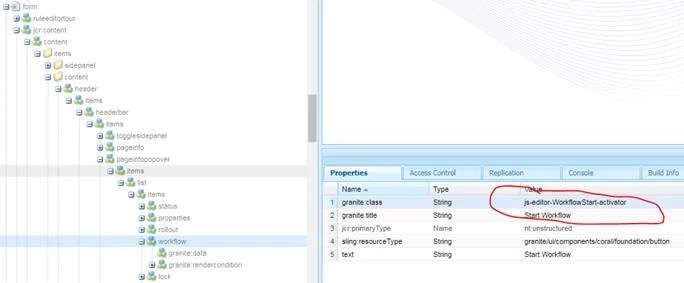
Do you see "cq-author-start-workflow start-workflow-activator” as Granite Class to invoke the workflow.?  Try  including the “js-editor-WorkflowStart-activator” to fix this.

2 replies

Mayank_Gandhi
Adobe Employee
Mayank_GandhiAdobe EmployeeAccepted solution
Adobe Employee
July 23, 2019

What version of Aem forms are you using? This is being fixed in latest version already.

Do you see "cq-author-start-workflow start-workflow-activator” as Granite Class to invoke the workflow.?  Try  including the “js-editor-WorkflowStart-activator” to fix this.

July 23, 2019

Thanks Mayank,

I am using Adobe Experience Manager 6.5.0.

Yes I see "cq-author-start-workflow start-workflow-activator” as Granite Class to invoke the workflow. I changed it to “js-editor-WorkflowStart-activator”, it fixed the above said issue.