Spinner in html 5 input type | Community
Skip to main content
deepakt84913413
Level 4
February 24, 2018
Solved

Spinner in html 5 input type

  • February 24, 2018
  • 1 reply
  • 1540 views

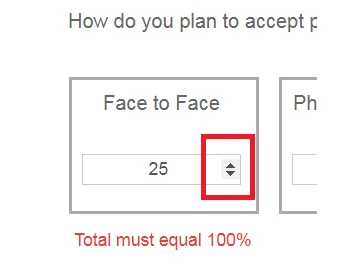
Whenever i enable HTML 5  input type for numeric component, the numeric pinner like below is also popping up. Can I hide this using the theme editor? or is there any other way to hide this?
This post is no longer active and is closed to new replies. Need help? Start a new post to ask your question.
Best answer by James_R_Green

Hi deepakt84913413

You don't appear to be able to change this in the theme editor as you need to do the following in CSS:

.numericInput input[type=number]::-webkit-inner-spin-button,

.numericInput input[type=number]::-webkit-outer-spin-button {

  -webkit-appearance: none;

  margin: 0;

}

Theme editor caters for the "::before" and "::after" pseudo selectors.

The ::-webkit-inner-spin-button pseudo selector, can't be input into the theme editor as far as I am aware.

Instead you can add the CSS above to a client library and reference that on your form (in addition to your theme). I tested it and this does remove the up and down arrows:

before

after

Thanks,

James

1 reply

James_R_Green
James_R_GreenAccepted solution
Level 6
February 24, 2018

Hi deepakt84913413

You don't appear to be able to change this in the theme editor as you need to do the following in CSS:

.numericInput input[type=number]::-webkit-inner-spin-button,

.numericInput input[type=number]::-webkit-outer-spin-button {

  -webkit-appearance: none;

  margin: 0;

}

Theme editor caters for the "::before" and "::after" pseudo selectors.

The ::-webkit-inner-spin-button pseudo selector, can't be input into the theme editor as far as I am aware.

Instead you can add the CSS above to a client library and reference that on your form (in addition to your theme). I tested it and this does remove the up and down arrows:

before

after

Thanks,

James

