Ruler in adobe live cycle designer in mm | Community
Skip to main content
August 12, 2011
Solved

Ruler in adobe live cycle designer in mm

  • August 12, 2011
  • 3 replies
  • 10305 views

Hi All,

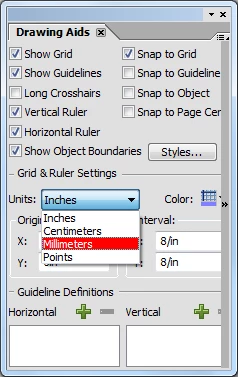
Is there any way in adobe designer where i can set the x and y co-ordinate in mm instead of inches in layout properties of an object?

I want to design form with particular specifications and those specifications are in mm and in designer the ruler is in inches how do i convert it in mm.

Regards

Abhishek

This post is no longer active and is closed to new replies. Need help? Start a new post to ask your question.
Best answer by radzmar

Doubleclick the ruler and select the measurement.

3 replies

Debadas
Level 4
August 12, 2011

Hello Abhishek,

You can directly specify the particular specifications of an object (in mm), which are given,

in the X and Y co-ordinates of the layout palette.

e.g. -: X: 23mm        Y: 45mm

This amount is automatically changed to inch format.

Thanks,

Debadas.

radzmar
radzmarAccepted solution
Level 10
August 12, 2011

Doubleclick the ruler and select the measurement.

August 12, 2011

Thanks guys!!!