Rearranging components | Adobe Higher Education
Skip to main content
apprentice0
October 18, 2017
Beantwoord

Rearranging components

  • October 18, 2017
  • 1 reactie
  • 1028 Bekeken

Hello,

How do I arrange two text field components so that both share the same block?  For example I want the text field components for First Name and Last Name to share the same line.  Currently, I am using a panel to implement it, which is contained within a larger panel.  What component can I use to group multiple components?

Thanks

Er kunnen geen reacties meer worden geplaatst op dit onderwerp.
Beste antwoord door Sakshi5

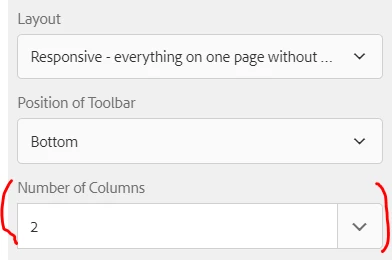
You can configure panel to be of multiple columns, that way you can have multiple fields in a single line, if the space permits otherwise they will wrap around.

Configuration under panel properties:

Panel is the only component you can use for grouping of fields

1 reactie

Sakshi5
Adobe Employee
Sakshi5Adobe EmployeeAntwoord
Adobe Employee
October 27, 2017

You can configure panel to be of multiple columns, that way you can have multiple fields in a single line, if the space permits otherwise they will wrap around.

Configuration under panel properties:

Panel is the only component you can use for grouping of fields