Reading Data from a Table using loop | Community
Skip to main content
Abhinav_Sharma
Level 4
December 15, 2010
Solved

Reading Data from a Table using loop

  • December 15, 2010
  • 2 replies
  • 14837 views

I have a dynamic table inside the PDF form. I want to loop through the table rows and read the cell contents. I successfully get the rows count in the table. But can't read the values from the cells. I have put editable TextField (txtName) control in each cell and trying to read its value.

screenshot is below.
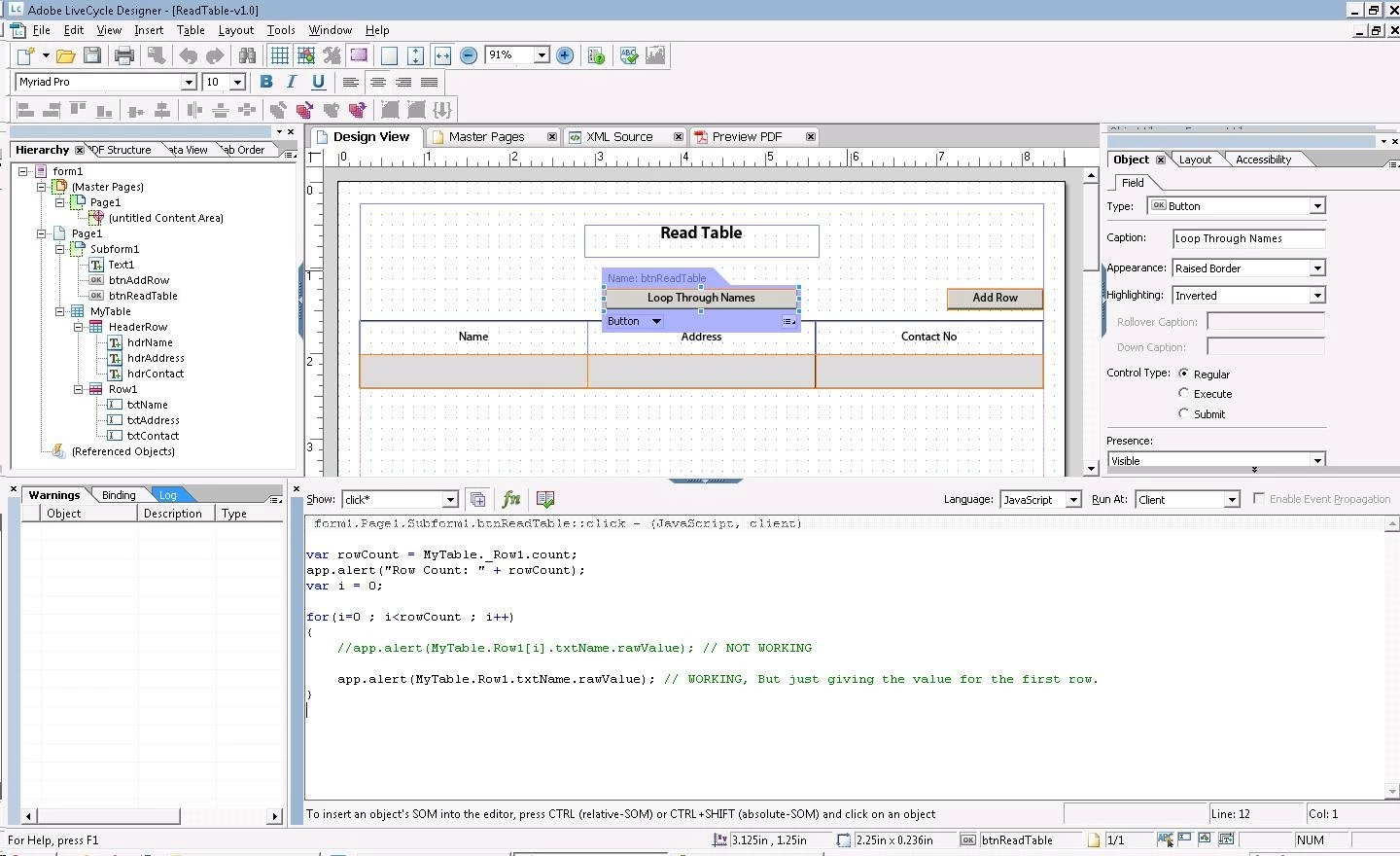
Code I am using is:

form1.Page1.Subform1.btnReadTable::click - (JavaScript, client)

var rowCount = MyTable._Row1.count;
app.alert("Row Count: " + rowCount);
var i = 0;

for(i=0 ; i<rowCount ; i++)
{
    //app.alert(MyTable.Row1[i].txtName.rawValue); // NOT WORKING
   
    app.alert(MyTable.Row1.txtName.rawValue); // WORKING, But just giving the value for the first row.
}

Please tell me how can I get the value of each name in every row by looping.

Thanks in advance.

-

Abhinav

This post is no longer active and is closed to new replies. Need help? Start a new post to ask your question.
Best answer by Niall_O_Donovan

Hi, Abhinav,

You need to resolve the node for the particular instance of i. The syntax is:

xfa.resolveNode("MyTable.Row1[" + i  + "].txtName").rawValue;

There is an example here that will show the loop in action:

http://www.assuredynamics.com/index.php/category/portfolio/two-way-binding-in-tables/

Hope that helps,

Niall

Assure Dynamics

2 replies

Niall_O_Donovan
Niall_O_DonovanAccepted solution
Level 10
December 15, 2010

Hi, Abhinav,

You need to resolve the node for the particular instance of i. The syntax is:

xfa.resolveNode("MyTable.Row1[" + i  + "].txtName").rawValue;

There is an example here that will show the loop in action:

http://www.assuredynamics.com/index.php/category/portfolio/two-way-binding-in-tables/

Hope that helps,

Niall

Assure Dynamics

Abhinav_Sharma
Level 4
December 15, 2010

That works.

Thanks a lot Niall O'Donovan

-

Abhinav