Level 4
March 6, 2024
Solved

programmatically changing textbox text color in an adaptive form

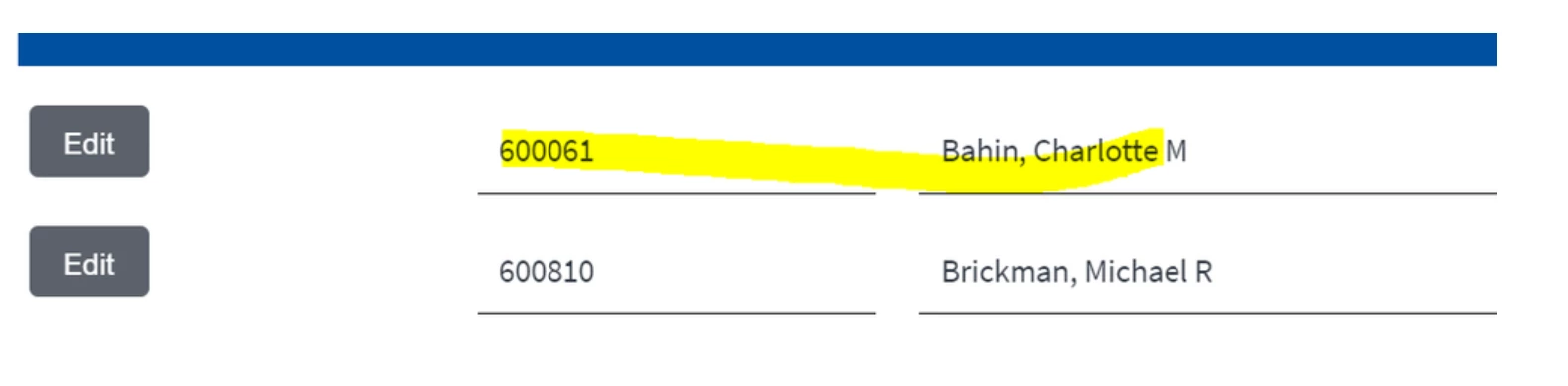
how do i change the color of a textbox text to red in an adaptive form? the cssClassName is readonly property. is there a programmatically way to do it?


This post is no longer active and is closed to new replies. Need help? Start a new post to ask your question.
PowerUserOneAccepted solution
Level 4
September 4, 2024

kautuk_shani


thank you for your follow up. I did discover a way of changing the text by using either javascript or jquery. the key is to grab the id of the control and work with it.


so for example if the image i provided on the question i wanted to change the color of the specific row. (this are created instances with the instancemanger). 


I was able to do it the same manner i changed the whole row highlighting to soft orange (code below). the background of the row (panel) was changed to a soft orange adding a class to the panel control. 

//highlights a grid row Soft Orange function HighLightRowSoftOrange(ctrl){ var el = $('#'+ ctrl.id)[0]; $('#'+ ctrl.id).addClass("highLightRowSoftOrange"); }


thank you all for your input 


PowerUserOne

13 replies

Adobe Employee
March 6, 2024

Try using the style layer and then select error state and style the text box accordingly 


Translate
Level 4
March 6, 2024

that is not programmatically. i am trying to change it on click event of the edit button. Nice to see you again workflowuser 🙂 

Translate
Level 4
March 6, 2024

Just a copy/paste from another question 🙂 

Try something like

myTextFieldName.font.fill.color.value = "249, 11, 8";

Translate
Level 4
March 6, 2024

thanks moris but this is not a PDF or livecycle designer. this is and adaptive form. that will not work

Translate
Adobe Employee
March 6, 2024

What is the use case for changing the color programmatically?

Translate
kautuk_sahni
Adobe Employee
Adobe Employee
September 4, 2024

@poweruserone Did you find the suggestions helpful? Please let us know if you require more information. Otherwise, please mark the answer as correct for posterity. If you've discovered a solution yourself, we would appreciate it if you could share it with the community. Thank you!

Translate
Kautuk Sahni
PowerUserOneAuthorAccepted solution
Level 4
September 4, 2024

kautuk_shani


thank you for your follow up. I did discover a way of changing the text by using either javascript or jquery. the key is to grab the id of the control and work with it.


so for example if the image i provided on the question i wanted to change the color of the specific row. (this are created instances with the instancemanger). 


I was able to do it the same manner i changed the whole row highlighting to soft orange (code below). the background of the row (panel) was changed to a soft orange adding a class to the panel control. 

//highlights a grid row Soft Orange function HighLightRowSoftOrange(ctrl){ var el = $('#'+ ctrl.id)[0]; $('#'+ ctrl.id).addClass("highLightRowSoftOrange"); }


thank you all for your input 


PowerUserOne

Translate