Problems with Flash in AEM Forms Workspace Queue Share Request | Community
Skip to main content
Level 7
April 17, 2018
Solved

Problems with Flash in AEM Forms Workspace Queue Share Request

  • April 17, 2018
  • 12 replies
  • 7821 views

In AEM Forms Workspace, when User A requests access to the queue of User B, User B gets an email notification with "Share Queue Request" in the subject line.  Clicking the link opens AEM Forms Workspace with a new item in the TO DO list of User B.  That item is associated with some sort of Flash interface that isn't loading.  Right clicking on it shows "movie not loaded". I'm trying this in IE as well as Firefox.  Neither works.  I've also tried different settings on IE compatibility view with no luck.
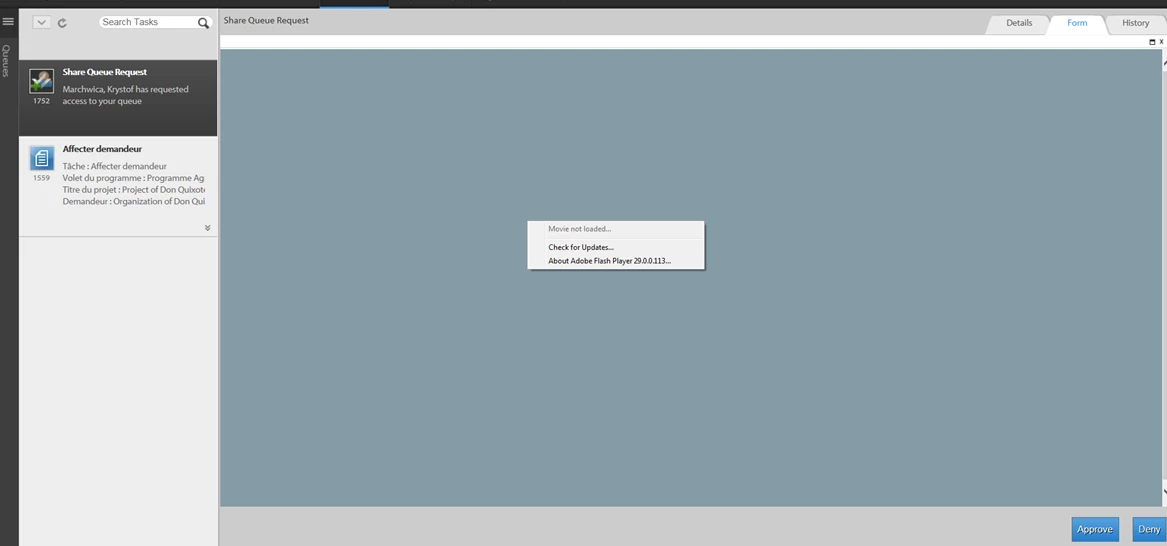
Flash is also used in AdminUI for managing queue sharing (home -> services -> forms workflow -> shared queue uses a Flash interface).  This is working fine for me.

So, I know that Flash is correctly installed and runs in my browser.

Has anyone else seen this problem?  Any suggestions for troubleshooting?  Thanks.

This post is no longer active and is closed to new replies. Need help? Start a new post to ask your question.
Best answer by Langdon_Jared

I opened an Adobe support ticket.  They confirmed that this is a bug in the Adobe software.  In fact, they reproduced the bug in AEM 6.3 SP1.  They have it logged as NPR-23821 (that's their Bugzilla/JIRA number).  I told Adobe that this isn't a critical issue for us, since we have workarounds.  Our workarounds are:

1) Users can proactively share their work queues without a need to initiate a request workflow

2) An Admin can manage queue sharing using adminui

12 replies

Level 7
April 17, 2018

Here's some more info.  When I click "Approve" or "Deny", the JavaScript console says:

SCRIPT438: Object doesn't support property or method 'postMessage'

File: main.js, Line: 113, Column: 518656

It's probably just a result of the fact that the Flash applet failed to load, but I thought I'd mention it here.

smacdonald2008
Level 10
April 17, 2018

Are you following Adobe docs to perform this use case?

Level 7
April 17, 2018

I don't understand your question.

Mayank_Gandhi
Adobe Employee
Adobe Employee
April 22, 2018

Hi Jared,

Please have a look at the below forum post where a very similar issue was discussed .

"movie not loaded" problem Flash 11.1.102.55 (IE9 32&64 & Chrome) on all websites

Level 7
April 23, 2018

Thanks Mayank.  That other post doesn't have anything to do with AEM Forms Workspace.  That said, I tried some suggestions there like clearing the Flash player data, but I had no luck.  Flash itself is working fine on my system.  For example, I see the moving clouds here: Flash Player Help .  Also Flash is working fine in the AdminUI application as shown in my screen shots above.

I suspect that the problem is in AEM Forms Workspace itself.  It may be missing a permission or it may have a bad path to the SWF, which is at /lc/libs/ws/libs/ws/WSNextAdapter.swf.  I don't know how to troubleshoot this any further.

It would help if someone out there can try the out-of-the-box functionality that allows a user to request access to another user's queue.  If someone else can run it successfully, then it would at least tell me that the problem is in my environment, and not a product bug in AEM Forms Workspace.  Thanks very much.

Mayank_Gandhi
Adobe Employee
Adobe Employee
April 24, 2018

Hi Jared,

Can you please confirm your AEM forms version and the CFP  level on the instance(aemfd package in particular) ? I will try to test the same on my instance and confirm.

-Mayank

Level 7
April 24, 2018

It's AEM 6.2.  I don't know what "CFP Level" means nor "aemfd".  I'm just a simple LiveCycle ES3 guy trying to upgrade.

Mayank_Gandhi
Adobe Employee
Adobe Employee
April 24, 2018

Hi Jared,

Please go to http://Host:name/lc/libs/cq/core/content/welcome.html  and you would be able to see the CFP towards the bottom left of the page.Also, you can check the forms-add on package by going to /crx/ packmgr url and

searching for the adobe-aemfd-win package.

By any chance are you hitting the workspace on HTTPS ?

Level 7
April 25, 2018

I see this:

Is that what you're looking for?  Is "CFP" the patch level?

Here's the view from Package Manager.

I'm not using HTTPS.  Thanks for you help!

Mayank_Gandhi
Adobe Employee
Adobe Employee
April 27, 2018

Hi Jared,

Thanks for sharing the instance details.The functionality is working for me.

Do you have any other instance of 6.2 where you are facing a similar problem or is it specific to one system?

Thanks