Problem with signature component.
Hello,
app server:

cluster, topology
2 application servers, 1 cluster
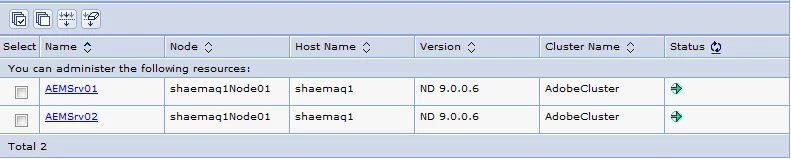
db:
DB2 V11.1
OS:
AIX 7200-02-01-1731
When invoking the SignatureService I get the following error:
| Error Calling SignatureService |
|---|
com.adobe.livecycle.signatures.service.impl.DSSConfigurationHelper (initialization failure) java.lang.SecurityException: JsafeJCE provider is disabled, a FIPS 140 required self-integrity check failed JsafeJCE provider is disabled, a FIPS 140 required self-integrity check failed Jun 04, 2019 4:04:50 PM com.adobe.livecycle.signatures.client.types.exceptions.SignaturesBaseException SEVERE: ALC-DSS-300-000 Generic SignaturesBaseException (in the operation : certify) Caused By: java.lang.SecurityException: JsafeJCE provider is disabled, a FIPS 140 required self-integrity check failed(AbstractResponseHolder.java178) Caused By: com.adobe.livecycle.signatures.service.impl.DSSConfigurationHelper (initialization failure)(J9VMInternals.java96) Caused By: java.lang.SecurityException: JsafeJCE provider is disabled, a FIPS 140 required self-integrity check failed(SignaturesInitializer.java69) Caused By: JsafeJCE provider is disabled, a FIPS 140 required self-integrity check failed(null-1) ALC-DSS-300-000 Generic SignaturesBaseException (in the operation : certify) Caused By: java.lang.SecurityException: JsafeJCE provider is disabled, a FIPS 140 required self-integrity check failed(AbstractResponseHolder.java178) Caused By: com.adobe.livecycle.signatures.service.impl.DSSConfigurationHelper (initialization failure)(J9VMInternals.java96) Caused By: java.lang.SecurityException: JsafeJCE provider is disabled, a FIPS 140 required self-integrity check failed(SignaturesInitializer.java69) Caused By: JsafeJCE provider is disabled, a FIPS 140 required self-integrity check failed(null-1) com.adobe.livecycle.signatures.client.SignatureServiceClient.certify(SignatureServiceClient.java:287) pt.gbes.teste.SignaturePOC.CertifyDocumentSOAP.main(CertifyDocumentSOAP.java:117) Caused By: com.adobe.idp.dsc.DSCException com.adobe.idp.dsc.provider.impl.base.AbstractResponseHolder.handleException(AbstractResponseHolder.java:178) com.adobe.idp.dsc.provider.impl.soap.axis.sdk.SoapSdkBindingStubUtil.deSerializeResponse(SoapSdkBindingStubUtil.java:132) com.adobe.idp.dsc.provider.impl.soap.axis.sdk.SoapAxisDispatcher.doSend(SoapAxisDispatcher.java:148) com.adobe.idp.dsc.provider.impl.base.AbstractMessageDispatcher.send(AbstractMessageDispatcher.java:69) com.adobe.idp.dsc.clientsdk.ServiceClient.invoke(ServiceClient.java:215) com.adobe.livecycle.signatures.client.SignatureServiceClient.certify(SignatureServiceClient.java:264) pt.gbes.teste.SignaturePOC.CertifyDocumentSOAP.main(CertifyDocumentSOAP.java:117) |
Does anyone know what this mean?
Thanks