Level 1
September 16, 2026
Question

Problem with adaptive form fragment adding components

  • September 16, 2026
  • 2 replies
  • 23 views

On Prem AEM 6.5 LTS Service Pack 2 -
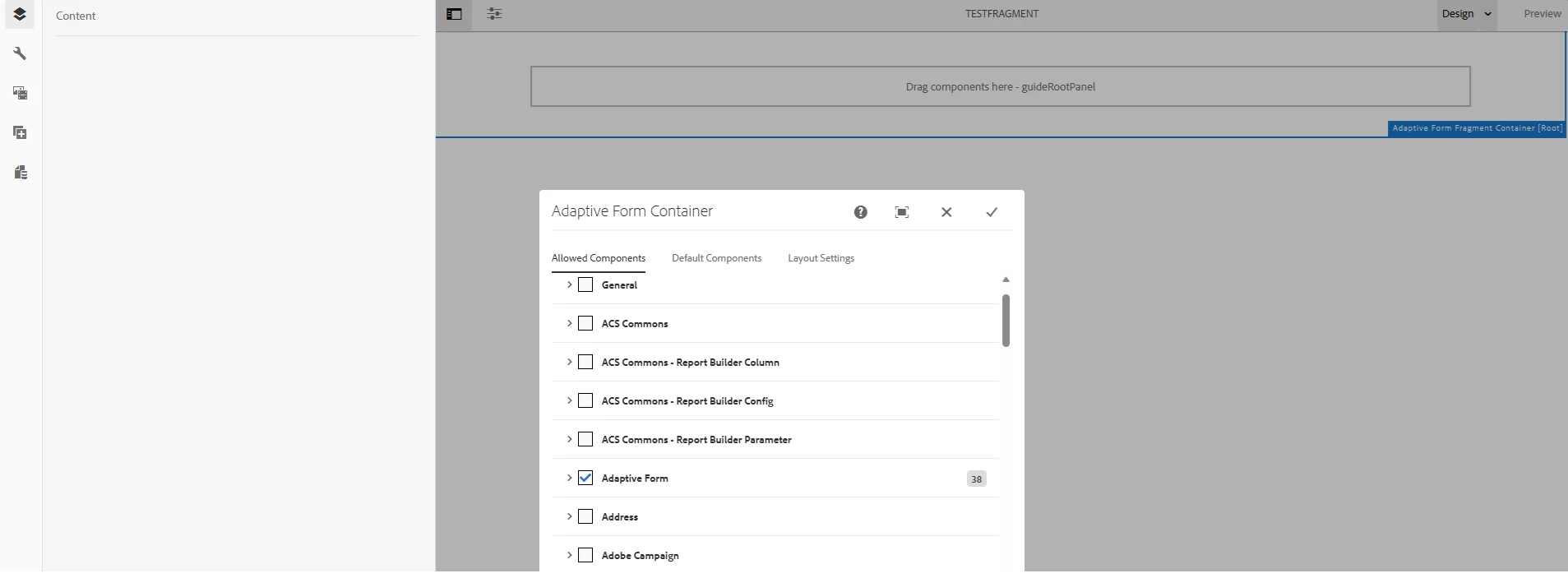
We’ve created an Adaptive Form but are having issues attempting to create a new Adaptive Form Fragment. After creating and opening the fragment for edit the page is missing the plus icon to add components and we cannot click and drag any component onto the page.

Also, clicking the configuration wrench icon at the top level fragment1 or guideRootPanel does not load the configuration options on the left.

We’re not seeing any error on the browser side and the only thing in the error log is the following which doesn’t seem to be the issue…?
16.09.2026 13:08:49.963 *ERROR* [[0:0:0:0:0:0:0:1] [1789578529526] GET /content/forms/af/reference-fragments/address.html HTTP/1.1] com.day.cq.wcm.core.impl.designer.DesignerImpl No design at /etc/designs/fd/af/default. Using default.
16.09.2026 13:08:49.996 *ERROR* [[0:0:0:0:0:0:0:1] [1789578529994] GET /libs/wcm/core/content/pageinfo.json HTTP/1.1] com.day.cq.wcm.core.impl.designer.DesignerImpl No design at /etc/designs/fd/af/default. Using default.
16.09.2026 13:08:50.105 *ERROR* [[0:0:0:0:0:0:0:1] [1789578530103] GET /content/forms/af/reference-fragments/address/jcr:content/guideContainer.treejson HTTP/1.1] com.day.cq.wcm.core.impl.designer.DesignerImpl No design at /etc/designs/fd/af/default. Using default.

We even thought it was a design issue and have added Adaptive Form but that didn’t help.
Any insight or suggestions would be appreciated.

2 replies

AmitVishwakarma
Community Advisor
Community Advisor
September 17, 2026

Hi ​@brackenk1997 

The No design at /etc/designs/fd/af/default. Using default message is generally a fallback warning. It is not, by itself, the reason why the Add Component control, drag-and-drop, or component configuration dialog is unavailable. Please validate the following in this order.

1. Make sure the editor is in Edit mode
In the first screenshot, the top-right mode selector shows Design. The Allowed Components, Default Components, and Layout Settings dialog belongs to Design mode. Switch the mode selector to: Edit

Then select guideRootPanel from the Content tree and try to add a component using the Insert Component (+) action or the Components browser.

Adobe documents the Adaptive Forms editor as supporting component insertion, drag-and-drop, and component-property editing from the authoring UI. https://experienceleague.adobe.com/en/docs/experience-manager-65-lts/content/forms/getting-started/introduction-forms-authoring


2. Confirm that the form and fragment use the same component generation

Check the fragment in CRXDE Lite and inspect its effective cq:template and sling:resourceType values. If the fragment uses:  /libs/fd/af/templateForFragment/defaultFragmentTemplate

then it is a Foundation Components / AFv1 fragment.


That template must be used with a Foundation-based Adaptive Form. If the parent form is based on Adaptive Forms Core Components / AFv2, create a new fragment using a Core Components-based fragment template and a Core Components-based theme. Do not fix this by manually changing cq:template on an existing fragment because the underlying content structure and resource types are different.

Adobe specifically distinguishes between:

3. Install the matching AEM Forms add-on

For AEM 6.5 LTS SP2, install the AEM Forms add-on that corresponds to the exact AEM LTS SP2 build.

Do not combine:

  • an older Forms add-on with the LTS SP2 runtime
  • multiple versions of Core Components
  • Core Forms Components from an unrelated release
  • old custom overlays with the newer Forms authoring client libraries

After installation, verify in:  /system/console/bundles

that the Forms and Adaptive Forms Core Components bundles are active.

Adobe's release guidance requires installing the corresponding Forms add-on whenever an AEM Service Pack or upgrade is applied. https://experienceleague.adobe.com/en/docs/experience-manager-release-information/aem-release-updates/forms-updates/aem-forms-releases

The Adaptive Forms Fragment Core Component is supported on AEM 6.5 Forms from the supported Core Components release onward.

4. Check the feature toggles if the Core Components fragment template is missing

On affected AEM 6.5 Forms builds, the Core Components fragment creation/template flow may still be gated by feature toggles. Go to: /system/console/configMgr Open: Adobe Granite Dynamic Toggle Provider 
Add the required toggle IDs under Enabled Toggles, save the configuration, and refresh the authoring page. For affected 6.5 builds, verify at least:  FT_FORMS-14833 FT_FORMS-2494

Also check the enabled-toggle response:/etc.clientlibs/toggles.json 

The exact toggle set is release-dependent, so it should be validated against the installed Forms add-on/build. Adobe documents the supported method for enabling toggles through the Dynamic Toggle Provider. https://experienceleague.adobe.com/en/docs/experience-manager-65-lts/content/forms/adaptive-forms-core-components/enable-feature-toggle

A restart is normally not required for a toggle change, but refresh the editor and clear the browser cache before retesting.

5. Recreate and test a clean fragment

After correcting the template and package setup:

  • Create a new Adaptive Form Fragment.
  • Select None as the form model for the first test.
  • Select the correct Foundation or Core Components fragment template.
  • Open the fragment directly from the Forms console.
  • Confirm that the editor is in Edit mode.
  • Add one standard text component.
  • Open the component properties using the wrench icon.
  • Test drag-and-drop with an out-of-the-box component.

Do not test initially with a fragment containing custom components, custom client libraries, overlays, or a schema/FDM. First prove that the OOTB fragment editor works.

6. If the issue still occurs, check the browser Network tab

Look for failed requests such as:

guideRootPanel.treejson

pageinfo.json

/content/forms/af/<fragment>.html


Also verify that the author has the required Forms authoring permissions, including membership in the appropriate Forms groups.


Amit Vishwakarma - Adobe Commerce Champion 2025 | 17x Adobe certified | 4x Adobe SME
Level 1
September 17, 2026

Amit,

Thanks for the reply. But no luck so far. See our comments for the steps below:

  1.  Make sure the editor is in Edit mode - Confirmed. Edit mode has the same issue and in our first 2 screens shots it does show Edit.
  2. Confirm that the form and fragment use the same component generation - Confirmed. Fragment is using sling:resourceType fd/fm/af/render
  3. Install the matching AEM Forms add-on - We’re running on prem Author 6.5 LTS Service Pack 2. Note: This is a copy of a production ready instance that never had forms installed/setup.  We’ve installed the following: adobe-aemfd-linux-pkg-6.1.206.zip,  adobe-aemfd-linux-pkg-6.1.220.zip, and aem-forms-reference-content.ui.content-2.1.0.zip
  4. Check the feature toggles if the Core Components fragment template is missing - FT_FORMS-14833 and FT_FORMS-2494 were missing had to be added to the list. The /etc.clientlibs/toggles.json is now: 
    {"enabled":["FT_SITES-30241","FT_SITES-15429","FT_SITES-15825","FT_SITES-15406","FT_SITES-15824","FT_SITES-15427","FT_FORMS-14833","FT_SITES-15745","FT_SITES-30886","FT_SITES-23054","FT_SITES-23274","FT_SITES-30327","FT_SITES-29874","FT_SITES-23310","ft-sites-293","FT_SITES-18423","FT_SITES-14080","FT_SITES-20334","FT_SITES-22677","FT_SITES-9388","FT_SITES-12441","FT_SITES-19570","FT_SITES-6098","FT_SITES-21609","FT_SITES-16188","FT_SITES-33642","FT_SITES-3115","FT_SITES-15815","FT_SITES-16529","FT_SITES-26271","CT_SITES-33528","FT_SITES-15997","ft-cq-4303126","CT_SITES-33884","FT_SITES-31849","FT_SITES-18708","FT_SITES-27781","FT_FORMS-2494","FT_SITES-18056","FT_SITES-22006","ENABLED","FT_SITES-15267","FT_SITES-23759","CT_SITES-29953","FT_SITES-17640","FT_SITES-15462","FT_SITES-31472","FT_SITES-35176"]}We then restarted the instance.
  5. Recreate and test a clean fragment - Created a new fragment and the same issues remain. We cannot add any out of the box Adaptive form components or access the wrench configuration properties.  There are no failed requests in the browser network tab. We’re logging in as the admin and the admin users has all permissions.