Possible to remove default banner? | Community
Skip to main content
helloktgrrl
May 5, 2009
Solved

Possible to remove default banner?

  • May 5, 2009
  • 13 replies
  • 14364 views

Hi, all. When my form is opened in Adobe Reader, there is a default purple banner at the top that says: Please fill out the following form. If you are a form author, choose Distribute Form in the Forms menu to distribute it to your recipients.

Is there a way that I can suppress this banner? Thanks!

Suzanne
This post is no longer active and is closed to new replies. Need help? Start a new post to ask your question.
Best answer by

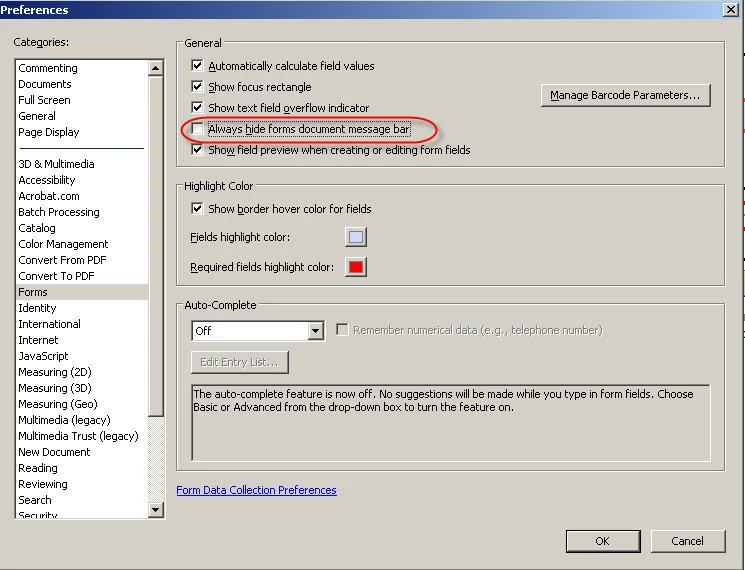
There is a setting in Acrobat/Reader for this. Under Edit/Preferences/Forms have a look at this setting.

13 replies

April 1, 2011

This may be a bit late for you, but I wanted to add my response for others that may be searching the internet for answers.

In your orignal form, go to File, then Properties.

Once there, select the Inital View Tab. After that, in the User Interface Options section, click "Hide window controls"

This will disable the "purple bar" completely. You will then need to re-save and re-open the file and voila.

Edited to Add: Oh yeah, this is NOT an April Fools Joke - lol

Jono_Moore
Level 10
April 4, 2011

This doesn't work for LiveCycle PDFs, at least with Acrobat 9, all those properties are greyed out.

December 15, 2015

Here is the solution I came up with:

1. Build your form in LiveCycle.

2. Save a copy of the undistributed form.

3. Open the copy in Acrobat (don't open it in LiveCycle).

4. Select File, Save As Other, Reader Extended PDF, Enable More Tools.

5. Save the File. This version should allow reader edit/save rights, but will not contain the Submit Form button on the ribbon at the top.


This works for an interactive XML LiveCycle form.  You won't get a collect responses file if you do it this way, but that didn't matter for my purposes.