ayecona
Level 5
August 5, 2019
Solved

how to upload a new custom DOR

I see that the templates to create a document of record are under
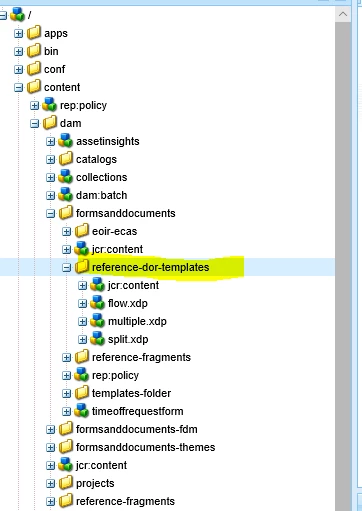
I installed AEM forms designer and created a Custom DOR for my needs now I just need to know how to place it in here so that I can use it with my new forms?

This post is no longer active and is closed to new replies. Need help? Start a new post to ask your question.
Mayank_Gandhi
Mayank_GandhiAccepted solution
Adobe Employee
August 5, 2019

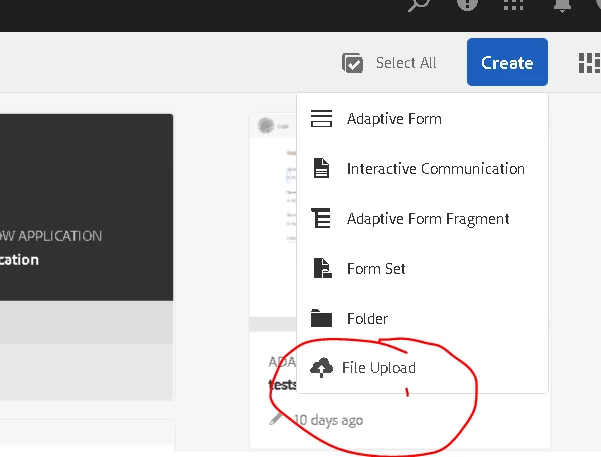
Upload it anywhere on the forms portal(where you see all other adaptive forms) using the file upload option of forms portal.

7 replies

Mayank_Gandhi
Adobe Employee
Adobe Employee
August 5, 2019

You want to replace the default DOR?

Translate
ayecona
ayeconaAuthor
Level 5
August 5, 2019

Mayank Gandhi​ no I want to be able to choose my own custom DOR, I will make a few of them and I believe I would like to choose from where I highlight below

Translate
Mayank_Gandhi
Adobe Employee
Adobe Employee
August 5, 2019

you can map the DOR from the form properties. Just below the form data model.

Translate
ayecona
ayeconaAuthor
Level 5
August 5, 2019

Mayank Gandhi​ yes that is the question I made how do I upload the new customs DOR into that location so that I can choose them

Translate
Mayank_Gandhi
Adobe Employee
Mayank_GandhiAdobe EmployeeAccepted solution
Adobe Employee
August 5, 2019

Upload it anywhere on the forms portal(where you see all other adaptive forms) using the file upload option of forms portal.

Translate
Khushwant_Singh
Adobe Employee
Adobe Employee
August 5, 2019

See, Adobe Experience Manager Help | Getting XDP and PDF documents in AEM Forms for information on how to upload xdp or other files.

Translate
Mayank_Gandhi
Adobe Employee
Adobe Employee
August 5, 2019

Depending on where you upload you can search any xdp

Translate