How to remove an apparently coded submit option | Community
Skip to main content
ReluctantProgrammer
Level 4
October 14, 2022
Solved

How to remove an apparently coded submit option

  • October 14, 2022
  • 3 replies
  • 1620 views

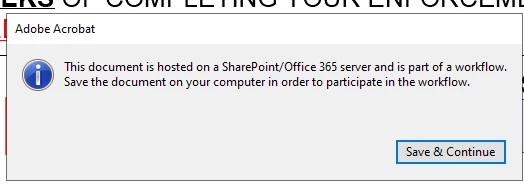
I have a form that was set up by someone no longer on our team.  When doing a preview the following shows at the top of the form...

Where is this configured and how can I get rid of it?  We are no longer going that direction within a workflow and would like to disable or remove it.  And stop this error from popping up.  


This post is no longer active and is closed to new replies. Need help? Start a new post to ask your question.
Best answer by radzmar

Those kinds of worksflows are defined through special metadate in the PDF, so you would not find anything about this, when looking into the form in Designer.


Open the form in Acrobat and look into the metadata under the file properties or by typing this.metadata; into the JavaScript console.


You'll propably find entries under the namespace adhocwf. If you want get rid of it you need to delete the corresponding metadata entries. This can be done with an bit JavaScript in Acrobats action wizards.


var oDoc = this,
    oXML = new XML(oDoc.metadata), //Load current metadata into XML object
    //Declare namespaces used in metadata
    nsRdf = new Namespace("http://www.w3.org/1999/02/22-rdf-syntax-ns#"),
    nsAdhocwf = new Namespace("http://ns.adobe.com/AcrobatAdhocWorkflow/1.0/");
//Delete unwanted metadata nodes from XML object
delete oXML.nsRdf::RDF.nsRdf::Description.nsAdhocwf::version;
delete oXML.nsRdf::RDF.nsRdf::Description.nsAdhocwf::allowAnonymous;
delete oXML.nsRdf::RDF.nsRdf::Description.nsAdhocwf::dataSetLocId;
delete oXML.nsRdf::RDF.nsRdf::Description.nsAdhocwf::dataSetName;
delete oXML.nsRdf::RDF.nsRdf::Description.nsAdhocwf::destUrl;
delete oXML.nsRdf::RDF.nsRdf::Description.nsAdhocwf::distributionMethod;
delete oXML.nsRdf::RDF.nsRdf::Description.nsAdhocwf::initiator;
delete oXML.nsRdf::RDF.nsRdf::Description.nsAdhocwf::state;
delete oXML.nsRdf::RDF.nsRdf::Description.nsAdhocwf::submitButtonInfo;
delete oXML.nsRdf::RDF.nsRdf::Description.nsAdhocwf::workflowId;
delete oXML.nsRdf::RDF.nsRdf::Description.nsAdhocwf::workflowType;

//Overwrite PDFs metadata with XML object (works only from batch, not console!!!)
oDoc.metadata = oXML.toXMLString();


3 replies

Adobe Employee
October 14, 2022

I am not getting that message

when do you get that message

you would need AEM Forms Designer to edit /modify the form

Adobe Employee
October 14, 2022

This toolbar with Submit button comes up when the XFA form is rendered into HTML.

Mayank_Gandhi
Adobe Employee
Adobe Employee
October 14, 2022

@reluctantprogrammer looks like a custom link or doc URL that you might have in your application. So you need to check whether it's being picked from SharePoint in workflow or script and copy it to the local server. Can be in a variable, workflow step or script. 

radzmar
radzmarAccepted solution
Level 10
October 16, 2022

Those kinds of worksflows are defined through special metadate in the PDF, so you would not find anything about this, when looking into the form in Designer.


Open the form in Acrobat and look into the metadata under the file properties or by typing this.metadata; into the JavaScript console.


You'll propably find entries under the namespace adhocwf. If you want get rid of it you need to delete the corresponding metadata entries. This can be done with an bit JavaScript in Acrobats action wizards.


var oDoc = this,
    oXML = new XML(oDoc.metadata), //Load current metadata into XML object
    //Declare namespaces used in metadata
    nsRdf = new Namespace("http://www.w3.org/1999/02/22-rdf-syntax-ns#"),
    nsAdhocwf = new Namespace("http://ns.adobe.com/AcrobatAdhocWorkflow/1.0/");
//Delete unwanted metadata nodes from XML object
delete oXML.nsRdf::RDF.nsRdf::Description.nsAdhocwf::version;
delete oXML.nsRdf::RDF.nsRdf::Description.nsAdhocwf::allowAnonymous;
delete oXML.nsRdf::RDF.nsRdf::Description.nsAdhocwf::dataSetLocId;
delete oXML.nsRdf::RDF.nsRdf::Description.nsAdhocwf::dataSetName;
delete oXML.nsRdf::RDF.nsRdf::Description.nsAdhocwf::destUrl;
delete oXML.nsRdf::RDF.nsRdf::Description.nsAdhocwf::distributionMethod;
delete oXML.nsRdf::RDF.nsRdf::Description.nsAdhocwf::initiator;
delete oXML.nsRdf::RDF.nsRdf::Description.nsAdhocwf::state;
delete oXML.nsRdf::RDF.nsRdf::Description.nsAdhocwf::submitButtonInfo;
delete oXML.nsRdf::RDF.nsRdf::Description.nsAdhocwf::workflowId;
delete oXML.nsRdf::RDF.nsRdf::Description.nsAdhocwf::workflowType;

//Overwrite PDFs metadata with XML object (works only from batch, not console!!!)
oDoc.metadata = oXML.toXMLString();