How to execute a script after URL submit in adaptive form | Community
Skip to main content
Level 2
January 14, 2025
Solved

How to execute a script after URL submit in adaptive form

  • January 14, 2025
  • 1 reply
  • 595 views

Hello,

I created a adaptive form that submits data to a php script with a Submit to URL link.
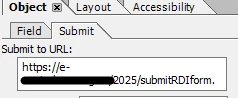
And in the post submit event of this button i click another invisible button liek this:

xfa.resolveNode("Countries.#pageSet.Page2.Invisible.Subform2.Button1").execEvent("click");


that also holds a script to upload the file on a server and save same details in a mysql table:

this.event__click.submit.target = "https://serveraddress/2025/submitRDI.php?id_poz=" + xfa.resolveNode("Countries.#pageSet.Page2.Invisible.Subform2.id_pvc").rawValue + "&rng=" + Countries.hiddenFields.RNG.rawValue;

Is there a way to do these 2 actions with 1 button so that after the 1st action is completed the second one will start?

Best answer by Pranay_M

Hi @cilonx,

As I understand I believe you want your button to perform 2 actions. For implementing the use case you follow the below approaches:

  1.  You can use the "preSubmit" and the "postSubmit" events for your button. You can add different scripts on different events like submitting the form on one event and uploading the form on the server on the other. They will be executed simultaneously one after the other and you should be able to achieve this use case.

  2. If you want to keep the logic on a single button then you can take a hidden field on the form and and use that hidden field as a condition to execute the second script. For Example: You can take a boolean field and set the default value as false. In the "postSubmit" event you can write the logic to submit the form to a URL. Post that you can set the flag value as true and use that condition to trigger the second script. This approach will make sure that the upload script is only executed if your form is submitted correctly

Thanks
Pranay

1 reply

Pranay_MAdobe EmployeeAccepted solution
Adobe Employee
January 14, 2025

Hi @cilonx,

As I understand I believe you want your button to perform 2 actions. For implementing the use case you follow the below approaches:

  1.  You can use the "preSubmit" and the "postSubmit" events for your button. You can add different scripts on different events like submitting the form on one event and uploading the form on the server on the other. They will be executed simultaneously one after the other and you should be able to achieve this use case.

  2. If you want to keep the logic on a single button then you can take a hidden field on the form and and use that hidden field as a condition to execute the second script. For Example: You can take a boolean field and set the default value as false. In the "postSubmit" event you can write the logic to submit the form to a URL. Post that you can set the flag value as true and use that condition to trigger the second script. This approach will make sure that the upload script is only executed if your form is submitted correctly

Thanks
Pranay

CilonXAuthor
Level 2
January 14, 2025

Thank you for these ideas, will try them!