Hidden components still taking up extra space [AEM form core component] | Community
Skip to main content
April 30, 2025
Solved

Hidden components still taking up extra space [AEM form core component]

  • April 30, 2025
  • 1 reply
  • 619 views

I am working on Adaptive form core component (version:1.1.64). I am using grid gap to set the gaps between the form fields, however the components which are set to hide in the form are still taking up spaces.

How to replicate the issue: 
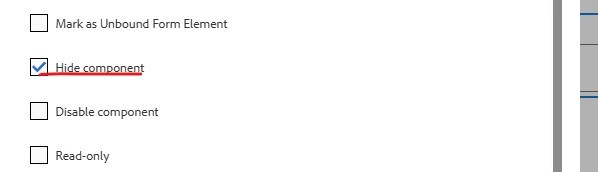
Set hide component using the author dialog:
In preview mode:
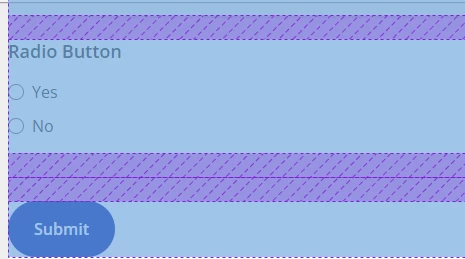
 

I found that the display: none was set to the component, but not to the component wrapper.

 

I tried to use cq:noDecoration to remove the wrapper element, but it broke the component edit functionality on author.

Is there any other way to fix this ?


This post is no longer active and is closed to new replies. Need help? Start a new post to ask your question.
Best answer by Pranay_M

Hi @jennyli6,

I have tested the same use case OOTB without any CSS options and I am not facing any issues as everything is working fine for me.


<div class="cmp-adaptiveform-textinput cmp-adaptiveform-textinput--empty" data-cmp-is="adaptiveFormTextInput" data-cmp-visible="false" data-cmp-enabled="true" data-cmp-required="false" data-cmp-readonly="false" id="textinput-a20479dccf" data-cmp-adaptiveformcontainer-path="/content/forms/af/test-hidden/jcr:content/guideContainer" aria-hidden="true">


Request you to check the clientlibs as it seems to be an issue related to your clientlibs.


Thanks

Pranay

1 reply

Adobe Employee
April 30, 2025

Hi @jennyli6,

Can you please try to upgrade the version of your core components and check if you could see the same issue.


https://github.com/adobe/aem-core-forms-components/releases/tag/core-forms-components-reactor-1.1.66


I have checked this on the new version and I am not able to replicate this behaviour. Please review and let me know incase you see this problem again.


Thanks
Pranay

JennyLi6Author
May 1, 2025

Hi @pranay_m ,


Thanks for your reply. I updated the from version to 1.1.66, the issue is still there.
We're using CSS Grid with gap to lay out form fields. Each component (e.g., <cmp-adaptiveform-textinput>) is wrapped in a div like:


<div class="textinput base">
  <div class= "cmp-adaptiveform-textinput" style="display: none;">
 </div>
</div>


Even though the inner component is hidden (display: none), the wrapper div still exists and takes up a full grid cell.


Not sure if there is an alternative way to fix this. Any suggestions?


Pranay_MAdobe EmployeeAccepted solution
Adobe Employee
May 2, 2025

Hi @jennyli6,

I have tested the same use case OOTB without any CSS options and I am not facing any issues as everything is working fine for me.


<div class="cmp-adaptiveform-textinput cmp-adaptiveform-textinput--empty" data-cmp-is="adaptiveFormTextInput" data-cmp-visible="false" data-cmp-enabled="true" data-cmp-required="false" data-cmp-readonly="false" id="textinput-a20479dccf" data-cmp-adaptiveformcontainer-path="/content/forms/af/test-hidden/jcr:content/guideContainer" aria-hidden="true">


Request you to check the clientlibs as it seems to be an issue related to your clientlibs.


Thanks

Pranay