Force Comment when Rejecting a Task | Community
Skip to main content
Level 1
May 26, 2026
Question

Force Comment when Rejecting a Task

  • May 26, 2026
  • 2 replies
  • 32 views

Hello,


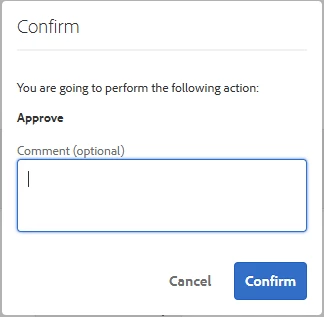
is there any possiblility to make the comment when confirming a “Assign Task” step in the AEM inbox mandatory?

Currently it is only optional on all cases but we need the possibility to also be able to force users to add a comment.


Thank you!
 

2 replies

Adobe Employee
May 28, 2026

Hi ​@tobias01 ,

There is no supported option to mark that Inbox comment as required/mandatory when the user confirms the task action.
Best-practice workaround: enforce a required comment field in the task form itself rather than the Inbox confirmation dialog.

Level 4
May 28, 2026

Hi ​@tobias01,

That’s a good suggestion around enforcing it at the task form level.


One additional pattern we’ve used in similar cases is handling this at the workflow level rather than just relying on the Inbox dialog.


Since the Inbox “Confirm” dialog doesn’t support mandatory validation for comments, one approach is:

- Add a required field in the task/dialog (as mentioned)

- Or validate input in the workflow step itself (e.g., via a Process Step or participant step logic), where the workflow does not proceed unless the required data/comment is present


This helps handle scenarios where:

- Users bypass or minimize form interaction

- You need stricter enforcement tied to the workflow outcome (e.g., reject/approve reasoning)


Another option, depending on the use case, is to store the comment as structured metadata in the task payload rather than relying on the optional Inbox comment field.


So while there’s no out-of-the-box way to enforce it directly in the confirm dialog, enforcing it at the workflow/form layer tends to give more control and consistency.


Curious if your use case is tied specifically to rejection/approval audit requirements, that can influence the best implementation approach.