Deleting an instance of repeatable panel in Adaptive forms | Community
Skip to main content
Level 3
March 20, 2026
Question

Deleting an instance of repeatable panel in Adaptive forms

  • March 20, 2026
  • 2 replies
  • 19 views

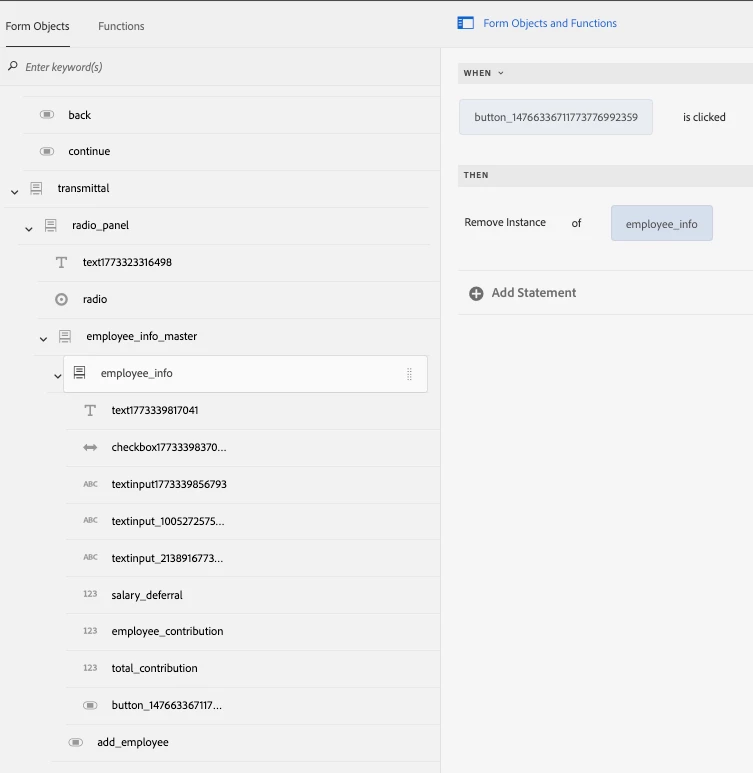
I have a repeatable panel in an Adaptive form built on core components, with a remove button inside the panel and an add button outside. When I use the rule editor to configure the remove button to delete a panel instance, it consistently removes the panel below the one I selected. For example, if I add three panels and try to delete panel 2, panel 3 gets deleted instead. While this could have been resolved using the Code editor, that option isn't available to me. My constraints are that we're working within a headless delivery model, so I can't use guidebridge, and custom JS functions aren't feasible because they would require passing the SOM expression, making the JS form-specific. Given these limitations, I would appreciate any suggestions on how to address this issue.
 

2 replies

Adobe Employee
March 20, 2026

Hi ​@kolluax,
Thank you for the detailed description of the issue with your repeatable panel in the Adaptive Form based on Core Components.

Below is our analysis and the recommended way forward.

1. Observed behaviour

You reported the following:

  • You have a repeatable panel (Core Components) with:
    • An Add button outside the panel, and
    • Remove button inside each panel instance.
  • The Visual Rule Editor is used to configure:
    • Add Instance on the Add button, and
    • Remove Instance on the Remove button.
  • At runtime:
    • When you add three instances (Panel 1, Panel 2, Panel 3) and click Remove on Panel 2Panel 3 gets removed instead.
    • In other words, the Remove Instance rule consistently acts on the last instance rather than the instance whose button was clicked.

You are also constrained by:

  • Headless delivery model – you do not want to depend on the classic guideBridge API.
  • No Code Editor in Rule Editor on your environment.
  • No form‑specific custom JS that requires hard‑coded SOM expressions.

2. Root cause (product behaviour)

This behaviour matches a known limitation in the current Rule Editor implementation for repeatable panels:

  1. Historically, rules on repeatable panels were evaluated in the context of the last instance of the panel.
  2. When you configure Remove Instance via the Visual Rule Editor, the generated rule does not use the current instance index. It internally behaves like:

    “remove the last instance of this panel”

This is documented internally and is currently being addressed under the rule‑editor enhancement, which adds context‑aware repeatable panels – rules will then be able to operate on the instance where the event occurred, rather than always targeting the last instance. A similar limitation and its workaround are described for another forms customer.

Until that enhancement is available on your tenant, what you are seeing is expected behaviour of the current Visual Rule Editor.

3. Recommended solution / workaround

Because Code Editor is disabled for you and you are on a headless model, the only supported and robust workaround is to move the “which instance to remove” logic into a reusable custom function, and keep the button rule itself very simple.

3.1. High‑level idea

  • The Remove button’s rule stays in the Visual Rule Editor, but instead of directly calling Remove Instance, it calls a custom function.
  • That custom function:
    • Receives the current context (globals),
    • Figures out the relative index of the panel instance from which the Remove button was clicked, and
    • Dispatches a removeInstance event on the repeatable panel with that index.

This is the exact pattern already used and validated for other customers, for example in the documented “Add or delete repeatable panel using dispatchEvent” use case and related support case for State of Pennsylvania, where the final working functions are:

function testAddInstance(globals) {
var repeatablePanel = globals.form.panelcontainer1724944003005;
globals.functions.dispatchEvent(repeatablePanel, 'addInstance', globals.field.$parent.$index + 1);
}

function testRemoveInstance(globals) {
var repeatablePanel = globals.form.panelcontainer1724944003005;
globals.functions.dispatchEvent(repeatablePanel, 'removeInstance', globals.field.$parent.$index);
}

Add or delete repeatable panel using the dispatchEvent property

This approach is fully compatible with Core Components, headless delivery and the new Rule Editor. It does not require classic guideBridge.

3.2. Implementation steps

Below is a concrete, product‑aligned pattern you can follow.

Step 1 – Create a reusable custom function

  1. In AEM, create a custom function bundle for your project as described here:
    Create a Custom Function for an Adaptive Form based on Core Components.
  2. Add two functions similar to the following (you only strictly need the remove one to fix your issue):
/**
* Add a panel instance immediately after the current one
* @name addPanelAfterCurrent
* @param {scope} globals
*/
function addPanelAfterCurrent(globals) {
// Replace with your repeatable panel field name
var repeatablePanel = globals.form.<yourPanelFieldName>;
var currentIndex = globals.field.$parent.$index;

// Insert a new instance after the current index
globals.functions.dispatchEvent(
repeatablePanel,
'addInstance',
currentIndex + 1
);
}

/**
* Remove the panel instance where the button was clicked
* @name removeCurrentPanel
* @param {scope} globals
*/
function removeCurrentPanel(globals) {
// Replace with your repeatable panel field name
var repeatablePanel = globals.form.<yourPanelFieldName>;
var currentIndex = globals.field.$parent.$index;

globals.functions.dispatchEvent(
repeatablePanel,
'removeInstance',
currentIndex
);
}

Key points:

  • globals.field is the button that was clicked.
  • globals.field.$parent.$index is the instance index of the repeatable panel for that button.
  • globals.form.<yourPanelFieldName> is the reference to the repeatable panel in the form model.
  • dispatchEvent(..., 'removeInstance', index) tells the runtime exactly which instance to remove.

This pattern is the same as the one that has already been validated with customers and documented in the Experience League use case above.

Step 2 – Wire the buttons via Visual Rule Editor

For each Remove button:

  1. Open Rule Editor for the Remove button (still using Visual mode).
  2. Create a rule like:
  • WHEN this button is clicked
  • THEN → Function Output → select removeCurrentPanel(globals)

No direct Remove Instance statement is used here; the function encapsulates the logic.

For the Add button:

  • If you are happy to always add a new instance at the end, you can keep the standard Visual Rule Editor Add Instance rule.
  • If you want to add after the current instance, use addPanelAfterCurrent(globals) in the same way.

This satisfies your constraints:

  • Headless‑friendly – uses the new globals/functions pattern used by Core Components and Universal Editor. No classic guideBridge use.
  • Rule Editor only – the author only selects a custom function in the Visual Rule Editor; they do not see or edit JavaScript.
  • Form‑agnostic logic – the only form‑specific piece is the panel name in the function (<yourPanelFieldName>). The rest of the logic is reusable across forms that share that naming pattern.

4. Roadmap / future improvement

Engineering is actively enhancing the Rule Editor so that Visual rules are context aware for repeatable panels, without requiring a custom function:

  • The enhancement tracked as FORMS‑16466 (internal) will allow the editor to generate rules similar to:
    removeInstance($form.repeatablePanel, getRelativeInstanceIndex($form.repeatablePanel)),
    so that the Remove action automatically applies to the panel instance whose button was clicked.
  • Once this enhancement is rolled out to your environment, you will be able to configure Remove Instance purely through the Visual Rule Editor, without custom functions.

We will keep you updated through release notes and can help you simplify your configuration once this reaches your tenant.

5. Summary

  • The behaviour you’re seeing (Remove button acting on the last instance) is a known limitation of the current Visual Rule Editor for repeatable panels.
  • supported workaround is to route the Remove action through a custom function which:
    • Calculates the current instance index, and
    • Calls dispatchEvent(..., 'removeInstance', index) for the correct panel instance.
  • This workaround:
    • Is compatible with your headless setup,
    • Does not require the classic guideBridge API,
    • Uses only the Visual Rule Editor from an authoring perspective.

Thanks

AmitVishwakarma
Community Advisor
Community Advisor
March 20, 2026

Hi ​@kolluax 

You're hitting a known limitation of the visual rule editor for repeatable panels in AF Core Components:

Remove Instance is not context‑aware and ends up operating on the wrong index.

With the current product, the only reliable way to delete exactly the panel whose delete button was clicked is to use a small, generic custom function and call it from the rule editor. This works in headless delivery as well, doesn't use GuideBridge, and doesn't require SOM expressions, so it's reusable across forms.

1. Create a generic custom function (form‑agnostic)

Create a JS clientlib that defines two functions: one for add and one for remove. These functions use the current button's position (globals.field.$parent.$index) and the repeatable panel's instance manager, so they don't need hard‑coded panel names or SOM.

/**
* Add a new instance *after* the current panel
* @name addPanelInstance
* @param {scope} globals
*/
function addPanelInstance(globals) {
// Assumes: button is a direct child of the repeatable panel
var instanceManager = globals.field.$parent.$parent;
var currentIndex = globals.field.$parent.$index;

// Insert new panel right after the one whose button was clicked
globals.functions.dispatchEvent(instanceManager, 'addInstance', currentIndex + 1);
}

/**
* Remove exactly the panel whose button was clicked
* @name removePanelInstance
* @param {scope} globals
*/
function removePanelInstance(globals) {
// Assumes: button is a direct child of the repeatable panel
var instanceManager = globals.field.$parent.$parent;
var currentIndex = globals.field.$parent.$index;

// Remove the correct instance
globals.functions.dispatchEvent(instanceManager, 'removeInstance', currentIndex);

// Optional: re‑initialize remaining instances if you rely on init logic
instanceManager.forEach(function (p) {
globals.functions.dispatchEvent(p, 'initialize');
});
}

Key points:

  • No GuideBridge.
  • No SOM expressions or hard‑coded panel IDs.
  • Works for any repeatable panel where the add/remove buttons are direct children of that panel.

How to wire the JS as a custom function is described here: "Create and add custom functions in an Adaptive Form" https://experienceleague.adobe.com/en/docs/experience-manager-65-lts/content/forms/adaptive-forms-core-components/create-and-use-custom-functions-core-components


2. Configure the Add/Delete buttons with Rule Editor

Once the clientlib is loaded and the functions are available:

  • Select your Add button inside the repeatable panel.
  • Open Rule Editor > Create.
  • WHEN [Add button] is clicked THEN > choose Function Output > pick addPanelInstance(globals).
  • Repeat for the Delete button:
    • Select the Delete button inside the same repeatable panel.
    • Open Rule Editor > Create.
    • WHEN [Delete button] is clicked THEN > choose Function Output > pick removePanelInstance(globals).

Because the function uses globals.field.$parent.$index, the correct instance index is passed to addInstance/removeInstance, so:

  • Clicking "Delete" on panel 2 deletes panel 2, not the last one.
  • Clicking "Add" on panel 2 inserts a new instance right after panel 2.

This approach aligns with the official custom‑function pattern for repeatable panels shown here (using dispatchEvent to manipulate instances): https://experienceleague.adobe.com/en/docs/experience-manager-cloud-service/content/forms/adaptive-forms-authoring/authoring-adaptive-forms-core-components/create-an-adaptive-form-on-forms-cs/create-and-use-custom-function-core-component/custom-function-core-components-use-cases and with the general repeatability documentation: https://experienceleague.adobe.com/en/docs/experience-manager-cloud-service/content/forms/adaptive-forms-authoring/authoring-adaptive-forms-core-components/create-an-adaptive-form-on-forms-cs/create-forms-repeatable-sections


3. Important assumptions 

  • Buttons must be direct children of the repeatable panel.
  • If you wrap them in extra containers, globals.field.$parent.$parent will no longer be the instance manager and you'll need to adjust that path.
  • Works in headless delivery too, as long as you're using the Adaptive Forms core runtime and custom functions (no dependency on GuideBridge APIs).


Amit Vishwakarma - Adobe Commerce Champion 2025 | 16x Adobe certified | 4x Adobe SME
kolluaxAuthor
Level 3
March 20, 2026

Thanks ​@AmitVishwakarma ​@Pranay_M .

But what should i pass to the “globals”, My rule looks like below, it defaults me to pick form objects not panels