This post is no longer active and is closed to new replies. Need help? Start a new post to ask your question.
DarrenBiz
DarrenBizAccepted solution
Level 6
July 9, 2018

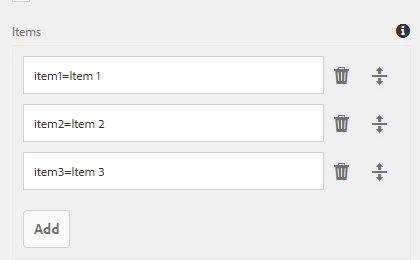
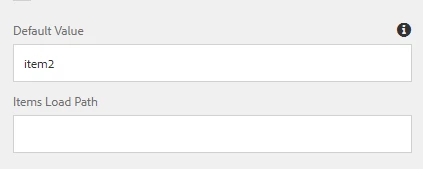
If Its a static list of items, you can set the default value on the component itself by entering a value into the Default Value field

e.g. to set "Item 2" as the default:

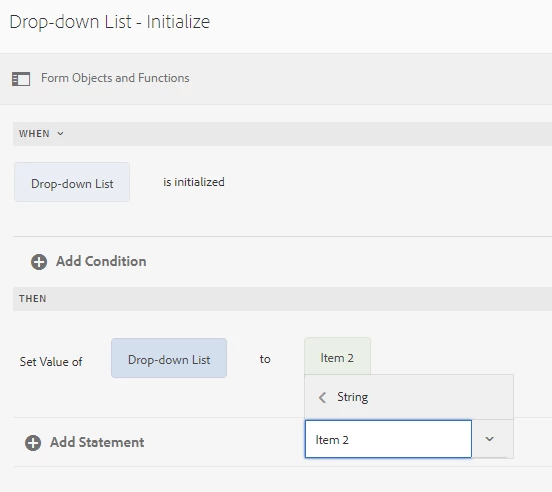
or using the Rules Editor:

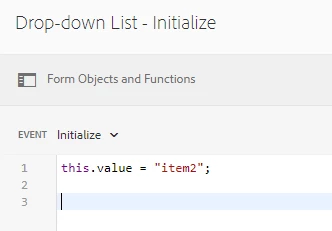
If its a dynamic list, you can set the value property [2] once the list is initialized [3]

[2] Adaptive Forms Class: GuideDropDownList

[3] Adobe Experience Manager Help | Adaptive Form Expressions

1 reply

DarrenBiz
DarrenBizAccepted solution
Level 6
July 9, 2018

If Its a static list of items, you can set the default value on the component itself by entering a value into the Default Value field

e.g. to set "Item 2" as the default:

or using the Rules Editor:

If its a dynamic list, you can set the value property [2] once the list is initialized [3]

[2] Adaptive Forms Class: GuideDropDownList

[3] Adobe Experience Manager Help | Adaptive Form Expressions

Translate