Date Picker field's calendar widget intermittently displays without any days | Community
Skip to main content
Level 2
January 28, 2025
Solved

Date Picker field's calendar widget intermittently displays without any days

  • January 28, 2025
  • 2 replies
  • 931 views

AEM 6.5, SPA, Angular 9, Bootstrap 4

AEM Forms packages:

adobe-aemfd-linux-pkg-6.0.1120.zip

adobe-aemfd-compat-pkg-2.0.48.zip
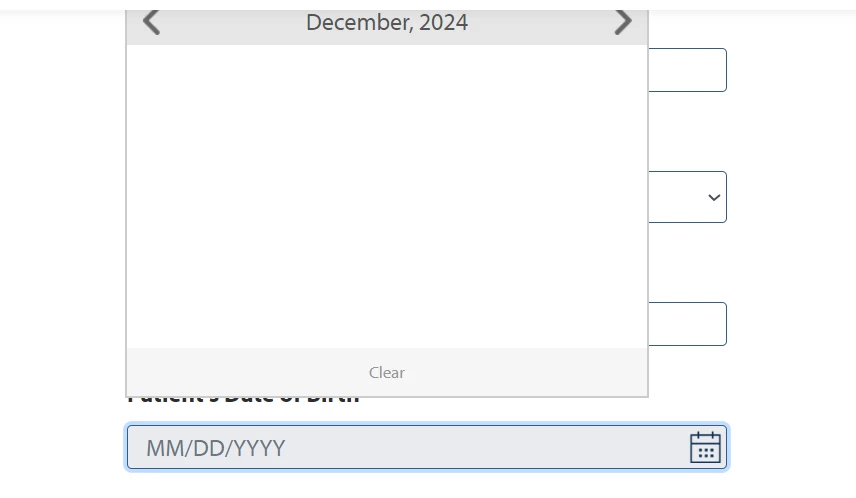
Date Picker field's calendar widget intermittently displays without any days (see image above).  It works most of the time, but we haven't been able to come up with steps to reproduce the blank popup.  We've seen the behavior on different Date Picker fields on different Adaptive Forms.

  1. Has anybody seen this behavior before?
  2. Do you have steps to reproduce the issue?
  3. Were you able to fix the issue or at least any hints for what to look for?
Best answer by Khushwant_Singh

User has been asked to log a ticket through the support channel to have this addressed in the foundation component. If you are starting a new project, it is recommended to use Core Components.  

2 replies

rishim22446870
Adobe Employee
Adobe Employee
January 29, 2025

@dpkhmhsAre you using foundation-based forms or core component-based forms? We've addressed many similar issues to the one you reported with the date picker core component. You can check the component here: https://github.com/adobe/aem-core-forms-components/tree/release/650/ui.af.apps/src/main/content/jcr_root/apps/core/fd/components/form/datepicker/v1/datepicker 

dpkhmhsAuthor
Level 2
January 29, 2025

I'm using whatever form components are installed with the AEM Forms install packages.  The component group for all the form components I'm using is "Adaptive Form".  The sling:resourceType is "fd/af/components/guidedatepicker".  I've always thought I'm using the core components but is there a simple way to know for sure?


rishim22446870
Adobe Employee
Adobe Employee
January 30, 2025

@dpkhmhs

Based on the screenshots you shared, it appears you're using foundation components to build the adaptive form. We recommend using the forms core components available through the AEM project archetype for creating adaptive forms.

Could you please switch to using the core components for this use case? We've resolved similar issues in the past using them.

Khushwant_Singh
Adobe Employee
Khushwant_SinghAdobe EmployeeAccepted solution
Adobe Employee
February 3, 2025

User has been asked to log a ticket through the support channel to have this addressed in the foundation component. If you are starting a new project, it is recommended to use Core Components.