Conditional page break each 12 row of table | Adobe Higher Education
Skip to main content
Meilleure réponse par _Bruce_Robertson

Hi,

You can add a conditional break to the row of your table.

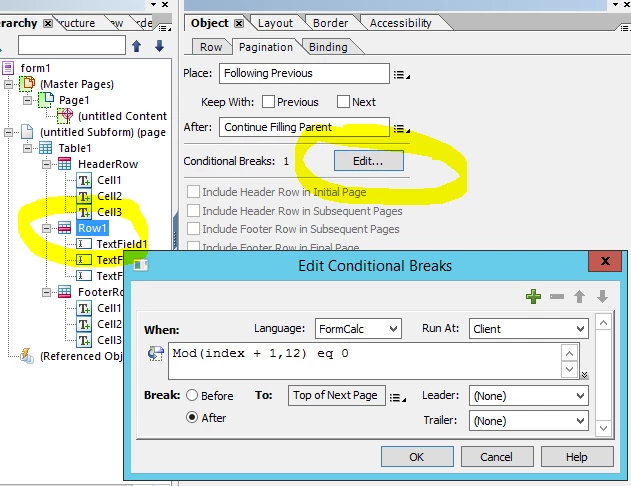
On the Pagination tab of the row, click the Edit button under conditional breaks, then add a expression like below, which uses a modulus 12 division test to cause a page break every 12 rows.

Regards

Bruce

1 commentaire

_Bruce_Robertson
Level 10
April 18, 2019

Hi,

You can add a conditional break to the row of your table.

On the Pagination tab of the row, click the Edit button under conditional breaks, then add a expression like below, which uses a modulus 12 division test to cause a page break every 12 rows.

Regards

Bruce

November 24, 2023

Hi Thank you. your answer helped me. But the issue I'm facing is header row used to include in the next page once after current page is filled. but it is not repeating after the conditional break. How can I repeat the header after the conditional break?


Magus069
Level 10
November 30, 2023

Hi there,


that's a good question. I hope this answer is still relevant for you or anyone that will encounter this thread.

All you have to do is select the header row object within the Leader drop down list

I hope this will help