Level 4
May 8, 2026
Solved

Can we add decimal number using Numeric box on Adaptive form created using foundation components on AEM 6.5.24

  • May 8, 2026
  • 1 reply
  • 37 views

Hi,

I am trying to add decimal default number on numeric box component on Adaptive form.

AEM version is 6.5.24 and Adaptive forms are build using foundation components.

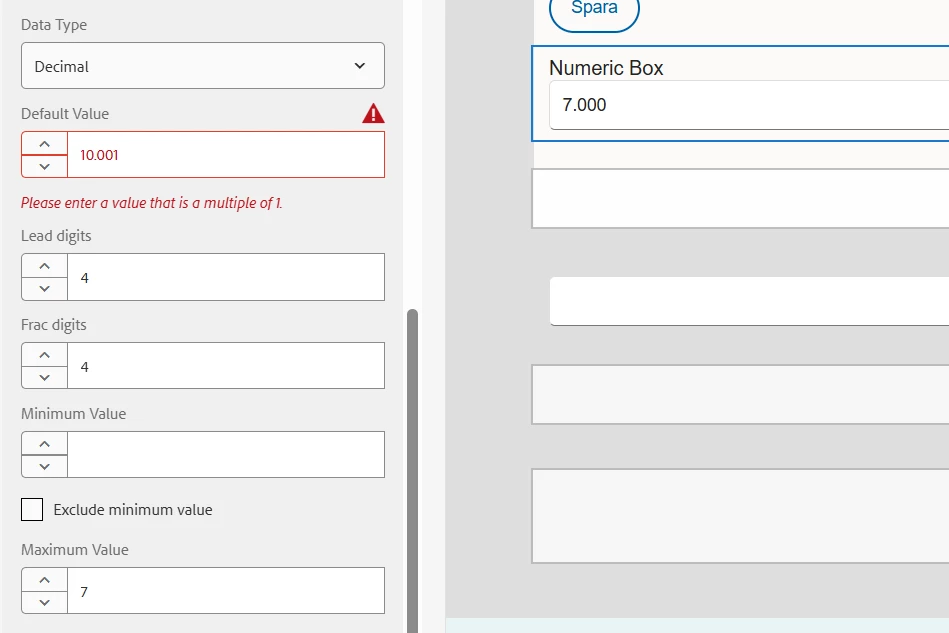
I can see this error on trying to add decimal number. It says “Please enter a value this is a multiple of 1”. after selecting Decimal data type. I tired float as well, but I get the same error.

Appreciate any assistance here. Thank you.


Best answer by Pranay_M

Hi ​@SmrithiGo,

Thank you for reaching out! I've looked into the issue you're experiencing with the Numeric Box component on AEM 6.5.24, and I have two workarounds that should resolve this for you.

This is a known validation behaviour in the Foundation Components where the "multiple of 1" constraint on the Default Value field is not re-evaluated when switching the Data Type to Decimal.

To fix the issue you can refer to one of the below 2 options:

Option 1 – Set the Default Value via Initialize Script

Leave the Default Value field empty in the component dialog to avoid the validation error, then set the value programmatically using the field's Initialize event:

1. Open the Script Editor on your Numeric Box field.
2. Select the Initialize event.
3. Add the following script:

   this.value = 10.001;

   (Replace 10.001 with your desired default value.)

This will set the decimal value as soon as the form loads.

Option 2 – Set the Default Value Directly via CRXDE Lite

This option bypasses the dialog validation entirely by editing the value directly in the JCR repository:

1. Navigate to CRXDE Lite (http://<host>:<port>/crx/de).
2. Browse to the JCR node for your Numeric Box field within your Adaptive Form.
3. Locate the property defaultValue.
4. Set it directly to your desired decimal value (e.g. 10.001) as a String type.
5. Click Save All.

This is the quickest option and takes effect immediately without any code changes.

Please try either of these approaches and let me know if you have any questions or run into any issues. Happy to assist further!

Thanks

Pranay
1 reply

Pranay_MAdobe EmployeeAccepted solution
Adobe Employee
May 8, 2026

Hi ​@SmrithiGo,

Thank you for reaching out! I've looked into the issue you're experiencing with the Numeric Box component on AEM 6.5.24, and I have two workarounds that should resolve this for you.

This is a known validation behaviour in the Foundation Components where the "multiple of 1" constraint on the Default Value field is not re-evaluated when switching the Data Type to Decimal.

To fix the issue you can refer to one of the below 2 options:

Option 1 – Set the Default Value via Initialize Script

Leave the Default Value field empty in the component dialog to avoid the validation error, then set the value programmatically using the field's Initialize event:

1. Open the Script Editor on your Numeric Box field.
2. Select the Initialize event.
3. Add the following script:

   this.value = 10.001;

   (Replace 10.001 with your desired default value.)

This will set the decimal value as soon as the form loads.

Option 2 – Set the Default Value Directly via CRXDE Lite

This option bypasses the dialog validation entirely by editing the value directly in the JCR repository:

1. Navigate to CRXDE Lite (http://<host>:<port>/crx/de).
2. Browse to the JCR node for your Numeric Box field within your Adaptive Form.
3. Locate the property defaultValue.
4. Set it directly to your desired decimal value (e.g. 10.001) as a String type.
5. Click Save All.

This is the quickest option and takes effect immediately without any code changes.

Please try either of these approaches and let me know if you have any questions or run into any issues. Happy to assist further!

Thanks

Pranay

SmrithiGoAuthor
Level 4
May 11, 2026

Thank you ​@Pranay_M , I can set the decimal value to numeric box using rule editor script.