Level 4
Oct 26, 2026 1:54 PM UTC
Solved

Can we add custom properties in filter in AEM forms 6.5 (On prem)

 Hi,

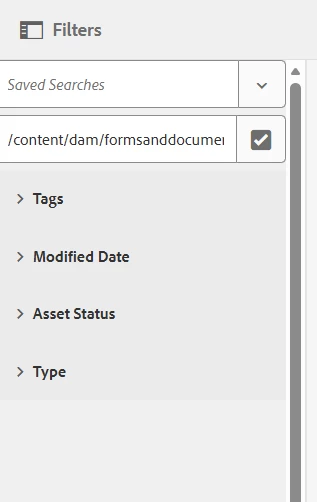
We have a requirement to add custom properties in the filter, so that users can easily search based on the values for those properties. We have three custom property which are of type String, and I want to add them to this filter: 

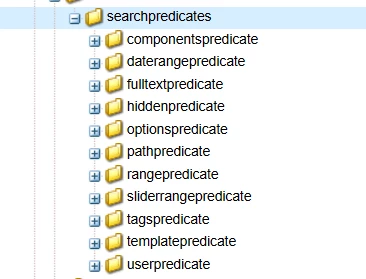
I could see that OOTB, these are the only options under: /libs/cq/gui/components/coral/common/admin/customsearch/searchpredicates

Can someone suggest if we can add custom properties to filter with String values. Thank you.

Pranay_MAccepted solution
Adobe Employee
Oct 28, 2026 3:05 PM UTC

Hi ​@SmrithiGo ,

Thank you for sharing the screenshots. They show that the Owner filter is using the DAM Property Predicate component:

Plain text

dam/gui/coral/components/admin/customsearch/searchpredicates/propertypredicate

The name property points to a field under jcr:content/metadata, and the text input is rendering in the Forms and Documents filter panel. This is consistent with the intended approach for allowing users to enter a custom String value.

The configuration also enables partialSearch and equalsIgnoreCase, indicating that partial, case-insensitive matching is intended. Please verify that the configured metadata path matches the property’s actual storage location and that searches return the expected results, including partial values and different letter cases. The screenshots confirm that the field renders, but not yet that the Forms search backend applies these settings correctly.

You can follow the same pattern for the other two properties once this behavior is confirmed. Keep the customization under /apps without modifying /libs, and validate it again on your target LTS release, particularly because the Forms console is reusing a DAM predicate component.

Thank you.
4 replies

Adobe Employee
Oct 28, 2026 2:41 PM UTC

Hi ​@SmrithiGo,

Custom String properties can be used as search filters in AEM. The available predicate components determine how users enter their search criteria; they do not restrict filtering to out-of-the-box metadata properties.

For your three custom properties, the recommended approach depends on the desired experience:

  • Property Predicate: Allows users to type a value to search a specific metadata property, where supported by the console’s search form.

  • Options Predicate: Allows users to select from predefined String values associated with a metadata property.

Your screenshot appears to show the Forms and Documents console. The available predicates and configuration options depend on the AEM Forms version, and changes to the Assets Admin Search Rail may not apply to this console. If its search form does not provide a Property Predicate, adding free-text filters may require a custom predicate and integration with the console’s search functionality.

Please avoid modifying /libs directly. Any required customization should use the supported extension mechanism for your version.

For reference, Adobe’s Search facets documentation describes Property and Options predicates for the Assets console.

To confirm the appropriate approach for your environment, please share your AEM Forms version and service pack, the repository paths of the three properties, and whether users should type values or select from a predefined list.

Thanks
Pranay

Translate
SmrithiGoAuthor
Level 4
Oct 28, 2026 2:51 PM UTC

 ​@Pranay_M , Thank you for your response.

We are currently on AEM 6.5.24, but planning to upgrade soon to LTS.

Do you think this is right way :


it shows like this on the filter in AEM forms:

this is placed under /apps/settings/forms/search/facets/fm/jcr:content/items for testing purposes.

Translate
Pranay_MAdobe EmployeeAccepted solution
Adobe Employee
Oct 28, 2026 3:05 PM UTC

Hi ​@SmrithiGo ,

Thank you for sharing the screenshots. They show that the Owner filter is using the DAM Property Predicate component:

Plain text

dam/gui/coral/components/admin/customsearch/searchpredicates/propertypredicate

The name property points to a field under jcr:content/metadata, and the text input is rendering in the Forms and Documents filter panel. This is consistent with the intended approach for allowing users to enter a custom String value.

The configuration also enables partialSearch and equalsIgnoreCase, indicating that partial, case-insensitive matching is intended. Please verify that the configured metadata path matches the property’s actual storage location and that searches return the expected results, including partial values and different letter cases. The screenshots confirm that the field renders, but not yet that the Forms search backend applies these settings correctly.

You can follow the same pattern for the other two properties once this behavior is confirmed. Keep the customization under /apps without modifying /libs, and validate it again on your target LTS release, particularly because the Forms console is reusing a DAM predicate component.

Thank you.
Translate
SmrithiGoAuthor
Level 4
Oct 29, 2026 7:44 AM UTC

thank you ​@Pranay_M. Yes I will validate after the upgrade as well.  

Translate