Level 2
November 8, 2022
Solved

calling AEM servlet from form

I have a rest endpoint that I want to invoke. I dont want to use fdm, how to invoke AEM servlet from form? can we set checkbox dynamically with servlet response?

This post is no longer active and is closed to new replies. Need help? Start a new post to ask your question.
Mayank_Gandhi
Mayank_GandhiAccepted solution
Adobe Employee
November 9, 2022

@formuser1 

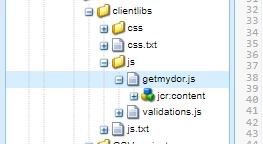
1. Create a client libs folder 


2. In the JS file create a function


function getPdf() {
var settings = {
"async": true,
"url": "URL will go here",
"method": "POST",
data: {
'data': result.data
}
}
$.ajax(settings).done(function(response) {
guideBridge.resolveNode("pdf").value = response;
})

}


3. Go to form, map your client libs.

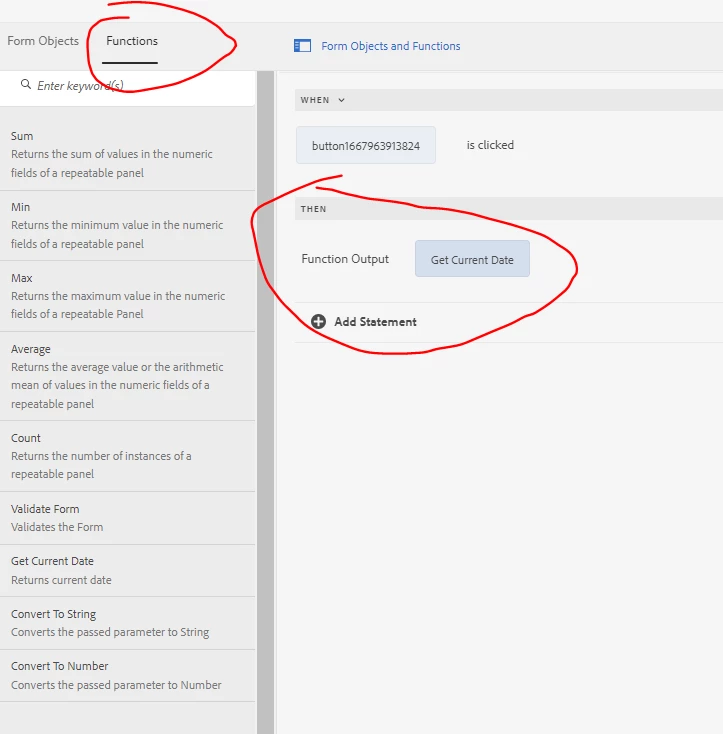
4. Go to rule editor/code editor and map the function which is making ajax call as shown below:


4 replies

Adobe Employee
November 8, 2022

you can use javascript to make the call. Create a client library and in that client library have your javascript make the call to the servlet. You can capture the response and display the value in the form using the guide bridge 

Translate
formuser1Author
Level 2
November 9, 2022

thanks @workflowuser 

Translate
Mayank_Gandhi
Adobe Employee
Mayank_GandhiAdobe EmployeeAccepted solution
Adobe Employee
November 9, 2022

@formuser1 

1. Create a client libs folder 


2. In the JS file create a function


function getPdf() {
var settings = {
"async": true,
"url": "URL will go here",
"method": "POST",
data: {
'data': result.data
}
}
$.ajax(settings).done(function(response) {
guideBridge.resolveNode("pdf").value = response;
})

}


3. Go to form, map your client libs.

4. Go to rule editor/code editor and map the function which is making ajax call as shown below:


Translate
formuser1Author
Level 2
November 9, 2022

@mayank_gandhi this worked. thanks!

Translate