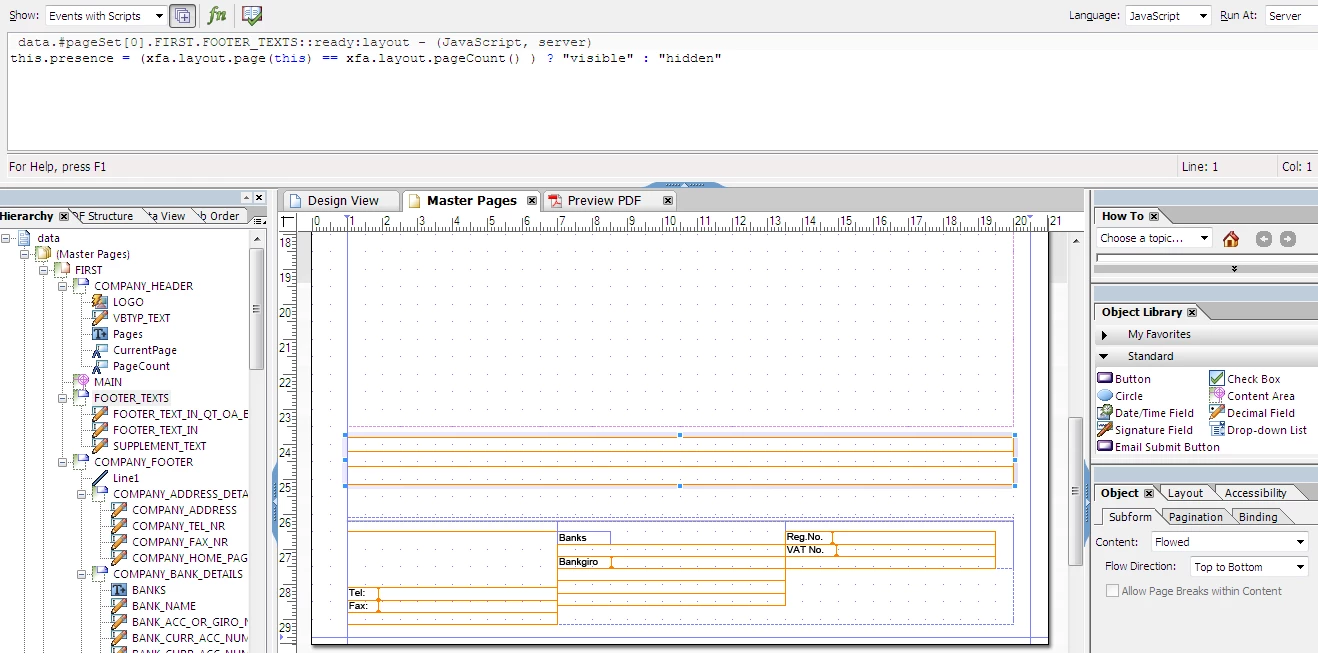
'Allow Page Breaks within Content' is greyed out on Subform. No parent Subform exists.
Hi,
I am trying to get text, that has been placed near the end of a page, to break to a new page, but I cannot get this to work.
I have a Subform, called FOOTER_TEXTS and containing 3 text fields, just below and outside of the 'MAIN' Content Area and just above a fixed (static) Subform called COMPANY_FOOTER.
The JavaScript that you see is just there to ensure that FOOTER_TEXTS gets printed only on the last page.
I have all 3 text fields in FOOTER_TEXTS set to 'Allow Multiple lines' and the height is set to 'Expand to fit' but the option to 'Allow Page Breaks within Content' is greyed-out in the Subform and all 3 Text Fields, resulting in the text in Subform COMPANY_FOOTER being overwritten.
What I would like is the text from the 3 fields in FOOTER_TEXTS to be printed on the bottom of the last page, just above the Subform COMPANY_FOOTER, and I would like the text to break to another page, if necessary.
Does anyone have any ideas on how I can get this to work?
Thank you in advance.
Kieron Kelly
Stockholm, Sweden
P.S. Subform is set as 'Flowed'.