aemforms workbench installation failure | Adobe Higher Education
Skip to main content
Level 2
October 2, 2022
解決済み

aemforms workbench installation failure

  • October 2, 2022
  • 1 の返信
  • 1499 ビュー

Execution of aemforms_workbench_6_X_0\run_windows_installer.bat from a known good installer returns a pop-up:
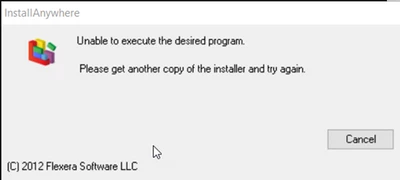
 

Has anyone experienced this issue before?

このトピックへの返信は締め切られました。
ベストアンサー FrustratedFootballer

@frustratedfootballer you can get it from the adobe software distribution portal.


The problem was resolved by changing the TEMP and TMP user and system windows variables to directory paths without "temp" or "tmp" in the path for the duration of the install. Note that if the install had to be repeated then these variables would have to be changed again.

1 の返信

Mayank_Gandhi
Adobe Employee
Adobe Employee
October 2, 2022

@frustratedfootballer what version of aem forms is it? Check if you copied from shared drive or AV scan sometime removes executable from the disk. 

Level 2
October 2, 2022

It is version 6.4. I also got the error with 6.5. I got past this error by changing the TEMP and TMP system and user variables. Now it is hanging on the "Installing Merge Module" step.

Level 2
October 2, 2022

I turned off wi-fi, unplugged my network cable, and changed the TEMP and TMP user variables. Installation was partially successful. It completed but displayed the message "An attempt was made to install Designer, but the installation was unsuccessful". Do you have any advice?