AEM repeatable subforms | Community
Skip to main content
July 19, 2017
Solved

AEM repeatable subforms

  • July 19, 2017
  • 3 replies
  • 1687 views

Hello folks,

I'm working on the migration from ES2 to AEM and it seems that there are some problems mainly with the "Preview HTML5" TAB in AEM.

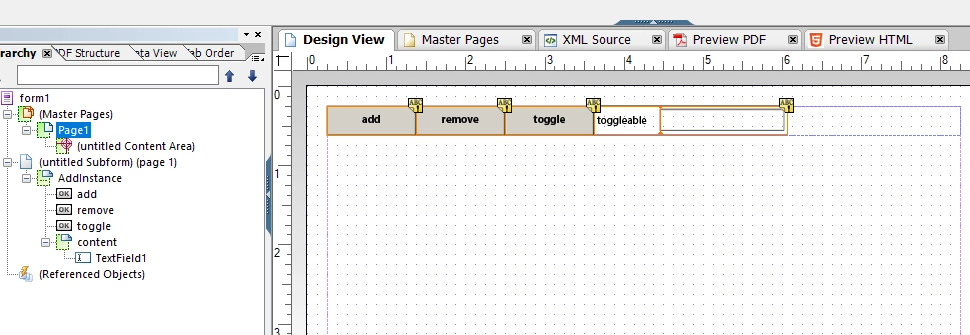
In designer AEM, when I tried to add a new instance of a repeatable subform (using addInstance function in a click event of a button), the new instance shows in preview PDF, it doesn't  in "Preview HTML5" .

It seems that is related to a refresh page problem.

Is there any idea that solve this issue?

Below my code:

form1.#subform[0].AddInstance.add::click - (JavaScript, both)

app.alert("count:"+_content.count);
_content.addInstance(true);
app.alert("count :"+_content.count);

(content is the name of the repeatable subform, containing a simple textField)

Thanks to everybody.
This post is no longer active and is closed to new replies. Need help? Start a new post to ask your question.
Best answer by Lee__A

With the HTML5 version of the form, you need to have at least one instance of the subform that exists initially. Also, make your life much simpler by ensuring every element in your form has a proper name including subforms. You should have nothing that is "untitled". Keep in mind that in the browser "app" does not exist so you should try / catch that if you'd like to use it in web & pdf.

3 replies

smacdonald2008
Level 10
July 19, 2017

Have you looked through all of the docs on this use case?

AEM 6.0 Forms Help | Creating forms with repeatable sections

Lee__AAdobe EmployeeAccepted solution
Adobe Employee
July 19, 2017

With the HTML5 version of the form, you need to have at least one instance of the subform that exists initially. Also, make your life much simpler by ensuring every element in your form has a proper name including subforms. You should have nothing that is "untitled". Keep in mind that in the browser "app" does not exist so you should try / catch that if you'd like to use it in web & pdf.

Adobe Employee
July 19, 2017

One additional side note. If you are creating new forms, use Adaptive Forms.