AEM Forms Cloud Service client libs | Community
Skip to main content
Level 5
June 7, 2023
Solved

AEM Forms Cloud Service client libs

  • June 7, 2023
  • 2 replies
  • 792 views

In AEM forms cloud service, there is no option for "code editor". How we can add the custom function for any fields like ajax or custom validations for the field. Or any way to enable the "code editor".

This post is no longer active and is closed to new replies. Need help? Start a new post to ask your question.
Best answer by aravindS

In AEM CS, there is no "code editor", so we need to call our clientlibs function in visual editor only.

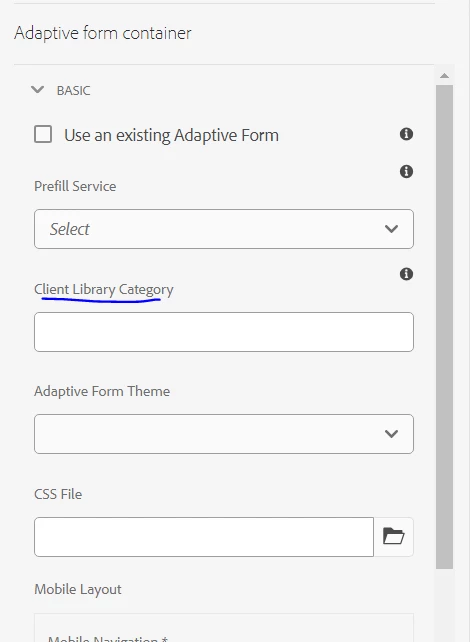
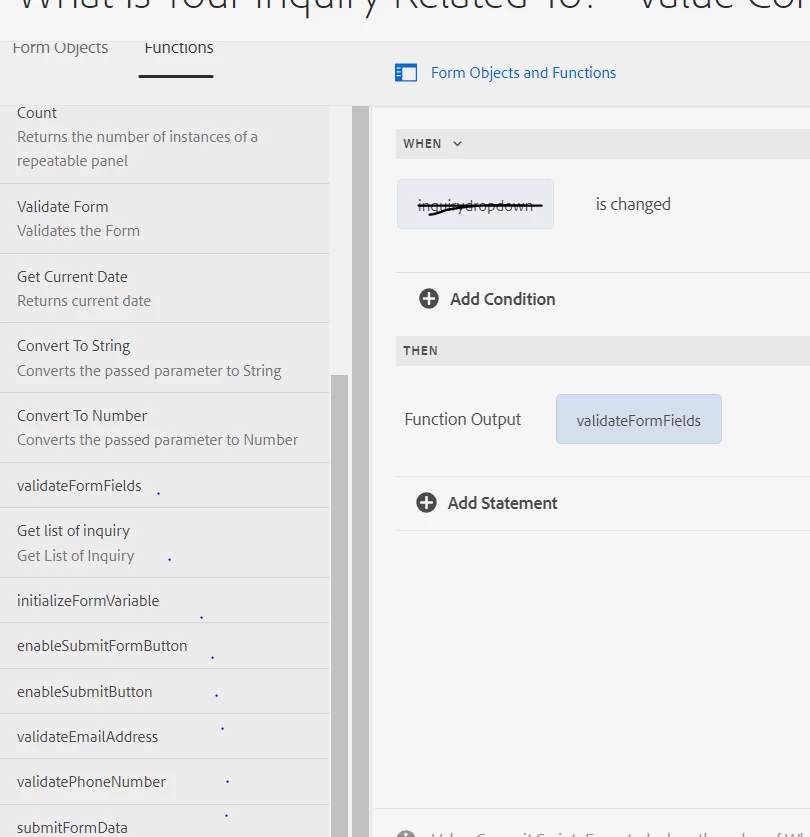
Found the way, We need to create a clientlibs, Author the category name in form container clientlibs section. After this you can able to see your functions in editor, 


2 replies

Pulkit_Jain_
Adobe Employee
Adobe Employee
June 7, 2023

@aravinds Don't think Code editor can be enabled on cloud service.

Best way forward is to add the javascript to the client libraries.

aravindSAuthor
Level 5
June 7, 2023

Hi @pulkit_jain_  , Yes in cloud service there is no code editor in Adaptive form, 

How i can call the respective method (clientlib methods) in adpative form field, how i can enable the guidebridge in AEM CS adaptive form

aravindSAuthorAccepted solution
Level 5
June 14, 2023

In AEM CS, there is no "code editor", so we need to call our clientlibs function in visual editor only.

Found the way, We need to create a clientlibs, Author the category name in form container clientlibs section. After this you can able to see your functions in editor,