AEM Forms -AEMaaCS - Post installation, objects configure/property screen breaking | Community
Skip to main content
May 20, 2024
Question

AEM Forms -AEMaaCS - Post installation, objects configure/property screen breaking

  • May 20, 2024
  • 1 reply
  • 756 views

Hi All,


Post AEM Forms cloud setup for local installation of aem-sdk-2024.4.15977.20240418T174835Z-240300 and Forms add add on - aem-forms-addon-2024.04.04.00-240300 pack, when trying to create new components, only old Libs/foundation components are showing correct properties on left panel, Any component which is developed with newer model HTL , the properties are broken and represents incorrectly and also not showing in popup tool. Here is the below screenshot. Please suggest what is missing for new core components, all components newly built using htl are seen similar


Text V2 is custom text developed using new standards of HTL.
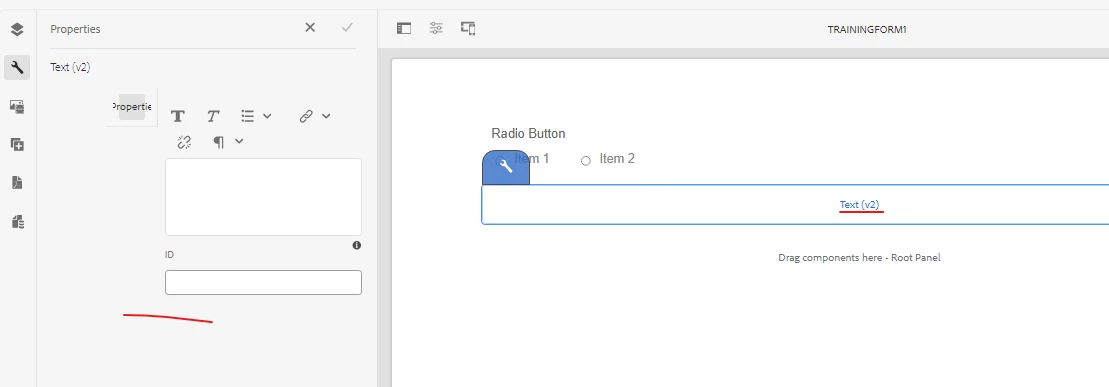


Also in cloud usually there is popup properties comes up instead of side panel. Can anyone help here ?
@nitrohazedev 

@mayank_gandhi 

This post is no longer active and is closed to new replies. Need help? Start a new post to ask your question.

1 reply

Level 9
May 20, 2024

I saw date act weird so I restarted the instance to check and it helped . Core components should not have shown it there on the left view pane . 

Abhilash9Author
May 20, 2024

yes correct, for me all components properties still showing on left panel, which is of old aem forms setup. trying to understand what is missing in new setup, so the property panel comes up in popup window. 

Level 9
May 21, 2024

Did u restart it ? Check the version on “about” for forms and sdk to confirm . Try fresh installation , wondering if it is corrupt