Adaptive Form Table - force scrolling horizontally | Adobe Higher Education
Skip to main content
crich2784
Level 6
August 5, 2022
Risolto

Adaptive Form Table - force scrolling horizontally

  • August 5, 2022
  • 1 risposta
  • 689 visualizzazioni

We have a table with a lot of columns - +20.  We would like them to be fixed width and have the Table scroll horizontally instead of squeezing everything on the screen.  Is there an easy way to do this?


Thanks,

Questo argomento è stato chiuso alle risposte.
Migliore risposta di Mayank_Gandhi

@crich2784 20 columns 🤔 🤔, above 10 it will have a very cluttered layout. Is it static data or user need to fill in as well?


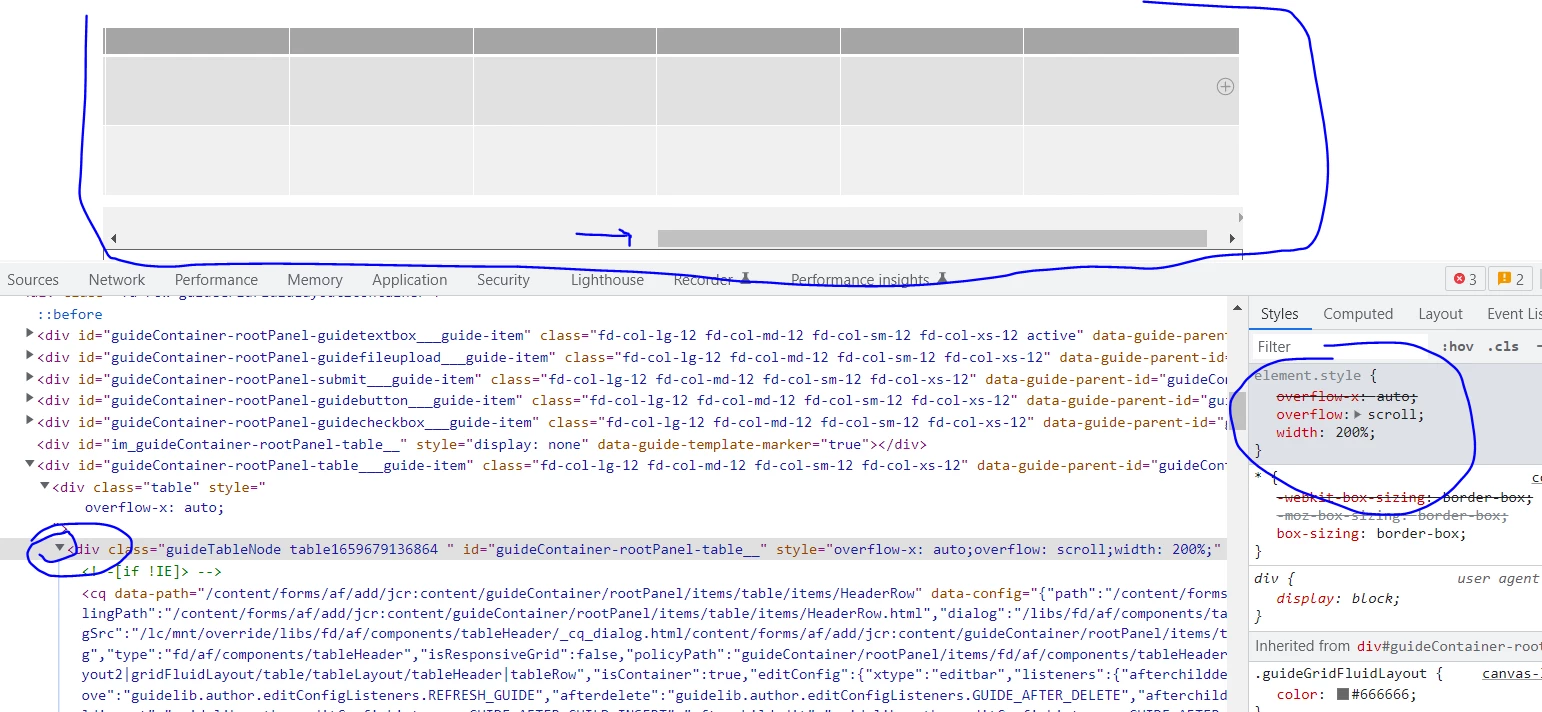
But anyways what you are looking for is to add overflow to the div tag

overflow: scroll;

width: 200%;


1 risposta

Mayank_Gandhi
Adobe Employee
Adobe Employee
August 5, 2022

@crich2784 20 columns 🤔 🤔, above 10 it will have a very cluttered layout. Is it static data or user need to fill in as well?


But anyways what you are looking for is to add overflow to the div tag

overflow: scroll;

width: 200%;