Issue in setting up Universal Editor local service | Adobe Higher Education
Skip to main content
narendragandhi
Community Advisor
Community Advisor
February 26, 2024
Respondido

Issue in setting up Universal Editor local service

  • February 26, 2024
  • 2 respostas
  • 3530 Visualizações

I am following this article to setup the local universal editor - https://experienceleague.adobe.com/docs/experience-manager-cloud-service/content/universal-editor/developing/local-dev.html?lang=en# but it's not working for me.


Can you please let me know what steps I could be missing if anyone has it working in their local?


Thanks

Narendra

Este tópico foi fechado para respostas.
Melhor resposta por maximilianvoss

Yep, you are right. Was able to see the latest universal-editor-cors library. So, how to use the Universal Editor locally then?


Please see: https://experienceleague.adobe.com/docs/experience-manager-cloud-service/content/implementing/developing/universal-editor/architecture.html?lang=en#building-blocks
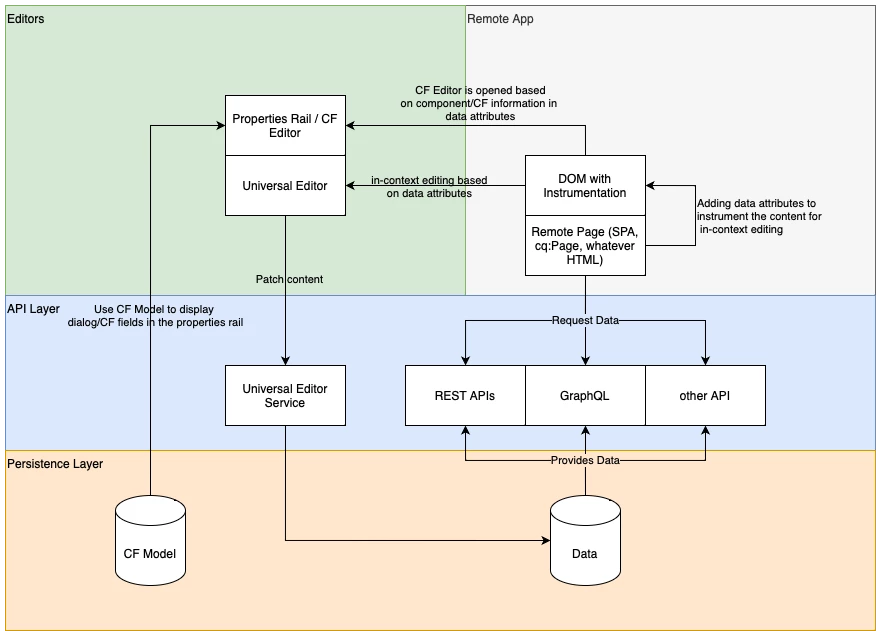


Universal Editor consists of two elements: UI & Service.

The Universal Editor UI is always hosted on https://experience.adobe.com or under AEM domain.

The Universal Editor Service - the part which is persisting changes to your AEM backend - is either centrally hosted by Adobe at https://universal-editor-service.experiencecloud.live or can be self-hosted by you. Use cases for self-hosting are local development or internal restrictions which prevent direct access to the AEM instance from the Internet.

2 Respostas

kautuk_sahni
Community Manager
Community Manager
February 28, 2024

@narendragandhi can you help us explain what issue are you facing? 


Setting up the local Universal Editor in AEM involves several steps:

Prerequisites:

Steps:

  1. Create a Certificate:

    • Option 1: Use OpenSSL to generate a self-signed certificate for development purposes only.
      openssl req -x509 -newkey rsa:2048 -keyout key.pem -out certificate.pem -days 365 -subj "/C=US/ST=YourState/L=YourCity/O=YourOrganization/CN=localhost"
      
    • Option 2: Alternatively, for a more secure development environment, use a temporary certificate authority like mkcert: https://github.com/FiloSottile/mkcert
  2. Configure the Universal Editor Service:

    • Edit the config.json file located in the Universal Editor Service installation directory.
    • Update the following properties:
      • server.port: Set the port on which the service will run (default: 8000).
      • https.enabled: Set to true to enable HTTPS.
      • https.keyStore: Path to your self-signed certificate keystore file (e.g., key.pem).
      • https.keyStorePassword: Password for the keystore file (leave blank if using OpenSSL).
  3. Run the Universal Editor Service:

    • Open a terminal and navigate to the Universal Editor Service installation directory.
    • Run the command ./universal-editor-service to start the service.
  4. Instrument your AEM page:

  5. Access the Local Universal Editor:

    • Open your browser and navigate to https://localhost:8000/.
    • If using a self-signed certificate: Accept the security warning as it's not trusted by default browsers. (For development only)
    • If using a temporary certificate authority like mkcert: You should be able to access the editor without any warnings.
    • You should now be able to edit your AEM page using the local Universal Editor Service.
Kautuk Sahni
Level 2
February 28, 2024

Followed your steps @kautuk_sahni. The local universal editor is still not working, getting a 404, when I hit the local host https://localhost:8000/


Here is what I did -
1. Followed the steps as documented here to setup the local Universal editor Service.

2. Added an additional config.json, considering the installation directory didn't have one. Still no luck!
3. Note: Downloaded the Universal editor service universal-editor-service.cjs from https://experience.adobe.com/#/downloads/content/software-distribution/en/aemcloud.html

maximilianvoss
Adobe Employee
Adobe Employee
February 28, 2024

That's maybe something we have to improve the documentation. Actually the 404 is correct and the UES is working on your localhost. 
Try https://localhost/corslib/LATEST and you will see you will get the latest universal-editor-cors library.

May 23, 2024

For react Apps to enable AUE on the pages:

add the fallowing dependency in package.json  dependency section 

"@adobe/universal-editor-cors": "^2.2.16",

then add the fallowing import in index.js 

import '@adobe/universal-editor-cors';

then instrumentalise the page as mentioned the Here