Workflow launcher is not triggering with condition for asset modified | Community
Skip to main content
Level 1
February 11, 2026

Workflow launcher is not triggering with condition for asset modified

  • February 11, 2026
  • 2 replies
  • 61 views

Hello Everyone,

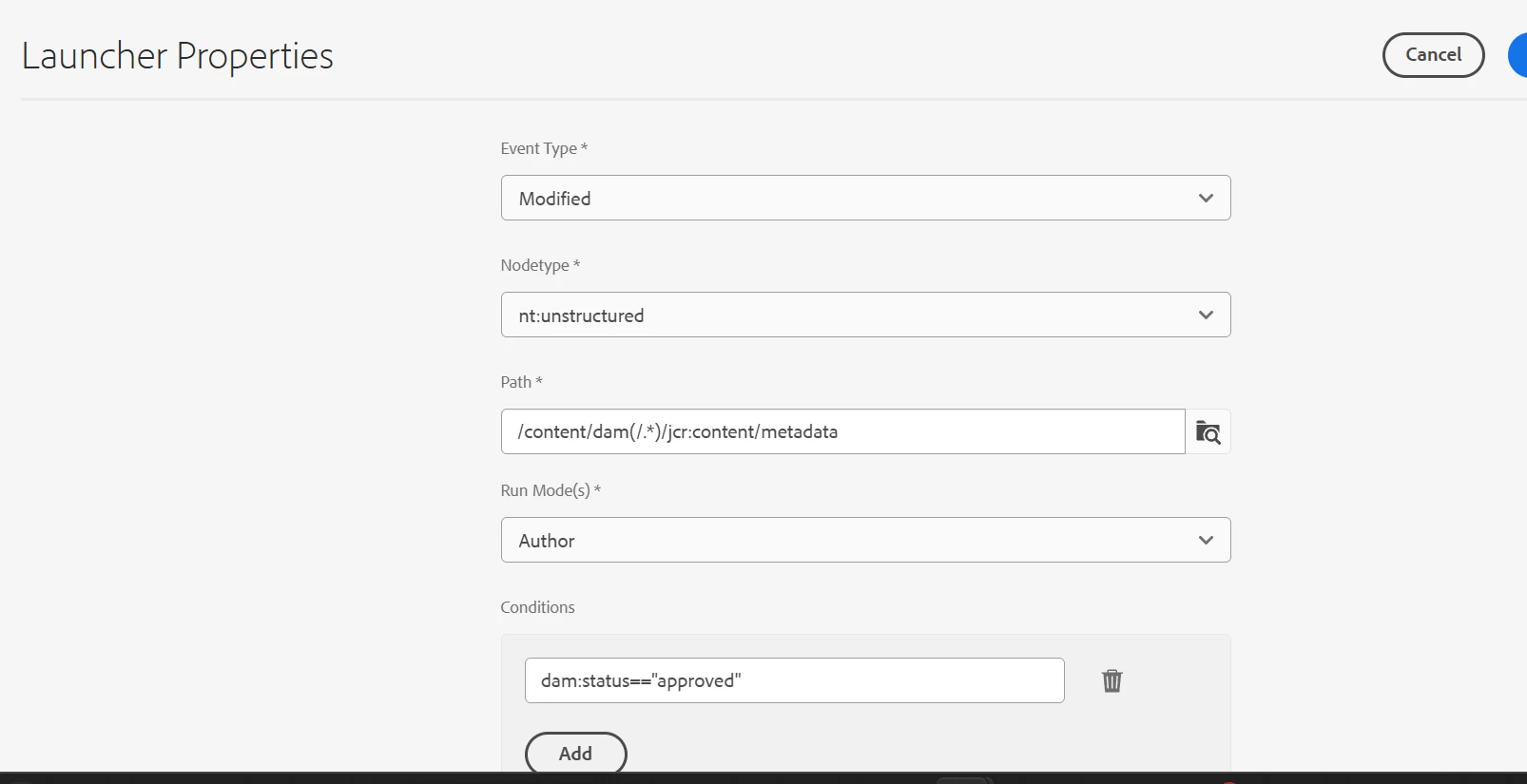
We have created launcher with condition as shown below in screenshot. But it is throwing error.
Env : AEM SDK
 Error : 
 

java.nio.file.InvalidPathException: Illegal char <:> at index 119: /content/dam/na-pharma/tremfya/cp-153397---tremfya-psa---brochure/021_TF_WS_METALWOMAN_AFTER-num06011v4 (1) (1).psd/jcr:content/metadata/dam:status	at java.base/sun.nio.fs.WindowsPathParser.normalize(WindowsPathParser.java:204)	at java.base/sun.nio.fs.WindowsPathParser.parse(WindowsPathParser.java:175)	at java.base/sun.nio.fs.WindowsPathParser.parse(WindowsPathParser.java:77)	at java.base/sun.nio.fs.WindowsPath.parse(WindowsPath.java:92)	at java.base/sun.nio.fs.WindowsFileSystem.getPath(WindowsFileSystem.java:231)	at java.base/java.nio.file.Path.of(Path.java:148)	at java.base/java.nio.file.Paths.get(Paths.java:69)	at com.adobe.aem.sites.eventing.impl.jcr.JcrEvent.<init>(JcrEvent.java:53) [com.adobe.aem.sites-eventing:0.0.80]	at com.adobe.aem.sites.eventing.impl.jcr.JcrEventMapper.buildJcrEvent(JcrEventMapper.java:27) [com.adobe.aem.sites-eventing:0.0.80]	at com.adobe.aem.sites.eventing.impl.observers.JcrListener.lambda$buildSourceFlux$0(JcrListener.java:172) [com.adobe.aem.sites-eventing:0.0.80]	at org.apache.jackrabbit.commons.observation.ListenerTracker$1.onEvent(ListenerTracker.java:190) [org.apache.jackrabbit.jackrabbit-jcr-commons:2.22.2]	at org.apache.jackrabbit.oak.jcr.observation.ChangeProcessor.contentChanged(ChangeProcessor.java:512) [org.apache.jackrabbit.oak-jcr:1.84.0]	at org.apache.jackrabbit.oak.plugins.observation.FilteringDispatcher.contentChanged(FilteringDispatcher.java:52) [org.apache.jackrabbit.oak-core:1.84.0]	at org.apache.jackrabbit.oak.spi.commit.BackgroundObserver$1$1.call(BackgroundObserver.java:124) [org.apache.jackrabbit.oak-store-spi:1.84.0]	at org.apache.jackrabbit.oak.spi.commit.BackgroundObserver$1$1.call(BackgroundObserver.java:118) [org.apache.jackrabbit.oak-store-spi:1.84.0]	at java.base/java.util.concurrent.FutureTask.run(FutureTask.java:317)	at java.base/java.util.concurrent.ThreadPoolExecutor.runWorker(ThreadPoolExecutor.java:1144)	at java.base/java.util.concurrent.ThreadPoolExecutor$Worker.run(ThreadPoolExecutor.java:642)	at java.base/java.lang.Thread.run(Thread.java:1583)I tried multiple approach but getting same error.Please help me here.

2 replies

AmitVishwakarma
Community Advisor
Community Advisor
February 12, 2026

Hi ​@SangramPa1 
There are two separate things happening here:

  1. Your launcher condition is mis‑configured, so the workflow never matches the metadata change.
  2. The stack trace you pasted (InvalidPathException: Illegal char <:> ... /metadata/dam:status) is from the AEM Sites Eventing bundle on Windows, not from the workflow engine itself. It’s a known issue and mostly just log noise in SDK, it doesn’t prevent workflows from running.

1. Fix the launcher configuration
From your screenshot, the launcher looks like this:

  • Event type: Modified
  • Node type: nt:unstructured
  • Path: /content/dam/(.*)/jcr:content/metadata
  • Condition: dam:status=="approved"

For metadata‑based triggers on DAM assets, the recommended pattern is:

  • Event type: Modified
  • Node type: dam:Asset (more precise than nt:unstructured)
  • Path (Globbing):  "/content/dam(/.*)?/jcr:content/metadata"
  • Condition (property filter): "jcr:content/metadata/dam:status==approved"

Notes:

After changing:

  • Save the launcher.
  • Edit an asset under /content/dam/..., set Status = approved, and save.
  • Check /var/workflow/instances or the Workflow console – you should see the workflow instance created.

2. The InvalidPathException is from Sites Eventing on Windows:

  • Bundle: com.adobe.aem.sites-eventing (AEM Sites Eventing)
  • It tries to treat a JCR path (which legitimately contains dam:status) as a Windows filesystem path using Paths.get(...).
  • On Windows, : is illegal in file paths, so Java throws InvalidPathException.

It does not block the classic workflow launchers from receiving events, it only breaks that particular Sites Eventing listener.

If the log spam annoys you on local SDK (Windows), you can:

  • Disable the Sites Eventing bundle in OSGi (for local dev only): com.adobe.aem.sites-eventing
  • Or simply ignore these errors; they won’t stop the metadata‑based workflow once your launcher is configured correctly.

Thanks,
Amit

Amit Vishwakarma - Adobe Commerce Champion 2025 | 16x Adobe certified | 4x Adobe SME
Level 1
February 13, 2026

Hi ​@AmitVishwakarma,

Thank you for reply. I tried above steps but it is not triggering workflow.  

AmitVishwakarma
Community Advisor
Community Advisor
March 9, 2026

Hi ​@SangramPa1 

Can you try this exact setup and share a screenshot of your launcher properties?

  1. First prove the launcher itself works – no condition
    • Event type: Modified
    • Node type: nt:unstructured
    • Path (Globbing): /content/dam(/.*)?/jcr:content/metadata
    • Condition: (leave empty)
    • Workflow: your model
    • Enabled: true
      Then:
    • Pick an asset under /content/dam/…
    • Change any metadata field and save.
    • Check Tools -> Workflow -> Instances (or /var/workflow/instances) and confirm a workflow instance appears.
    • If this does not trigger: problem is not dam:status; it's model/permissions/launcher being disabled or wrong path.
    • If this does trigger: the engine and path are fine; next step is just fixing the condition.
  2. Then add the condition – but match it to your node type
    • Decide which node you want to listen on:
      • Option A – listen on the asset node (most common)
        • Event type: Modified
        • Node type: dam:Asset
        • Path: /content/dam(/.*)?
        • Condition: jcr:content/metadata dam:status==approved
      • Here the event node is /content/dam/.../myasset.jpg (type dam:Asset), so the property path must include jcr:content/metadata/..., just like other launcher examples: jcr:content/metadata/dc:format!=application/json in the JSON exclusion KB for DAM Update Asset launchers https://experienceleague.adobe.com/en/docs/experience-cloud-kcs/kbarticles/ka-29606
    • Option B – listen directly on the metadata node
      • Event type: Modified
      • Node type: nt:unstructured
      • Path: /content/dam(/.*)?/jcr:content/metadata
      • Condition: dam:status==approved
      • Here the event node itself is /content/dam/.../myasset.jpg/jcr:content/metadata, so you use just dam:status as the property name.
    • Use exactly one of these patterns; don't mix dam:Asset with /jcr:content/metadata path and then also use dam:status or vice‑versa.
  3. About the Windows InvalidPathException
    That stack trace on AEM SDK Windows:
    java.nio.file.InvalidPathException: Illegal char <:> at index ...
    ... JcrEventMapper.buildJcrEvent ...

    is coming from AEM Sites Eventing, not the workflow engine. It's a known Windows‑only annoyance and doesn't stop the classic workflow launcher from firing; you can ignore it for this debugging.

If, after using Option A or B exactly as above, the "no‑condition" launcher fires but the "with condition" one doesn't, ask them to paste the launcher JSON from:

/conf/global/settings/workflow/launcher/config/... and you can then point out the exact mismatch (node type vs path vs condition).

Amit Vishwakarma - Adobe Commerce Champion 2025 | 16x Adobe certified | 4x Adobe SME
rk_pandian
Level 4
March 9, 2026

Hi ​@SangramPa1, are you still getting the same error or a different one?

How about getting the resource of the asset and its value map to verify the dam:status & proceed further?


Regards,

Ramkumar