When did the File Upload Conflicts (Filename Overwrite Warning) dialog box UI change? | Community
Skip to main content
Level 2
May 23, 2023

When did the File Upload Conflicts (Filename Overwrite Warning) dialog box UI change?

  • May 23, 2023
  • 3 replies
  • 1355 views

Hi, 


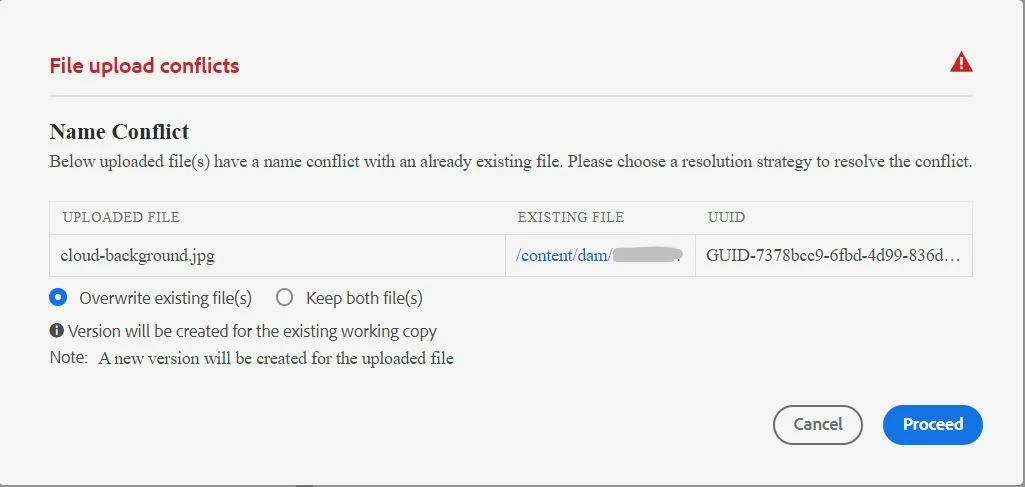
I'm trying to figure out the source to a mystery with our AEM instance. We noticed that the File upload warning disappeared for a few weeks, and up until about a week ago, we noticed the Name Conflict Warning box was popping up again, but with a totally different interface (UUID, existing file path). Anyone have any ideas or experienced something similar with Assets? If it was part of a maintenance update, it would be great to know which one and when it was released. 
 

This post is no longer active and is closed to new replies. Need help? Start a new post to ask your question.

3 replies

diksha_mishra
Community Advisor
Community Advisor
May 24, 2023

@sdaube Good you brought it up. I run a quick test and not getting any prompt. will be opening a support ticket as overwrite by default is happening and we can't create versions otherwise.

Request you to contact Adobe support as well and post your findings here.


Adobe Employee
May 24, 2023

Is it cloud or AEM 6.5?

Also are you sure this is not some custom code based on your business requirement?


sdaubeAuthor
Level 2
May 25, 2023

Thanks for responding. We're cloud based and did not custom code this. 

aanchal-sikka
Community Advisor
Community Advisor
May 25, 2023

Hello @sdaube 

If it is an AEM as a Cloud Service instance, have the environments been updated? When the issue started happening and when it was resolved?

We should be able to able to get these dates from Cloud Manager pipelines executions?


Aanchal Sikka
sdaubeAuthor
Level 2
May 25, 2023

We have the cloud instance. We noticed the issue the week of May 8, but suspect it started the first week of May. Then we noticed the new dialog box last week. Sorry, I don't have exact dates. And we originally opened a ticket with Adobe Support but the rep was not able to pinpoint the cause or release that might have pushed the update.