Unable to author Interactive Video in Dynamic Media enabled instance | Community
Skip to main content
shelly-goel
Adobe Employee
Adobe Employee
January 8, 2023
Solved

Unable to author Interactive Video in Dynamic Media enabled instance

  • January 8, 2023
  • 2 replies
  • 1987 views

Hi All,


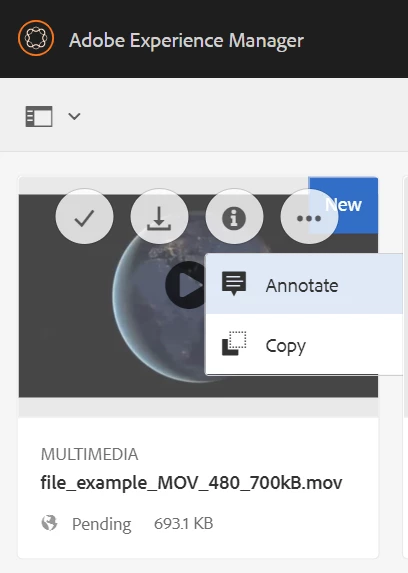
I have started the AEM 6.5.14 instance in dynamicmedia_scene7 runmode and created the cloud services config as well (Tools > Cloud Services > Dynamic Media Configuration > global). I have then uploaded two videos (.mp4 & .mov) in Assets and trying to Edit those videos to author for Interactive media (https://experienceleague.adobe.com/docs/experience-manager-learn/assets/dynamic-media/dynamic-media-interactive-video-feature-video-use.html?lang=en#) but I do not get the "Edit" option. Please suggest how to get the "Edit" option, is there any other pre-requisite for it to work?

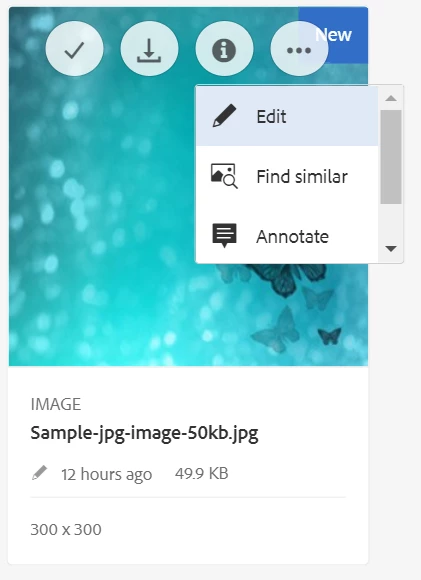
I have also uploaded an image and I see the "Edit" option on that so that means the cloud config is working fine but video is not editable.
 

This post is no longer active and is closed to new replies. Need help? Start a new post to ask your question.
Best answer by shelly-goel

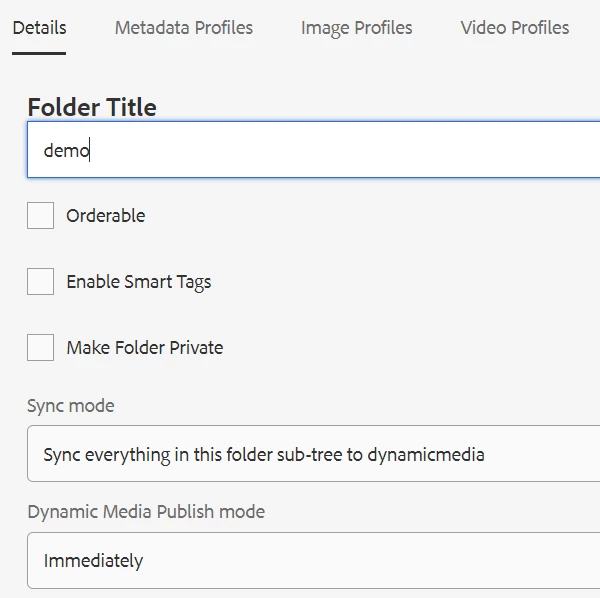
I was able to solve the issue by setting below properties (Sync Mode) to the asset folder in which video is uploaded


2 replies

Adobe Employee
January 9, 2023

Can you check if the video has been processed in DM ?

Have you published the viewers?

Does your dms7 account have video processing capabilities?

Adobe Employee
January 9, 2023

I think it may be an open deferred issue in Jira for 6.5.5 + version , try raising a support ticket .CQ-4330033

shelly-goel
Adobe Employee
Adobe Employee
January 9, 2023

We tried on another 6.5.9 instance and it is working fine there so this doesn't look like a AEM version issue.

I also tried with the direct URL and I'm able to edit the video but the "Edit" option is not available.

http://localhost:4502/mnt/overlay/dam/gui/content/s7dam/shoppablevideo/editor.html/<video path>

shelly-goel
Adobe Employee
shelly-goelAdobe EmployeeAuthorAccepted solution
Adobe Employee
January 11, 2023

I was able to solve the issue by setting below properties (Sync Mode) to the asset folder in which video is uploaded