User and group permissions can be pretty confusing when you start to think about numerous possible use cases.
For the example use case you stated, your custom group users may or may not be able to access those specific restricted DAM folders. It depends on the order in which the permissions were applied.
Example 1:
- There's a group: 'DAM-Users'
- It has allow access to all DAM folders
- Created a new custom group: 'Restricted-DAM-Users'
- We set deny access to 'My Assets' folder in DAM
- Created a user: 'dam-user'
- We make this user member of both groups: 'DAM-Users' & 'Restricted-DAM-Users'
What is the expected final permission for the 'dam-user' on DAM folder 'My Assets'?
-> In this case, the user will not be able to access the 'My Assets' folder.
Example 2 (in continuation)
But now,
- If I create another new user group, say, 'Lenient-DAM-Users'
- Set allow access to 'My Assets' folder
- Make 'dam-user' member of this 'Lenient-DAM-Users' group.
Now what is the expected final permission for the 'dam-user' on DAM folder 'My Assets'?
-> Now, the user will be able to access the 'My Assets' folder.
To understand more technically in depth, I suggest reading the below Adobe docs:
- https://experienceleague.adobe.com/docs/experience-manager-65/administering/security/user-group-ac-admin.html?lang=en#how-access-rights-are-evaluated
- Best practices: https://experienceleague.adobe.com/docs/experience-manager-65/administering/security/security.html?lang=en#best-practices
It is easy to lose yourself in the permissions sets especially when there are complex number of user groups and permissions.
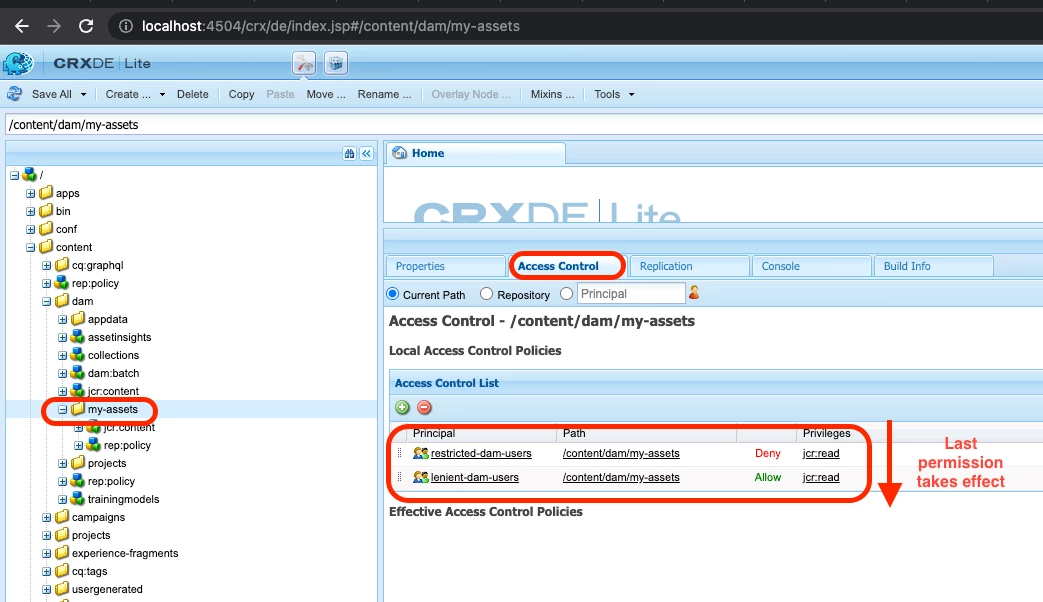
Here's a quick way to test the permissions on a given path:
- Go to CRXDE, http://[host]:[port]/crx/de/index.jsp
- Select the path you want to test access to.
- Select the 'Access Control' tab
- See the order of the permissions under 'Access Control List'. These are the list of permissions applied on that path.
- The bottom most permission takes more precedence.
- You can also change the order of the permissions by click and drag.