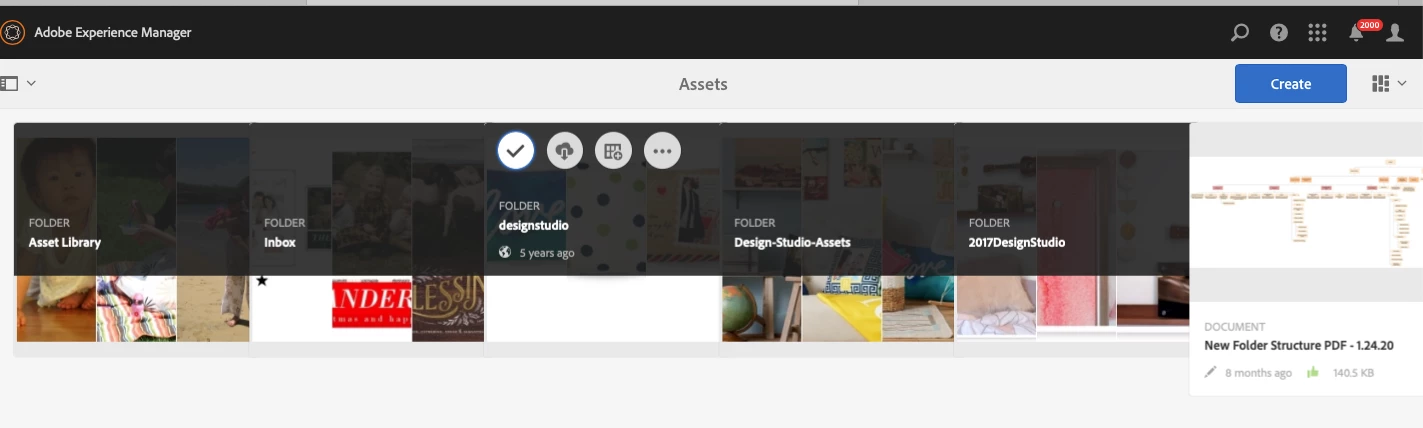
My images of thumbnails are skewed and overlap each other. | Community
Skip to main content
September 28, 2020
Solved

My images of thumbnails are skewed and overlap each other.

  • September 28, 2020
  • 1 reply
  • 1248 views

I have no idea what happened, but my thumbnails are not appearing correctly. They are over lapping each other and I have no white space in-between them. Has this happened to anyone else? I am on version 6.2. 
 

This post is no longer active and is closed to new replies. Need help? Start a new post to ask your question.
Best answer by diksha_mishra

I hope you might have tried the following:

1. New browser

2. Incognito Window

3. Clear Cache and Cookies

If yes, it's time to try these:

  1. Login via the AEM System Console http://host:port/system/console/slingjsp
  2. Click on Recompile all JSPs

Alternatively, 

  1. Log via CRXDE Lite
  2. Browse to /var/clientlibs
  3. Delete all contents under /var/clientlibs with the exception of rep:policy
  4. Click Save All

1 reply

diksha_mishra
Community Advisor
diksha_mishraCommunity AdvisorAccepted solution
Community Advisor
September 29, 2020

I hope you might have tried the following:

1. New browser

2. Incognito Window

3. Clear Cache and Cookies

If yes, it's time to try these:

  1. Login via the AEM System Console http://host:port/system/console/slingjsp
  2. Click on Recompile all JSPs

Alternatively, 

  1. Log via CRXDE Lite
  2. Browse to /var/clientlibs
  3. Delete all contents under /var/clientlibs with the exception of rep:policy
  4. Click Save All