This post is no longer active and is closed to new replies. Need help? Start a new post to ask your question.
vikasbhartiAccepted solution
Adobe Employee
Feb 6, 2023 4:37 AM UTC

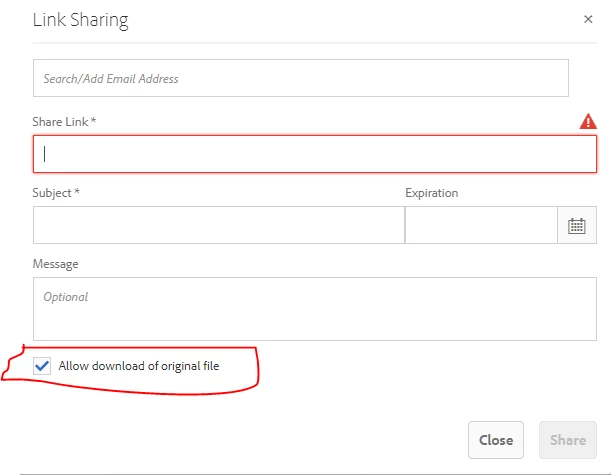
The configurable options for asset download are limited and detailed information on what's allowed is mentioned in this help article: https://experienceleague.adobe.com/docs/experience-manager-brand-portal/using/download/brand-portal-download-assets.html%3Flang%3Dde#configure-download

Other than that, there is no option to customize the share link form. 
3 replies

Level 3
Feb 2, 2023 4:24 PM UTC

I'd like to piggy back on this inquiry, can you set image terms to the share link interface in Brand Portals?  These terms are already in a field in the metadata.


Translate
Level 2
Feb 2, 2023 5:23 PM UTC

Hi @sos  Thanks for your response. This dialog comes from "/libs/dam/gui/content/assets/adhocassetsharedialog" and at the Brand Portal level I am not sure how i can customize it!

Translate
vikasbhartiAdobe EmployeeAccepted solution
Adobe Employee
Feb 6, 2023 4:37 AM UTC

The configurable options for asset download are limited and detailed information on what's allowed is mentioned in this help article: https://experienceleague.adobe.com/docs/experience-manager-brand-portal/using/download/brand-portal-download-assets.html%3Flang%3Dde#configure-download

Other than that, there is no option to customize the share link form. 

Translate