how to identify the user that uploads a file | Community
Skip to main content
Level 3
January 26, 2023
Solved

how to identify the user that uploads a file

  • January 26, 2023
  • 3 replies
  • 1120 views

Hello

 I'd like to know who uploaded a file.  Can I add a search criteria in the search forms?  Or extract it in a report?  If so what is the correct node to use to do so?

This post is no longer active and is closed to new replies. Need help? Start a new post to ask your question.
Best answer by digarg17

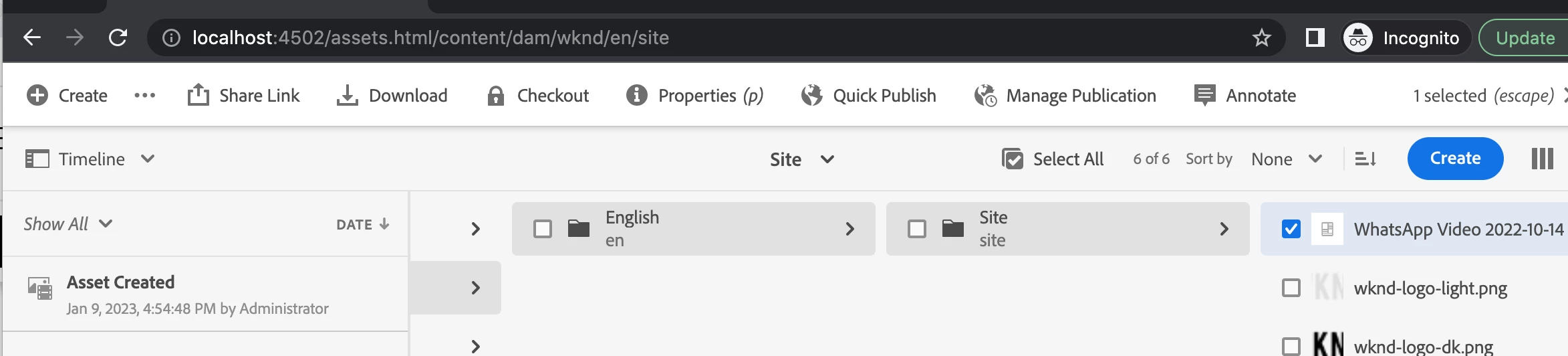
Hi @sos  you can just check the timeline of the asset (see snapshot below). It lists jcr:created and jcr:createdBy properties of the asset.


For bulk viewing , use OOTB Asset report.

3 replies

lukasz-m
Community Advisor
Community Advisor
January 26, 2023

Hi @sos,

Information about asset user who uploads the assets is represented by jcr:createdBy property stored under dam:Asset node.

You can use OOTB Assets Report:

  1. Open /mnt/overlay/dam/gui/content/reports/reportlist.html
  2. Select Create
  3. Choose Upload report
  4. Fill all the data like title, date range, path etc
  5. Add custom column that will show jcr:createdBy value
  6. Click create and wait for report generation to be completed.

You can browse report directly on AEM or download results.

More about Assets Report can be found under:

digarg17Adobe EmployeeAccepted solution
Adobe Employee
January 27, 2023

Hi @sos  you can just check the timeline of the asset (see snapshot below). It lists jcr:created and jcr:createdBy properties of the asset.


For bulk viewing , use OOTB Asset report.

SOSAuthor
Level 3
January 30, 2023

Thank you all for your responses.