Hide Asset Metadata for all user except admin | Community
Skip to main content
sudeshb1607
Level 2
February 17, 2021
Solved

Hide Asset Metadata for all user except admin

  • February 17, 2021
  • 1 reply
  • 1333 views

Hi,


I want to hide/disable metadata option(To import metadata CSV) for all the users except admins. How can I achieve this functionality?


Thanks,

Sudesh

This post is no longer active and is closed to new replies. Need help? Start a new post to ask your question.
Best answer by davidjgonzalezzzz

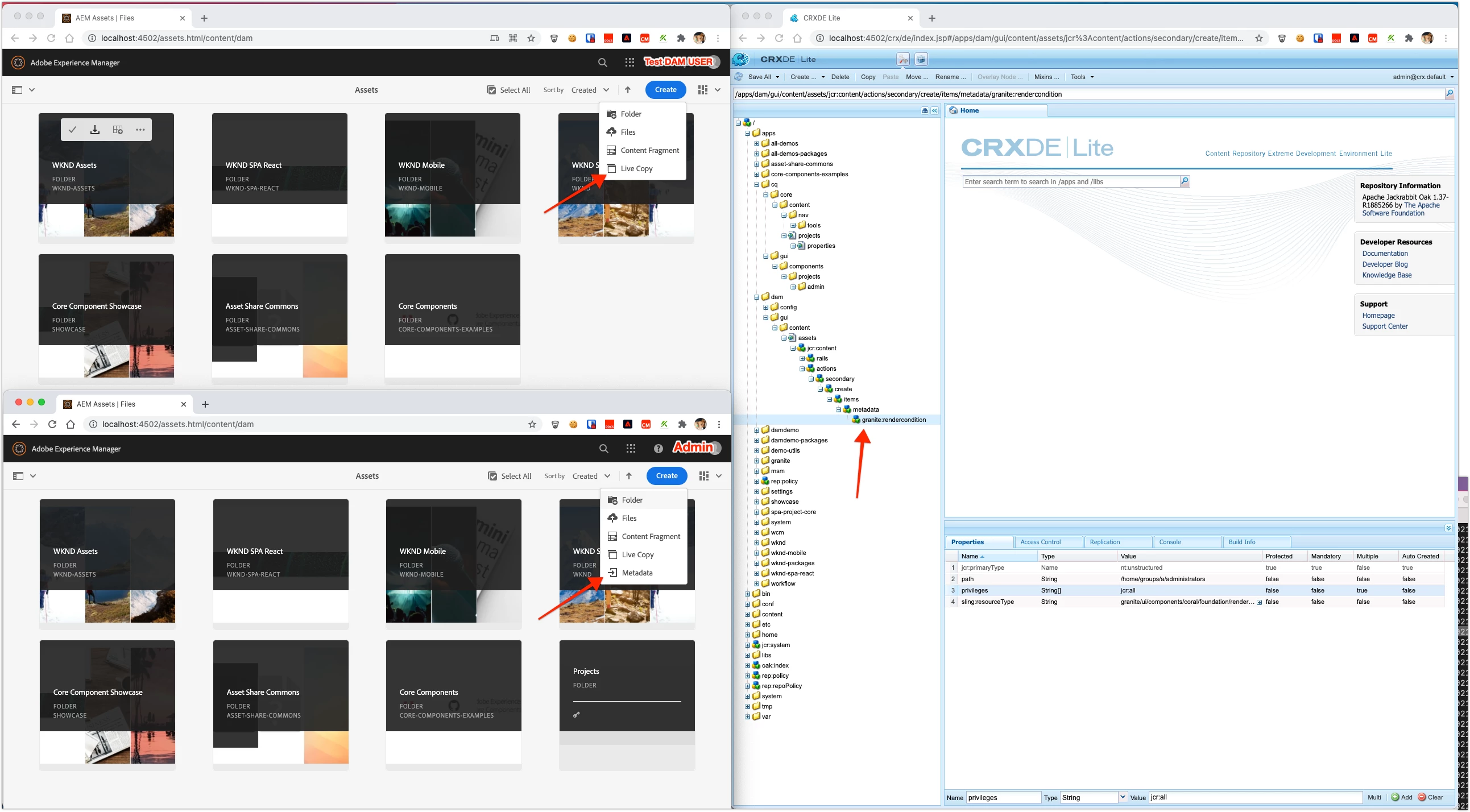
You can overlay the menu node and add a rendition condition to it.


Overlay: /libs/dam/gui/content/assets/jcr:content/actions/secondary/create/items/metadata at /apps/dam/gui/content/assets/jcr:content/actions/secondary/create/items/metadata


Add a rendition condition at: /apps/dam/gui/content/assets/jcr:content/actions/secondary/create/items/metadata/granite:rendercondition


You can do something like:

  • sling:resourceType: granite/ui/components/coral/foundation/renderconditions/privilege
  • privileges: jcr:all
  • path: /home/groups/a/administrators

You can make define rendition condition you want: https://helpx.adobe.com/experience-manager/6-3/sites/developing/using/reference-materials/granite-ui/api/jcr_root/libs/granite/ui/docs/server/rendercondition.html and https://helpx.adobe.com/experience-manager/6-3/sites/developing/using/reference-materials/granite-ui/api/jcr_root/libs/granite/ui/docs/server/el.html


I don't think there is anything that exposes the user name directly, but TBH, that's probably not the best approach. it's better to test a privilege on something relevant; even my jcr:all check on the administrators group path, is a bit of a hack, it was just an easy, well known/stable, path to check that (AFIAK) only admin user would have jcr:all on. 


Anyhow, first i'd double check that you actually want to only restrict this to the admin user (since ideally no one should be logging in w/ that user) and then define your render condition accordingly.



1 reply

davidjgonzalezzzzAdobe EmployeeAccepted solution
Adobe Employee
February 17, 2021

You can overlay the menu node and add a rendition condition to it.


Overlay: /libs/dam/gui/content/assets/jcr:content/actions/secondary/create/items/metadata at /apps/dam/gui/content/assets/jcr:content/actions/secondary/create/items/metadata


Add a rendition condition at: /apps/dam/gui/content/assets/jcr:content/actions/secondary/create/items/metadata/granite:rendercondition


You can do something like:

  • sling:resourceType: granite/ui/components/coral/foundation/renderconditions/privilege
  • privileges: jcr:all
  • path: /home/groups/a/administrators

You can make define rendition condition you want: https://helpx.adobe.com/experience-manager/6-3/sites/developing/using/reference-materials/granite-ui/api/jcr_root/libs/granite/ui/docs/server/rendercondition.html and https://helpx.adobe.com/experience-manager/6-3/sites/developing/using/reference-materials/granite-ui/api/jcr_root/libs/granite/ui/docs/server/el.html


I don't think there is anything that exposes the user name directly, but TBH, that's probably not the best approach. it's better to test a privilege on something relevant; even my jcr:all check on the administrators group path, is a bit of a hack, it was just an easy, well known/stable, path to check that (AFIAK) only admin user would have jcr:all on. 


Anyhow, first i'd double check that you actually want to only restrict this to the admin user (since ideally no one should be logging in w/ that user) and then define your render condition accordingly.