Editing Assets Admin Search Rail | Community
Skip to main content
jimp38732070
Level 3
August 11, 2017
Solved

Editing Assets Admin Search Rail

  • August 11, 2017
  • 8 replies
  • 3839 views

Adding search predicates for tag lists has worked well.  I have a Language dropdown in the schema that I would like to be able to search against.  Would I create an options list node for those languages and use that node path in the Options field for the Language predicate in the search rail? 

Thanks,

Jim P
This post is no longer active and is closed to new replies. Need help? Start a new post to ask your question.
Best answer by jimp38732070

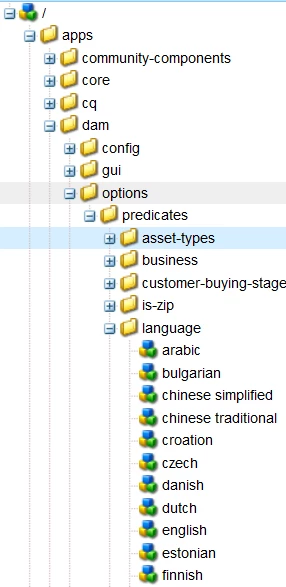
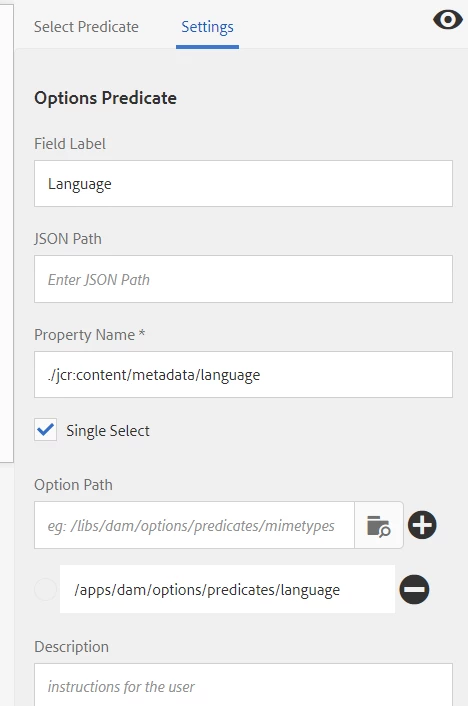
Very good.  Got it working correctly.  I created a node under /apps/dam/options/predicates/language that matched exactly the metadata "value" in the language drop-down contained in the schema.  Using the "Options Predicate" in the search rail and set as below, all works well.  In our case, the language drop-down in the schema had been created with the language name as the title, but the "value" contained the 2 or 4 letter language abbreviation.  We needed to make sure the "value" in the search predicate matched exactly what was in the drop-down.  Seems obvious now but at the time just missed the connection.  Thanks Scott, appreciate your help!

Jim P

8 replies

smacdonald2008
Level 10
August 12, 2017

Please post a screenshot to make it clear what you want to do.

jimp38732070
Level 3
August 14, 2017

I have a field defined in the metadata schema named Language.  I'd like to add this field to the Assets Admin Search Rail so I can search by language.

Jim P

jimp38732070
Level 3
August 16, 2017

This is one area the docs are really lean.  One would expect any field in the schema would be easy searchable.  Is there an example anywhere that spells out how a drop-down based field is added to the search rail?

Thanks,

jim P

smacdonald2008
Level 10
August 16, 2017

I am checking internally to see if anyone has written a blog on this subject. I know there are no docs in this use case.

jimp38732070
Level 3
August 16, 2017

Thanks Scott.  If i can get steered in the right direction I'll write up a detailed doc on it.

Thanks again,

Jim P

smacdonald2008
Level 10
August 16, 2017

One of our AEM Touch UI experts has suggested that you read this doc: https://docs.adobe.com/docs/en/aem/6-3/administer/content/assets/custom-search-facets.html

jimp38732070
jimp38732070AuthorAccepted solution
Level 3
August 16, 2017

Very good.  Got it working correctly.  I created a node under /apps/dam/options/predicates/language that matched exactly the metadata "value" in the language drop-down contained in the schema.  Using the "Options Predicate" in the search rail and set as below, all works well.  In our case, the language drop-down in the schema had been created with the language name as the title, but the "value" contained the 2 or 4 letter language abbreviation.  We needed to make sure the "value" in the search predicate matched exactly what was in the drop-down.  Seems obvious now but at the time just missed the connection.  Thanks Scott, appreciate your help!

Jim P

Level 2
May 2, 2021

Hey @jimp38732070  I have same usecase, But when I try to use options predicate I am able to see list of checkboxes in the form instead of dropdown with options. How did u manage to make it dropdown Could you please share your thoughts here.