Dynamic media not able to see any activity on image renditions. | Community
Skip to main content
Level 3
November 14, 2023
Solved

Dynamic media not able to see any activity on image renditions.

  • November 14, 2023
  • 1 reply
  • 585 views

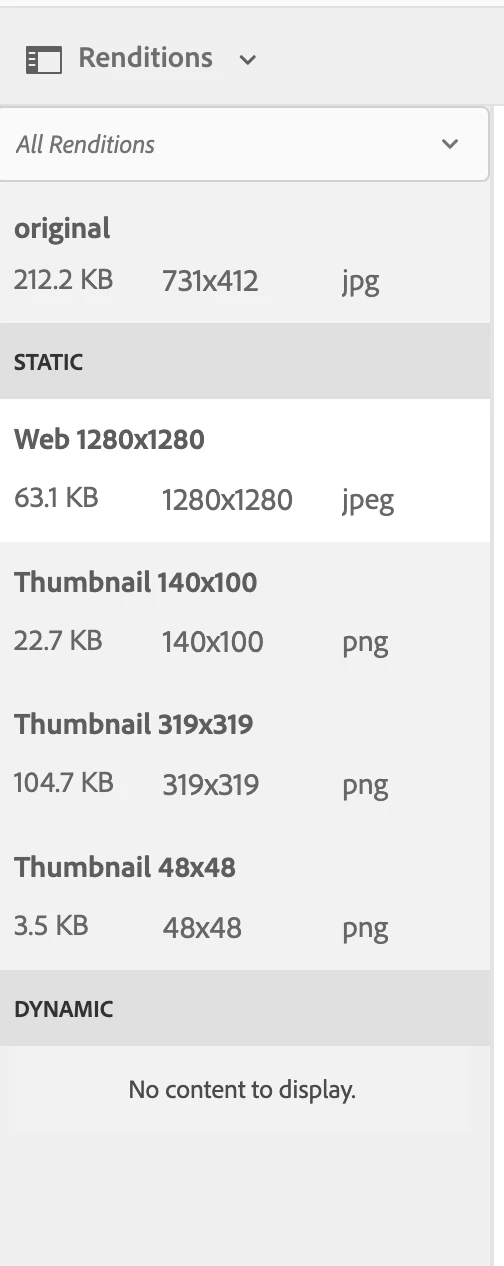
Unable to see any of the dynamic or smart crop activities even after connecting to dynamic media. Connection was successful as I can edit or crop and rotate but don't see any type of renditions on the left hand side timeline options.
  

This post is no longer active and is closed to new replies. Need help? Start a new post to ask your question.
Best answer by vikasbharti

To view the Smart Crop renditions, create an Image Profile and apply it to the designated folder. Once this setup is complete, newly uploaded assets will undergo smart crop processing, and you can observe the results in the Renditions options. For existing assets, click "Reprocess" on AEM Cloud after selecting the image assets. On AEM 65, utilize the DAM Update Asset workflow.

For a more comprehensive guide, refer to the detailed steps outlined here: https://experienceleague.adobe.com/docs/experience-manager-65/assets/dynamic/image-profiles.html?lang=en#creating-image-profiles).

1 reply

vikasbhartiAdobe EmployeeAccepted solution
Adobe Employee
November 14, 2023

To view the Smart Crop renditions, create an Image Profile and apply it to the designated folder. Once this setup is complete, newly uploaded assets will undergo smart crop processing, and you can observe the results in the Renditions options. For existing assets, click "Reprocess" on AEM Cloud after selecting the image assets. On AEM 65, utilize the DAM Update Asset workflow.

For a more comprehensive guide, refer to the detailed steps outlined here: https://experienceleague.adobe.com/docs/experience-manager-65/assets/dynamic/image-profiles.html?lang=en#creating-image-profiles).