Dynamic Media Bulk Publish | Community
Skip to main content
Sandeep_Danny95
Level 2
February 13, 2024
Solved

Dynamic Media Bulk Publish

  • February 13, 2024
  • 2 replies
  • 1461 views

Hello, 

In my current implementation, we have Dynamic Media setup in Central DAM, and I'm able to do select the assets and publish them to the Dynamic media in Central DAM and then I am able to use them in a different environment where I'm actually creating pages.

The issue that I have is that anytime I have to publish I have to always select the assets and do it, I want to do it at the folder level, I should be able to select folders and be able to do the "Publish to Dynamic Media" and then the images within the folder and the child folders should be published and available to use for making/creating content.

I do not see an out of the box solution for this, can anyone guide me here?

Thank you.

This post is no longer active and is closed to new replies. Need help? Start a new post to ask your question.
Best answer by diksha_mishra

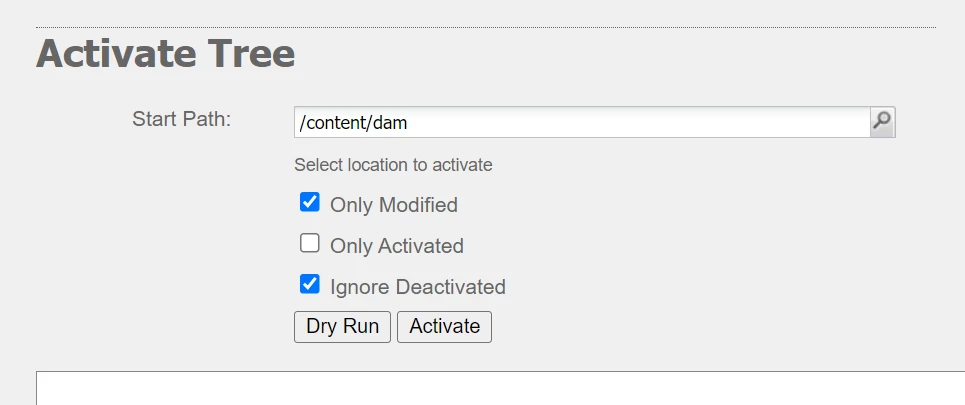
@sandeep_danny95 Please try Tree replication from https://<domain>/libs/replication/treeactivation.html

Here, you can specify the folder path which needs publishing (including sub-folders and assets).

Try to conduct this activity in batches of 1000 assets only. You can use Dry run to get estimated no.of assets first in the logs screen.

Hope this helps.

2 replies

diksha_mishra
Community Advisor
diksha_mishraCommunity AdvisorAccepted solution
Community Advisor
February 13, 2024

@sandeep_danny95 Please try Tree replication from https://<domain>/libs/replication/treeactivation.html

Here, you can specify the folder path which needs publishing (including sub-folders and assets).

Try to conduct this activity in batches of 1000 assets only. You can use Dry run to get estimated no.of assets first in the logs screen.

Hope this helps.

Sandeep_Danny95
Level 2
February 13, 2024

Hi Diksha, thank you for the response and this actually helped me to publish the assets to the Dynamic media by choosing the folders and also the subfolders and assets inside it.

Thank you.

narendragandhi
Community Advisor
Community Advisor
February 13, 2024

Hi @sandeep_danny95 


You can also explore the various sync mode options in Dynamic Media to enable selective publishing of assets at folder level. Refer this document for further details - https://experienceleague.adobe.com/docs/experience-manager-cloud-service/content/assets/dynamicmedia/selective-publishing.html?lang=en


You can enable this at folder level with option to sync immediately or upon activation etc. Please try these and let us know if its helpful for your usecase.


Thanks

Narendra

Sandeep_Danny95
Level 2
February 13, 2024

Hi Narendra Gandhi, thank you for response and this helped me future proof my folders as I do not have to do anymore manual work for publishing the assets into Dynamic media as it is done automatically for any asset uploaded into the folder which has the appropriate settings. 

Thank you.