DAM retention policy | Community
Skip to main content
Level 2
May 3, 2017
Solved

DAM retention policy

  • May 3, 2017
  • 3 replies
  • 2910 views

DAM retention policy can vary depending on the organization but can anyone help me out with a generic or minimum things to keep in mind regarding retention policy of assets.

Can anyone help me out with the best practices of retention in AEM DAM (i.e. DAM retention policy) 

Eg:

when to delete the assets? (like verisons of assets and old assest etc)

On what basis we can delete like delete if the asset is older than 6 months or delete it if its size is greater than 10mb etc.

When to archive and when to purge?

 
This post is no longer active and is closed to new replies. Need help? Start a new post to ask your question.
Best answer by kautuk_sahni

As mentioned by Gaurav, the purging of assets depends on your use-case and it varies accordingly.

But if you want to delete unused/big size/active/inactive Assets then you can filter them easily.

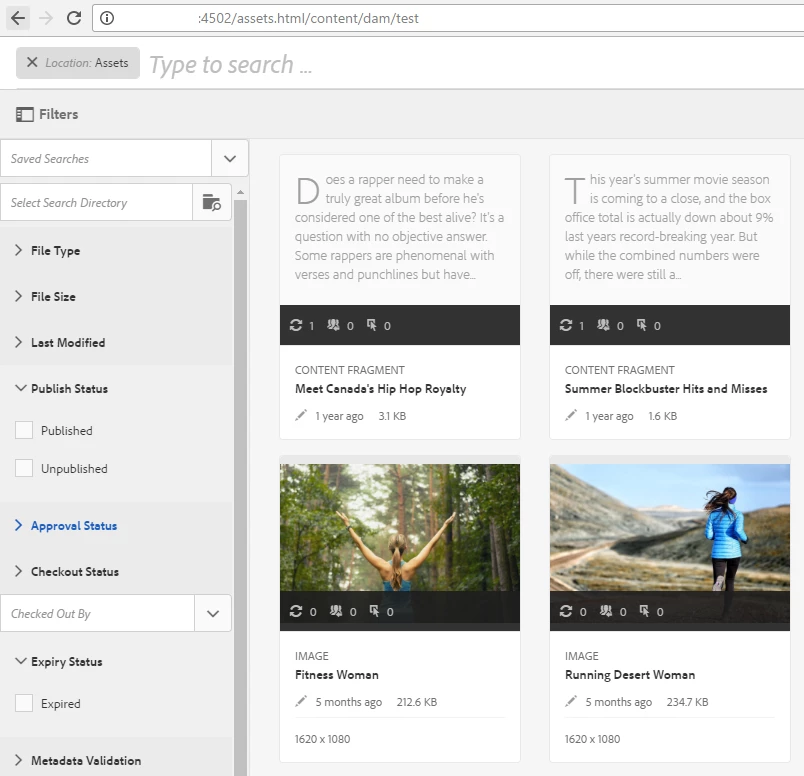
If you press ‘/’ on /assets.html and press “Enter” key, you’d land at the search result page – from the left top, you can click the “boxy-icon” to open filters, like at [0]

In the image at [0], you’d note that there are filters that you can use to show the required assets and accordingly you can purge them too.

[0]

~kautuk

3 replies

kautuk_sahni
Community Manager
Community Manager
August 11, 2017

mvance Any help here?

~kautuk

Kautuk Sahni
Adobe Employee
August 11, 2017

It depends on each organization policy. For example BFSI would never want to delete anything. You can review below for more understanding on AEM maintenance tasks

Aem maintenance

Operations Dashboard

Revision Cleanup

Thanks,

Gaurav

kautuk_sahni
Community Manager
kautuk_sahniCommunity ManagerAccepted solution
Community Manager
August 11, 2017

As mentioned by Gaurav, the purging of assets depends on your use-case and it varies accordingly.

But if you want to delete unused/big size/active/inactive Assets then you can filter them easily.

If you press ‘/’ on /assets.html and press “Enter” key, you’d land at the search result page – from the left top, you can click the “boxy-icon” to open filters, like at [0]

In the image at [0], you’d note that there are filters that you can use to show the required assets and accordingly you can purge them too.

[0]

~kautuk

Kautuk Sahni