Custom search results for global search | Community
Skip to main content
ShivaniTandon
February 17, 2021
Solved

Custom search results for global search

  • February 17, 2021
  • 2 replies
  • 1157 views

How to restrict the assets of a particular folder from appearing in global or filter search results based on role of a user

This post is no longer active and is closed to new replies. Need help? Start a new post to ask your question.
Best answer by davidjgonzalezzzz

Another interesting solution could be the following:


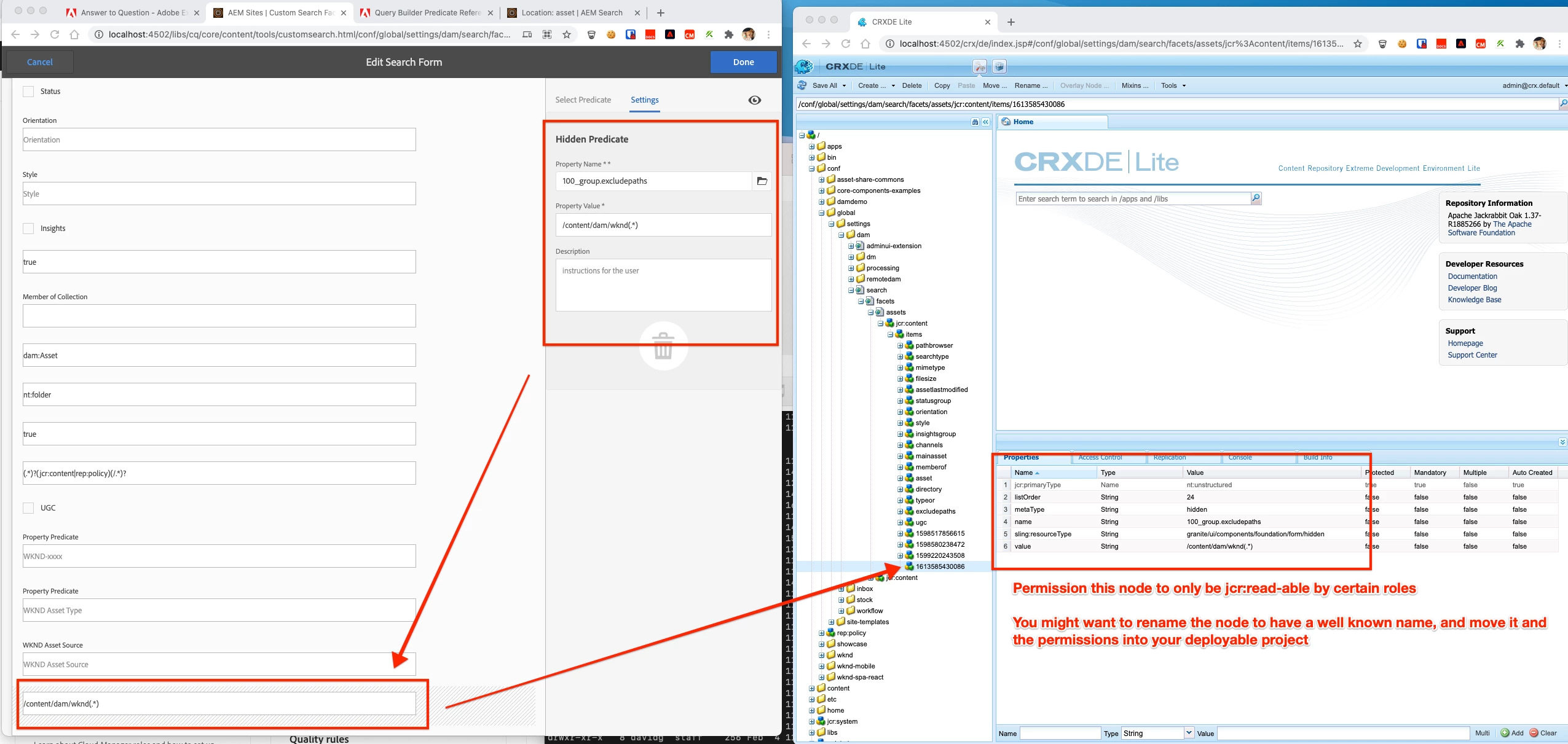
1. For each role/path combo - create a  Hidden predicate on the Assets Search Form 

1. Use the excludespaths QueryBuilder predicate to exclude a specific path/path-pattern -- test this out as excludepaths seems like it might be a little slower, you might be able to figure out how to do the inverse using the paths predicate as well.

1. Permission those hidden predicates nodes in the JCR to be only read-able by members in the role that shouldn't be able to see assets in those folders.


This is effectively selectively toggling the inclusion of Search Form predicates that exclude paths, based on the users permission (which should be mapped to a user group/role).


As I mentioned, performance test this to make sure it's OK, but you should be able to work something out w/ this that only affects OOTB Assets Search experience. Also, double-check all the places users might search from to ensure these predicates are evaluated there (ex. I don't think they're evaluated from the Page Editor sidebar) ... If you need something TRULY global, i think ACLs on the folders/assets themselves are going to end up being your answer.


https://helpx.adobe.com/experience-manager/6-3/sites/developing/using/querybuilder-predicate-reference.html#excludepaths

2 replies

Adobe Employee
February 17, 2021

Can you simply deny read permissions on the folder for the user group that maps to this role?


That will obviously result in these users not being able to browse (or in general, see) these assets, but it sounds like you might not want that anyhow?


davidjgonzalezzzzAdobe EmployeeAccepted solution
Adobe Employee
February 17, 2021

Another interesting solution could be the following:


1. For each role/path combo - create a  Hidden predicate on the Assets Search Form 

1. Use the excludespaths QueryBuilder predicate to exclude a specific path/path-pattern -- test this out as excludepaths seems like it might be a little slower, you might be able to figure out how to do the inverse using the paths predicate as well.

1. Permission those hidden predicates nodes in the JCR to be only read-able by members in the role that shouldn't be able to see assets in those folders.


This is effectively selectively toggling the inclusion of Search Form predicates that exclude paths, based on the users permission (which should be mapped to a user group/role).


As I mentioned, performance test this to make sure it's OK, but you should be able to work something out w/ this that only affects OOTB Assets Search experience. Also, double-check all the places users might search from to ensure these predicates are evaluated there (ex. I don't think they're evaluated from the Page Editor sidebar) ... If you need something TRULY global, i think ACLs on the folders/assets themselves are going to end up being your answer.


https://helpx.adobe.com/experience-manager/6-3/sites/developing/using/querybuilder-predicate-reference.html#excludepaths