Asset Metadata CSV Import Failing | Community
Skip to main content
harsingh91
Level 3
July 15, 2021
Solved

Asset Metadata CSV Import Failing

  • July 15, 2021
  • 1 reply
  • 3471 views

Hello Team,


When I am trying to import new asset metadata CSV, it is always failing with - Job failed due to an exception(Required column assetPath not present in the sheet).

To make sure all the fields are correct, first I exported the CSV, opened it, changed a field then trying to import the same CSV.

It always failing with the same error.


What can be the reason for it ?


Thanks in advance,

This post is no longer active and is closed to new replies. Need help? Start a new post to ask your question.
Best answer by diksha_mishra

@harsingh91 I faced this issue once, as the file extension was causing confusion for AEM.

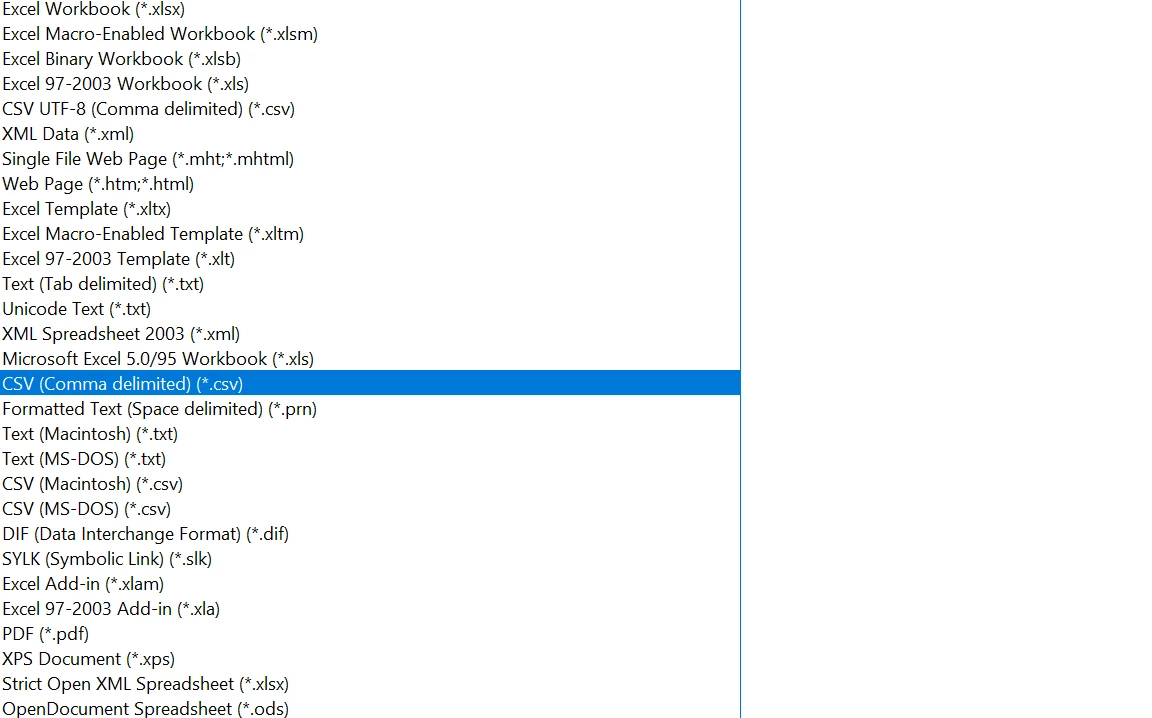
There are multiple extensions available while saving the updated CSV file, make sure you check carefully and retry upload.


If you still face any issues, refer to this help doc for header info: https://experienceleague.adobe.com/docs/experience-manager-64/assets/administer/metadata-import-export.html?lang=en 


Hope this helps.

1 reply

diksha_mishra
Community Advisor
diksha_mishraCommunity AdvisorAccepted solution
Community Advisor
July 15, 2021

@harsingh91 I faced this issue once, as the file extension was causing confusion for AEM.

There are multiple extensions available while saving the updated CSV file, make sure you check carefully and retry upload.


If you still face any issues, refer to this help doc for header info: https://experienceleague.adobe.com/docs/experience-manager-64/assets/administer/metadata-import-export.html?lang=en 


Hope this helps.

harsingh91
Level 3
July 15, 2021

@diksha_mishra , I specially taking care of that to have correct extension, even changed the text editor to make sure. But still CSV failing every time with the same error