
dmescia2
Level 4
September 18, 2026
Question

Are we able to change how versions are listed?

  • September 18, 2026
  • 2 replies
  • 49 views

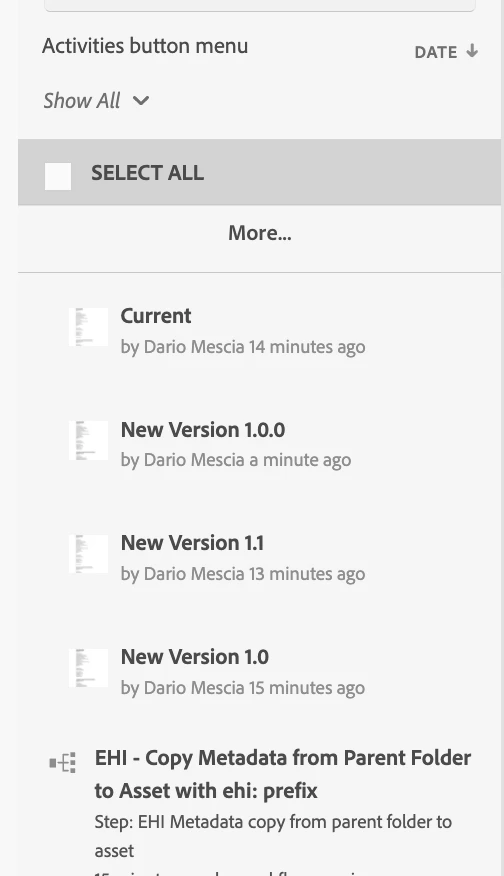
Does it bother anyone else how the versions are labeled in AEM? I have no idea which one is which. Instead of v1, v2, v3, etc they keep appearing as New Version 1.0, New Version 1.1, New Version 1.0.0. What on earth do any of those mean? Cant these be listed as Original, Version 2, Version 3, etc. and then show the date. they were uploaded and by whom? That is how the average human brain would read these things. Is that a setting I can change or is this the standard operating procedure of the system?


    2 replies

    dmescia2
    dmescia2Author
    Level 4
    September 18, 2026


    AmitVishwakarma
    Community Advisor
    Community Advisor
    September 20, 2026

    Hi ​@dmescia2 The New Version 1.0, New Version 1.1, and similar values are AEM's generated technical identifiers for asset snapshots. They are not semantic release numbers and do not represent major/minor/patch levels.

    AEM does not provide a standard global setting to replace those identifiers with Original, Version 2, Version 3, and so on. However, when creating a version manually through Timeline -> Save as Version, you can enter a human-readable Label and Comment.

    The date display is configurable separately: go to User/Profile -> My Preferences -> Relative Date Presentation -> Always show exact date. The timeline already records the user associated with the version activity. For automated uploads, the displayed user may be the integration or service account.

    Amit Vishwakarma - Adobe Commerce Champion 2025 | 17x Adobe certified | 6x Adobe SME