AEM DAM Metadata schema Description field box size | Community
Skip to main content
Level 3
August 9, 2024
Solved

AEM DAM Metadata schema Description field box size

  • August 9, 2024
  • 1 reply
  • 763 views

Hi Team,


I am new to AEM and am trying to pick it up as fast as possible as it is a very interesting platform to learn. 


How can I resize the Description box when creating custom metadata schema? It is a single text line. I want it to be at least 5 lines and display at all time. It should also adjust size automatically to display the entire entered text. 

Screen grabs for reference. Manual says I am on AEM 6.5. 


Many thanks!
This post is no longer active and is closed to new replies. Need help? Start a new post to ask your question.
Best answer by digarg17

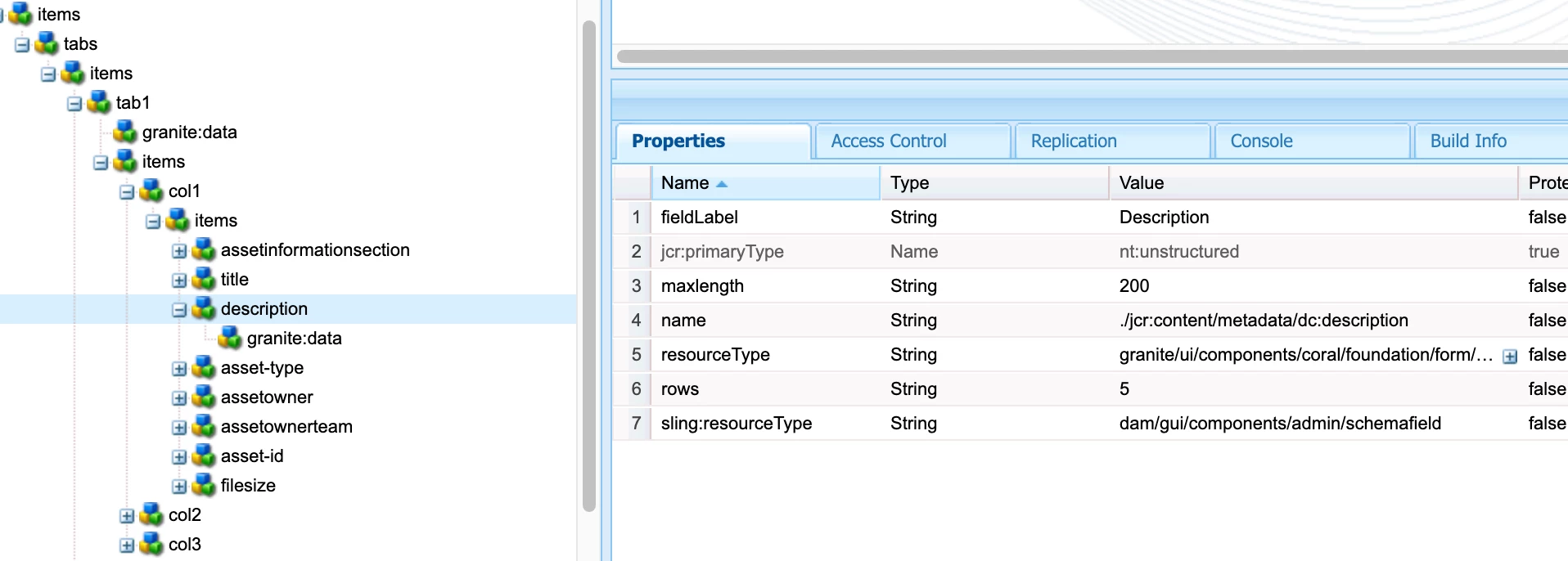
 Add rows property and change resource type as shown above to granite/ui/components/coral/foundation/form/textarea from backend when you check-in your metadata schema via code. You may also add cols property if needed.

1 reply

digarg17Adobe EmployeeAccepted solution
Adobe Employee
August 9, 2024

 Add rows property and change resource type as shown above to granite/ui/components/coral/foundation/form/textarea from backend when you check-in your metadata schema via code. You may also add cols property if needed.

PovEimAuthor
Level 3
August 13, 2024

Hi @digarg17 ,


Thanks for your answer! This is exactly what I was after. 

I ran into some other error which is permissions related and am unable to save the changes made. Pending for help from ICT 🙂


Cheers