Aem cloud asset upload time duration | Community
Skip to main content
Community Advisor
December 2, 2024
Solved

Aem cloud asset upload time duration

  • December 2, 2024
  • 2 replies
  • 665 views

when uploading asset to aem cloud through user interface it takes few seconds to get all the images and renditions appear.  Image doesn't appear it shows processing. Sometimes even small files take time, is there a way to speed up the upload of this process 

This post is no longer active and is closed to new replies. Need help? Start a new post to ask your question.
Best answer by RajaShankar

Hi @mshaji ,

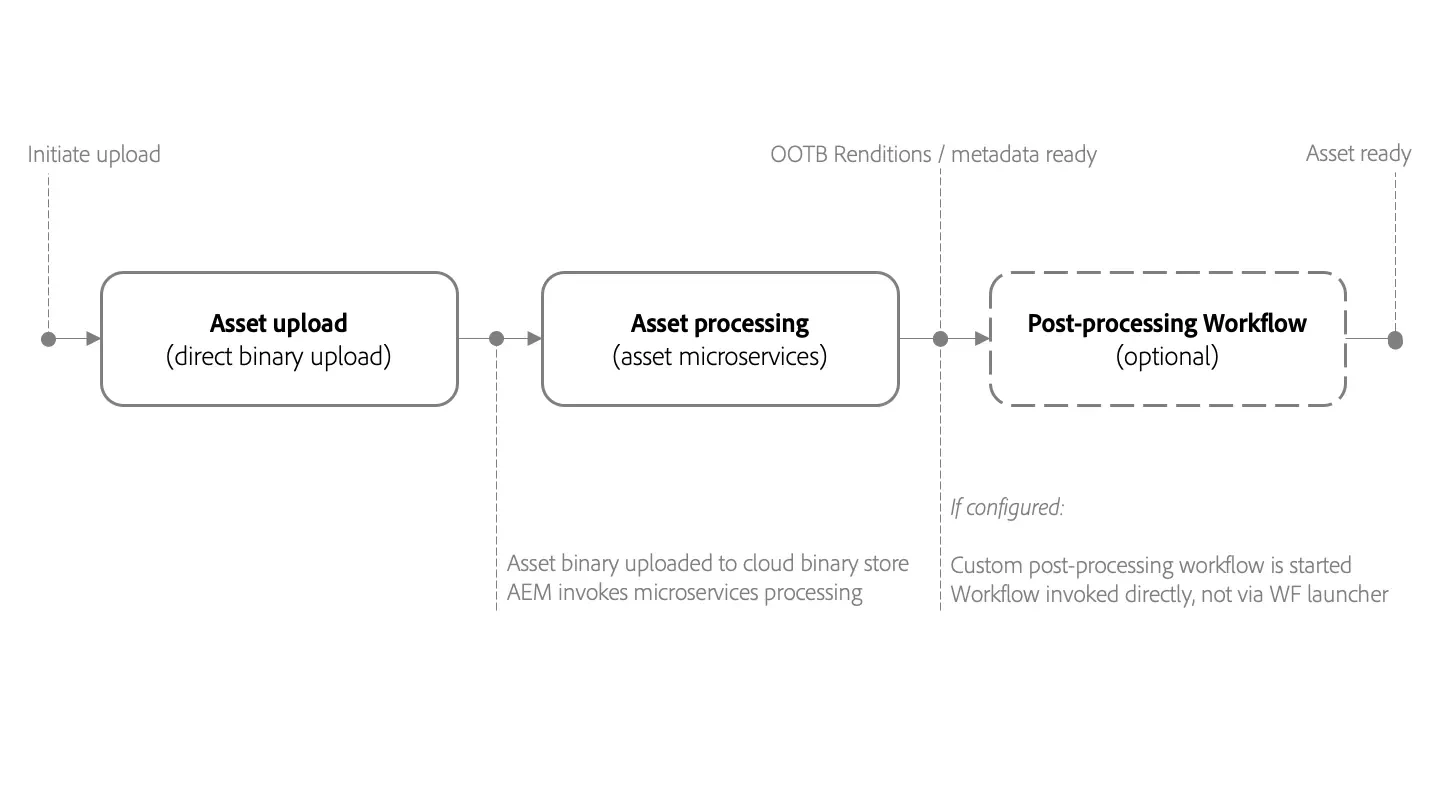
When you upload the image(asset) to AEM Cloud it kick starts the following process as shown in below image.
Now Make sure that 

a) is there any post processing workflow configured?

b) Asset processing depends on the configuration in Processing Profiles.Check is there any custom profiles applied.Usually default configuration provides very basic rendition generation capability.Check is there any custom profiles applied with additional rendition generation capability.

Refer the below AEM Assets Cloud link to identify how to check whether any custom profile/custom workflow configured in your instance.https://experienceleague.adobe.com/en/docs/experience-manager-cloud-service/content/assets/manage/asset-microservices-configure-and-use


Hope this helps.


Regards,

Rajashankar.R


2 replies

RajaShankar
Community Advisor
RajaShankarCommunity AdvisorAccepted solution
Community Advisor
December 2, 2024

Hi @mshaji ,

When you upload the image(asset) to AEM Cloud it kick starts the following process as shown in below image.

Now Make sure that 

a) is there any post processing workflow configured?

b) Asset processing depends on the configuration in Processing Profiles.Check is there any custom profiles applied.Usually default configuration provides very basic rendition generation capability.Check is there any custom profiles applied with additional rendition generation capability.

Refer the below AEM Assets Cloud link to identify how to check whether any custom profile/custom workflow configured in your instance.https://experienceleague.adobe.com/en/docs/experience-manager-cloud-service/content/assets/manage/asset-microservices-configure-and-use


Hope this helps.


Regards,

Rajashankar.R


Community Advisor
December 2, 2024

On AEMaaCS asset processing is done outside of experience manager environment [1] and is an async process.


Post processing workflows are kicked off after renditions are generated via asset compute. 

Check for the below items on your environment

1. Observe Asset Processing Queue in sling jobs status. You can navigate to developer console.
2. Are there any post processing workflows configured if yes, make them transient.
3. Often, processing label in UI is cached, observe by disabling browser cache or view in incognito mode.

[1] https://experienceleague.adobe.com/en/docs/experience-manager-cloud-service/content/assets/asset-microservices-overview