AEM Assets Dynamic renditions preview UI and Image presets thumbnail UI show Broken Images | Community
Skip to main content
New Member
September 11, 2025
Solved

AEM Assets Dynamic renditions preview UI and Image presets thumbnail UI show Broken Images

  • September 11, 2025
  • 3 replies
  • 1041 views

Hi Community,

We’re running into an issue with Dynamic Media previews on AEM as a Cloud Service Author.

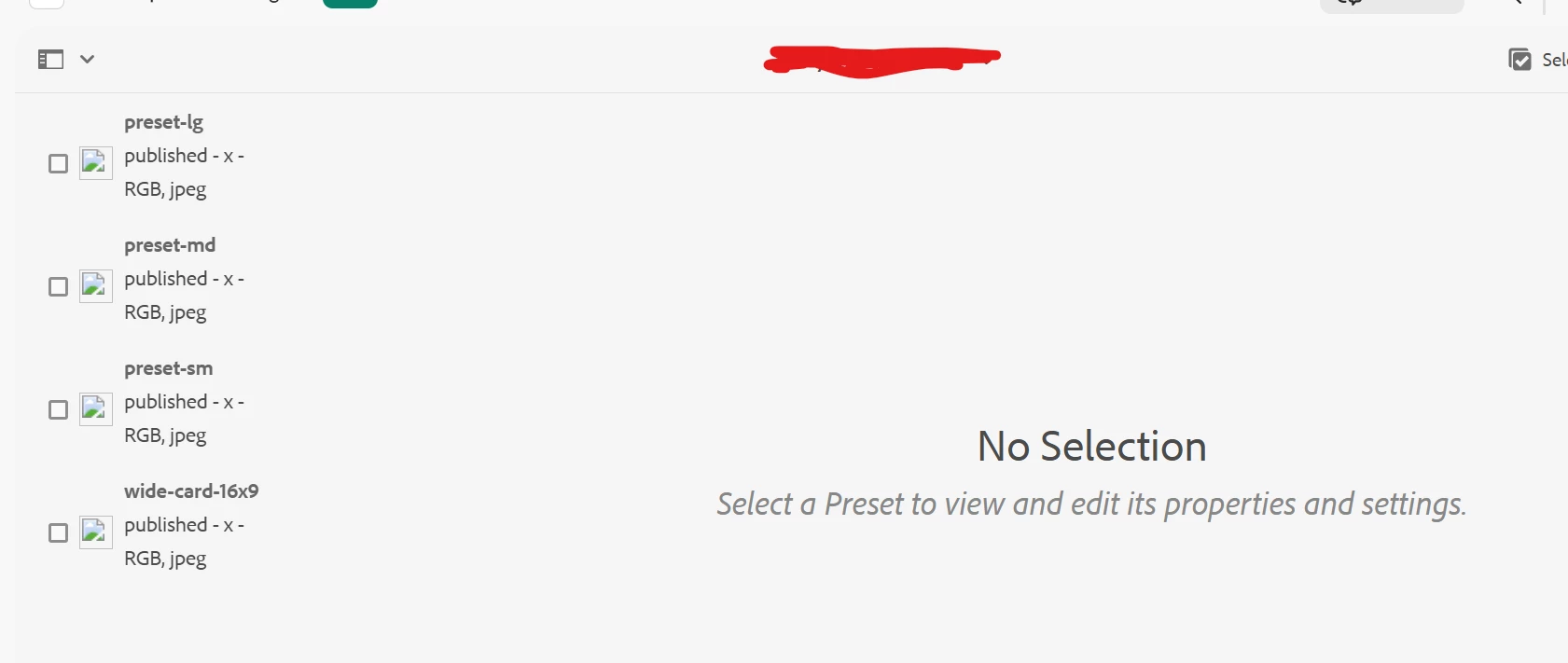
When viewing assets in the Asset Details view or when browsing Dynamic Media image presets in the side rail, the thumbnails and previews fail to load. Looking at the network calls, the preview URLs are being generated like this:

https://author-xxxxx.adobeaemcloud.com/is/image/...?$preset-lg$


These requests return 403 or 404 since /is/image/ is not available on the author domain in Cloud Service.

However, when we copy the rendition URL or use RESS, the URL points correctly to the Scene7 CDN:

https://s7d1.scene7.com/is/image/...?$preset-lg$


So the problem seems to be that the AEM Author UI is picking data-imageserver=/is/image/ instead of data-production-imageserver=https://s7d1.scene7.com/is/image/ when building the preview URLs.


Questions:

  1. Is this a known limitation/bug in AEM as a Cloud Service (that the Author UI still tries to render previews via /is/image/)?

  2. Should we expect Author to automatically use the production Scene7 delivery URLs for previews?

  3. Is there a recommended configuration (OSGi, service mapping, etc.) to fix this, or does it require a product fix from Adobe?

Environment:

  • AEM as a Cloud Service

  • Dynamic Media hybrid mode enabled

  • Issue occurs in Asset Details (renditions) and Image Presets console
     

cc: @kautuk_sahni 

Best answer by vikasbharti

Please find the answers to the questions:

Is this a bug?

No, it is the expected design, but errors indicate a misconfigured DM Preview server or missing allowlist IPs.(https://experienceleague.adobe.com/en/docs/experience-manager-cloud-service/content/assets/dynamicmedia/dm-publish-settings#test-secure-testing-service)

Should Author UI use production CDN directly?

No, Author uses /is/image/ and the preview/test server by design for unpublished/secure asset preview.

How do you fix?

1. Ensure the Secure (Preview) Test server is enabled and the Author IP is allowlisted in DM Classic.

2. Ensure AEM’s DM config has the correct “Secure Preview Server” set.

3. Use Sample Manager for sync/debugging, since CRX is not accessible with AEM CS.

https://experienceleague.adobe.com/en/docs/experience-manager-cloud-service/content/assets/dynamicmedia/troubleshoot-dm#viewers

3 replies

Saravanan_Dharmaraj
Community Advisor
Community Advisor
September 11, 2025

@kiranma1  Have you checked this documentation? especially on how to fix Image preview not loading. Please test it lower environment or local instance. I haven't tested this. 
https://experienceleague.adobe.com/en/docs/experience-manager-65/content/assets/dynamic/troubleshoot-dms7


Level 4
September 22, 2025

Hi @kiranma1 ,


It seems your Dynamic Media connection is broken, which is why the image server domain is falling back to the current domain, which is author. Can you check if your Dynamic Media connection is success?


Thanks!

vikasbhartiAdobe EmployeeAccepted solution
Adobe Employee
September 22, 2025

Please find the answers to the questions:

Is this a bug?

No, it is the expected design, but errors indicate a misconfigured DM Preview server or missing allowlist IPs.(https://experienceleague.adobe.com/en/docs/experience-manager-cloud-service/content/assets/dynamicmedia/dm-publish-settings#test-secure-testing-service)

Should Author UI use production CDN directly?

No, Author uses /is/image/ and the preview/test server by design for unpublished/secure asset preview.

How do you fix?

1. Ensure the Secure (Preview) Test server is enabled and the Author IP is allowlisted in DM Classic.

2. Ensure AEM’s DM config has the correct “Secure Preview Server” set.

3. Use Sample Manager for sync/debugging, since CRX is not accessible with AEM CS.

https://experienceleague.adobe.com/en/docs/experience-manager-cloud-service/content/assets/dynamicmedia/troubleshoot-dm#viewers