


Calling All Marketers! How to Build Your Own Audiences with Coworker with No Data Expertise
Are you tired of chasing your marketing ops team for every audience, or new to the team and want to get hands-on fast? Adobe CX Enterprise Coworker lets you build audiences yourself without being the data expert.
Here are two easy ways to get started.
1. Directly ask Coworker to build it.
Give it the targeting criteria you already have in mind, a high-level campaign goal, or both and Coworker will strategize with you.
Try simple natural-language prompts like:
- "Build an audience of recent cart abandoners."
- "Build an audience of homeowners in California."
- "Build an audience for a new member welcome campaign."
- "Build an audience for Black Friday Sales, recommend a target strategy first."
- "Build an audience for a member upgrade nudge campaign, targeting silver loyalty members close to upgrade with recent engagement."
Coworker acts as your thinking partner: surfacing reusable audiences, relevant attributes and events, and explaining its recommendations so you can make informed choices. Ask follow-up questions and adjust criteria to get to your ideal target. Once you confirm your components, Coworker assembles the audience and shows you a size estimate.
Here's one pro tip. Ask "Show me waterfall estimate" to see exactly how many people you lose at each step of your targeting. For example, you might start with 200k loyalty members, then narrow to 100k once you add points close to next tier and further to 40K once you add "recent purchase.". This helps you quickly spot which criteria might be too narrow before you save the audience.
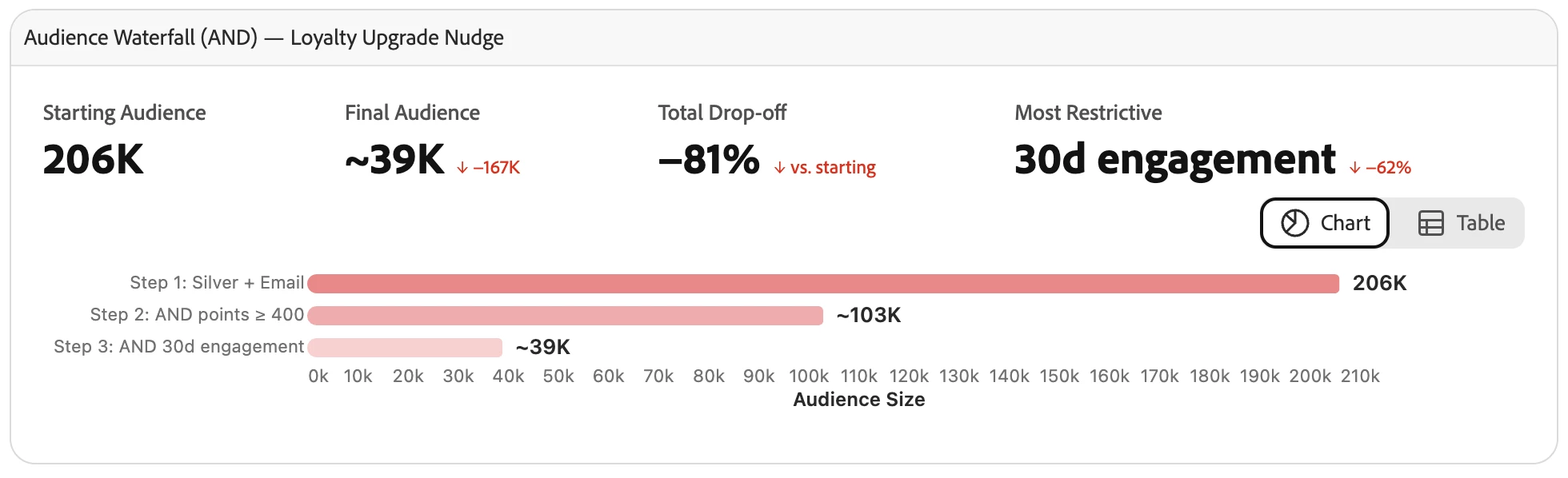
When it looks right, just say "save the audience." Coworker will save the audience in draft for you.
2. Explore the data first.
If you are someone who prefers to explore before you build, try:
- "Are there existing audiences built for Black Friday Sales Campaign?"
- "What attributes can I use for finding frequent buyers?"
Then turn exploration into action:
- "Now create an audience with these attributes you found."
- "Now build a new audience on top of this one but add [criteria]."
With Coworker, every marketer can build audiences on their own, and data ops teams get to spend less time on repetitive requests and more time on the harder problems.
Have you used Coworker for your audience workflows? Use this thread to share what you've tried and how it worked for you!