Traffic of marketing channel detail (under visit segment) is smaller than sum of each traffic under marketing channel detail | Community
Skip to main content
Level 2
April 23, 2024
Solved

Traffic of marketing channel detail (under visit segment) is smaller than sum of each traffic under marketing channel detail

  • April 23, 2024
  • 2 replies
  • 2536 views

Hi, someone who consider this question.

I've noticed that the total traffic reported for a marketing channel detail is less than the sum of each individual campaign ID (cid)'s traffic within that marketing channel detail. I suspect that this might be due to the way the marketing channel detail segments traffic, possibly by removing duplicate visitors. Could someone provide a more technical explanation for this discrepancy? 

Many thanks

Best answer by Jennifer_Dungan

Thank you for reply, @jennifer_dungan 


Now, it is clear about above example. Back to the root case, I understood that the total visit traffic for the Marketing Channel Detail (represented in dark red) should be equal to the sum of the visit traffic for each CID (shown in light red). However, the total traffic for the Marketing Channel Detail is less than the combined traffic from the 2,329 CID rows.
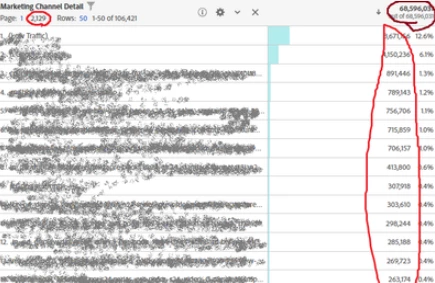
Are there any additional logical steps needed to resolve this issue?


Thanks a lot.


No, the total in dark red should be less than the sum of each of the CID the rows in red.


Because as I showed in my first example, a Marketing channel that spans across multiple visits will count in both the row (value x set in Visit 1 and carried forward to visit 2 - will count as 2) and the total visits (2 actual visits have value x, will also count for 2, since there were 2 actual visits involved)...


But a visit may have multiple marketing channels in the same visit... that will count in each row below, but only count once in the total (visit 3 comes from search, then marketing email, then the user does a search - each of these will count once per row all within the same visit, but since there is only a single visit, so the total will count only 1 due to de-duplicated visits).


The last thing you want is your report to inflate the total visits.


If you have only 3 visits, and 5 marketing channels in play, you wouldn't show the total of "5"... this would inflate the actual number of visits.... the marketing channels that affect the same visit will still have to show the individual marketing channel contribution, but the total will de-duplicate to make sure the total lines up with your actual visits.

2 replies

Krishna_Musku
Community Advisor
Community Advisor
April 23, 2024

There might be few reasons for this discrepancy:

Last-touch attribution: By default, AA uses last-touch attribution. This means that the last marketing channel a user interacts with before converting will be applied to marketing channel.

Channel overrides: Some channels, like direct traffic, can override other channels. For example, if a user clicks on a paid search ad and then directly types the URL into their browser, the direct channel overrides the paid search channel.

Processing rules: Some custom processing rules can alter channel assignments. For example, you might have rules that reassign certain traffic to specific channels.

Jennifer_Dungan
Community Advisor and Adobe Champion
April 23, 2024

Hello @sunghunyo 


From your post:

I've noticed that the total traffic reported for a marketing channel detail is less than the sum of each individual campaign ID (cid)'s traffic within that marketing channel detail

You don't specify the metric you are using to compare, but I guess it will be similar whether you are using Visits or Page Views.... And I am going to assume you are using "Tracking Code" (s.campaign / eVar0) for checking your Campaign IDs.


The biggest thing you have to remember on this is the attribution in use.


Marketing Channels have 30 Day Attribution by default, whereas Tracking Code had a 7 Day Attribution by default.


So let's look at a sample:


Visit 1 - Campaign X (Search)

  • Page A - cid=X
    • Marketing Channel set to "Search"
    • Marketing Channel Detail set to "X"'
    • metric: Instance of Marketing Channel incremented
    • Tracking Code set to "X"
    • metric: Instance of Tracking Code incremented
  • Page B
    • Marketing Channel and Marketing Channel Detail maintains value "X" due to 30 Day Attribution
    • metric: Instance of Marketing Channel is not incremented, since the values are not explicitly set
    • Tracking Code maintains value "X" due to 7 Day Attribution
    • metric: Instance of Tracking Code is not incremented, since the values are not explicitly set
  • Page C
    • Same as Page B


Visit 2 - 3 Days Later (no cid)

  • Page D
    • Marketing Channel and Marketing Channel Detail maintains value "X" due to 30 Day Attribution
    • metric: Instance of Marketing Channel is not incremented, since the values are not explicitly set
    • Tracking Code maintains value "X" due to 7 Day Attribution
    • metric: Instance of Tracking Code is not incremented, since the values are not explicitly set
  • Page E
    • Same as Page D


Visit 3 - 12 Days Later (no cid)

  • Page F
    • Marketing Channel and Marketing Channel Detail maintains value "X" due to 30 Day Attribution
    • metric: Instance of Marketing Channel is not incremented, since the values are not explicitly set
    • Tracking Code is ""  due to 7 Day Attribution has expired
    • metric: Instance of Tracking Code is not incremented, since the values are not explicitly set
  • Page G
    • Same as Page F


Visit 4 - Campaign Y (Email)

  • Page H - cid=Y
    • Marketing Channel set to "Email"
    • Marketing Channel Detail set to "Y"'
    • metric: Instance of Marketing Channel incremented
    • Tracking Code set to "Y"
    • metric: Instance of Tracking Code incremented


Marketing Channel:

    Page Views Visits Instance of Marketing Channel
Marketing Channel   8 3 2
  Search 7 2 1
  Email 1 1 1


Tracking Code:

    Page Views Visits Instance of Tracking Code
Tracking Code   6 4 2
  X 5 3 1
  Y 1 1 1


Basically, Visit #3 was still within the 30 Day Attribution for the Marketing Channel, but was outside the 7 Day Attribution for Tracking Code... therefore, that visit, and those 2 page views inside the visit are not counted in your Tracking Code Report. Hence the difference.


Now, if you are setting your Marketing Channel Detail to the value of your CID, then you can use that when correlating your Channels to your CIDs... since Marketing Channel and Marketing Channel Detail are explicitly connected under the same Instance and Attribution.

SunghunYoAuthor
Level 2
April 26, 2024

Thank your for reply, @jennifer_dungan.


What I wanted to say is that the sum of the Marketing Channel Detail sub CID is not the same as the traffic value of the Marketing Channel Detail.


In common sense, shouldn't the marketing channel detail traffic, which is the upper segmentation, be equal to the sum of the traffic by each CID, which is the lower segment?


There is a question.


I have noticed the case when the sum of traffic for each CID is larger than Total Marketing Channel Detail Traffic.


Many thanks

SunghunYoAuthor
Level 2
April 30, 2024

Hi @sunghunyo,


You're welcome.


In your scenario, two different ads with the same CID X, you would have 2 Visits and 2 Marketing Channel Instances with CID X.


I know this can be hard to conceptualized because attribution can be complicated.


Think of it this way:

The "Page Views" of your Marketing Channels will count on every page view until a new value is set, or the expiry is reached.


The "Instance of Marketing Channel" will count every time a value is explicitly set (i.e. your CID is actually in the URL, and processed by your Marketing Channel rules).


So to re-iterate your scenarios:


Visit 1 through AD 1

  • Page A with CID X
    • Page View incremented
    • Visit incremented
    • Marketing Channel Detail set to X
    • Marketing Channel instance incremented (since X is explicitly set)


Visit 2 through AD 2

  • Page B with CID X
    • Page View incremented
    • Visit incremented
    • Marketing Channel Detail set to X
    • Marketing Channel instance incremented (since X is explicitly set)


    Page Views Visits Marketing Channel Instance
X   2 2 2
  Page A 1 1 1
  Page B 1 1 1


I hope this is clear?


Thank you for reply, @jennifer_dungan 


Now, it is clear about above example. Back to the root case, I understood that the total visit traffic for the Marketing Channel Detail (represented in dark red) should be equal to the sum of the visit traffic for each CID (shown in light red). However, the total traffic for the Marketing Channel Detail is less than the combined traffic from the 2,329 CID rows.

Are there any additional logical steps needed to resolve this issue?


Thanks a lot.