The event is firing in the debugger but the data is not showing up in the Analytics dashboard | Community
Skip to main content
Level 2
January 29, 2024
Question

The event is firing in the debugger but the data is not showing up in the Analytics dashboard

  • January 29, 2024
  • 1 reply
  • 1768 views

I can see the following events firing in the Adobe Analytics debugger 
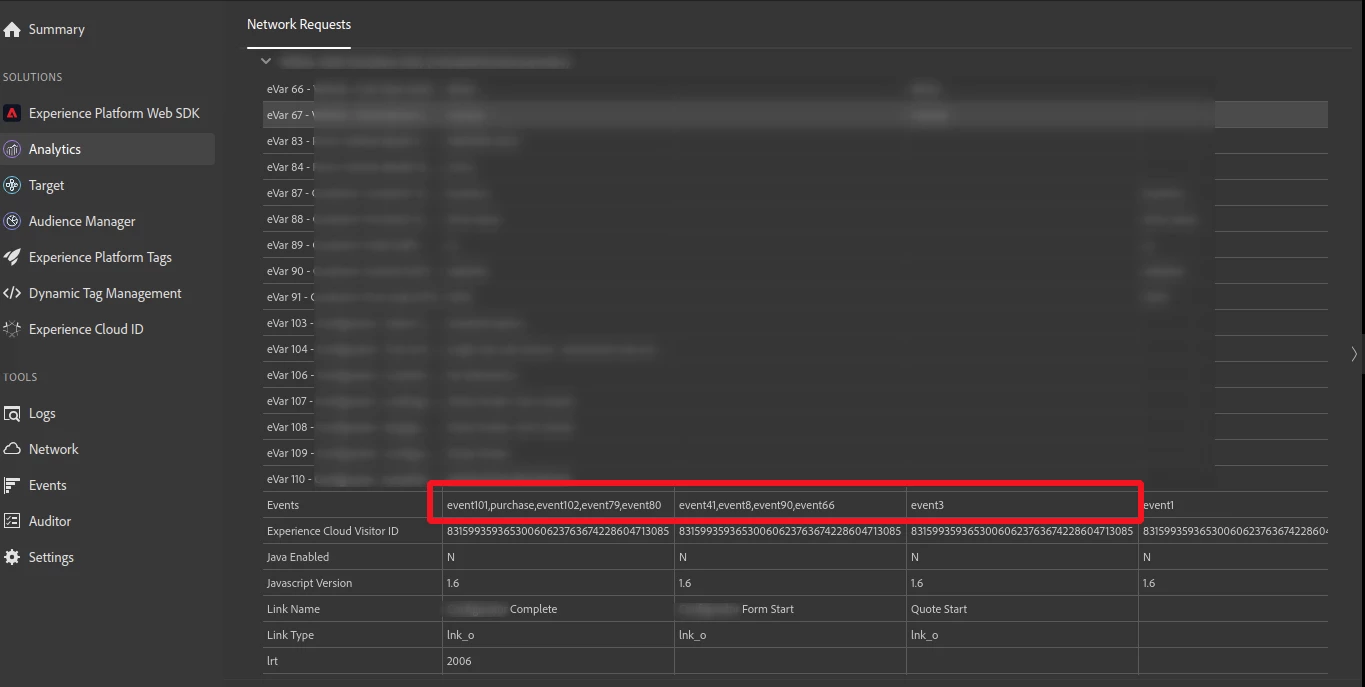
 

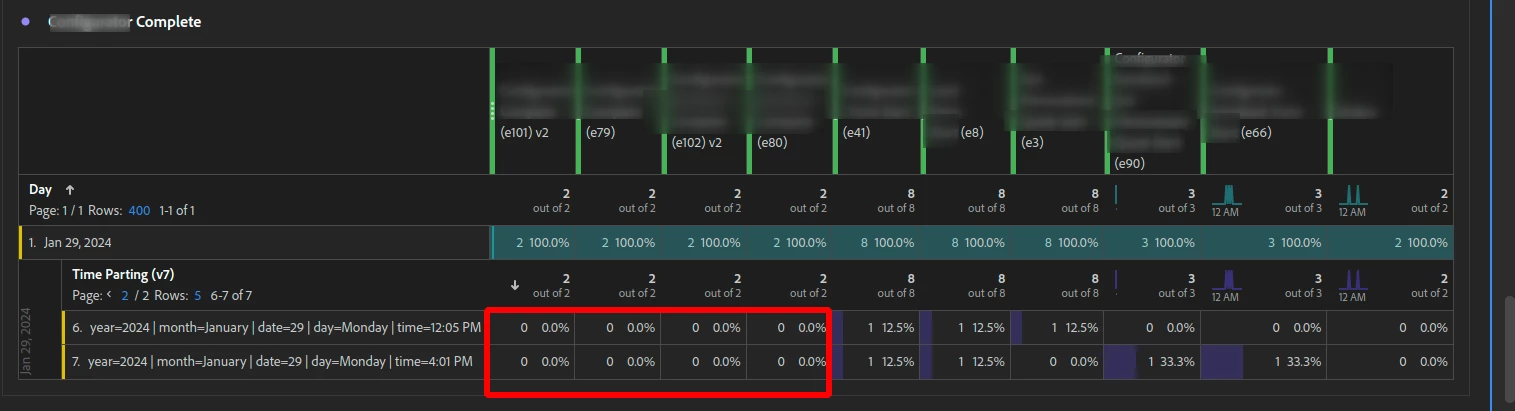
However, these fired events are not showing up on the Adobe Analytics dashboard 


I am firing three rules at a single user action (button click) to fire these events. However, these are three different unique event actions in the digitaldataobject. 


At the moment, it looks like rules for [event 3] and [event41,8,90,61] are showing up correctly in the analytics dashboard. However, the rule for [events 101,102,79,80,purchase] are heavily underreporting 


Is there any reason for this discrepancy? 

This post is no longer active and is closed to new replies. Need help? Start a new post to ask your question.

1 reply

MandyGeorge
Community Advisor and Adobe Champion
January 29, 2024

Looking at your second screenshot, what are in rows 1-5 of the time parting evar?

It looks like the events are being counted, just not attributed to those values of the evar. But we can only see rows 6 and 7, is it possible it could attributed for one of the values in rows 1-5?

Jennifer_Dungan
Community Advisor and Adobe Champion
January 29, 2024

Agreed, we can see there are event counts in the totals row, and there's "2" in total... but 7 rows of breakdown data...  but those breakdowns will be shown based on other columns of event data.... (examples e41, e8, e3, e90, e66).


The first screen shot (showing the capturing of data), doesn't show us the v7 value (this is off the visible page of collected data), to confirm those values correspond to the event data.


Also note, that if you collected the data then immediately checked your report, there is about an hour or so processing delay. Data won't appear directly in Workspaces. 

SupunDAuthor
Level 2
January 30, 2024

The size of the calls (number of events and eVars) shouldn't be a concern... Adobe will send values as GET when the total length of the data is under 2000 characters, and as POST when the total length is over 2000 characters... most of our calls fall into the POST method... I only had an issue about 10 years ago (where the POST wasn't recording properly), but I haven't seen that issue since.. and I am sure there would be a lot of complaints if that was back.


Can you confirm that you events 79 and 80 are configured as counter events? As well, can you confirm that they are both set to the correct recording events?  I just want to rule out that the issue is caused by a mis-configuration:


Now, I think you might have a uniqueness setting on eVar80 (since it's labeled as "serialized")... you are passing a completely unique value there correct? Once a serial has been used, it's for life... that same serialization will never count again...  And from your debugging, I don't see a serial being passed... so that might be part of the problem there.... 


Hi @jennifer_dungan


Yes, we have configured them as Counter events. They have been configured as "Always Record Event" for Event 79 and "Record Once Per Visit" for Event 80 which is the serialized event 


On this occasion, even tho it says serialised we are not using unique identifiers to serialise the event. We have only set admin configurations to record one hit per visit. 


At this moment in time, we are mainly concerned about event 79 having a very low count.